Custom Item Models
Custom Item Models Mod powered by Custom Model Data Component
Screenshots

About this Mod
Custom Item Models
Setup
This modification is only needed on the server side - clients without this mod will be able to join and use all provided functionality. It also works in singleplayer if installed on client.
Usage
To see compatible ResourcePack examples, navigate into tutorial directory.
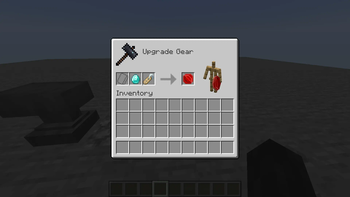
Rename Name Tag on the Anvil into the string that you would usually put inside minecraft:custom_model_data={strings:[]} array.

Diamond before applying Name Tag with the title ruby:
{
    count: 1,
    Slot: 0b,
    id: "minecraft:diamond"
}
Then, apply this Name Tag onto the item via Smithing Table.

Diamond after applying Name Tag with the title ruby:
{
    count: 1,
    Slot: 0b,
    id: "minecraft:diamond",
    components: {
        "minecraft:custom_model_data": {
            strings: ["ruby"]
        }
    }
}
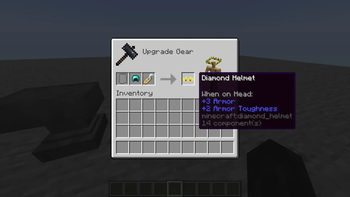
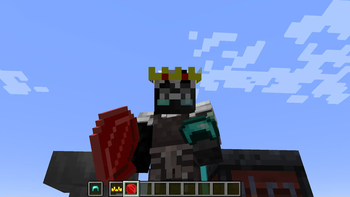
This mod also changes minecraft:equippable component for such items as armor pieces and elytras.
for example, Diamond Helmet before applying Name Tag with the title crown:
{
    count: 1,
    Slot: 0b,
    id: "minecraft:diamond_helmet"
}

and after applying Name Tag with the title crown:
{
    count: 1,
    Slot: 0b,
    id: "minecraft:diamond_helmet",
    components: {
        "minecraft:custom_model_data": {
            strings: ["crown"]
        },
        "minecraft:equippable": {
            equip_sound: "minecraft:item.armor.equip_diamond",
            slot: "head",
            asset_id: "cim:crown"
        }
    }
}

ATTENTION: Be aware that asset_id will always be under cim namespace, due to how vanilla code operates. You can see examples in the tutorial directory.
You don't have to use cim namespace for item models, only for armor rendering.

License
This mod is available under the MIT license. Feel free to learn from it and incorporate it in your own projects.
Available Versions
How to Install Custom Item Models on Your Server
Order Server
Order a Minecraft Java server with at least 3 GB RAM (4 GB recommended).
Set fabric Loader
In the panel under "Egg", select the fabric loader and matching Minecraft version (26.1.2).
Install Mod
Open the mod browser in the dashboard and search for "Custom Item Models". Click "Install" – done! Alternatively, upload the .jar via SFTP to the /mods folder.
Compatibility
Mod Loaders
Minecraft Versions
26.1.2, 26.1.1, 26.1 (+8 more)
Server-side
✓ RequiredRecommended RAM
4 GB(min. 3 GB)Frequently Asked Questions
Custom Item Models server crashes on startup – what to do?
Most common cause: wrong fabric version or insufficient RAM. Check the server log (latest.log) for "OutOfMemoryError" or "Mixin" errors. With Mado Hosting: ensure at least 3 GB RAM is allocated and the loader matches the mod version (26.1.2). You can switch loaders with one click in the panel.
Is Custom Item Models compatible with fabric?
Custom Item Models officially supports fabric for Minecraft 26.1.2, 26.1.1, 26.1. The Mado dashboard automatically detects incompatible loader combinations.
Server lagging with Custom Item Models – how to optimize performance?
Recommended RAM: 4 GB (per 8 players). Use /spark profiler to check if Custom Item Models consumes the most tick time. Common fixes: reduce server view-distance to 8-10, install "performant" or "starlight" as supplementary mods on Forge. With Mado Hosting, your server runs on NVMe SSDs with dedicated CPU cores for minimal latency.
Similar Mods

![[ETF] Entity Texture Features](https://cdn.modrinth.com/data/BVzZfTc1/af683d206d50b05258d865b0d6e4aa2f2cee12f2_96.webp)
![[EMF] Entity Model Features](https://cdn.modrinth.com/data/4I1XuqiY/6e5bbd0d06b1741bfdab6c0cfab6de8fdaf0064c_96.webp)



Rent Modded Server
Install Custom Item Models with just one click on your server.