
Cinematic Weather
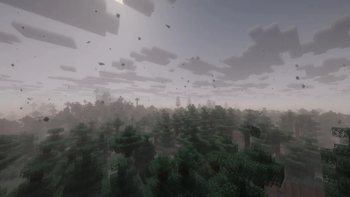
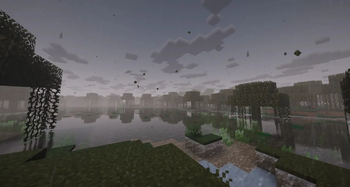
Adds immersive visual wind, realistic falling leaves, storm, and dynamic camera shake effects
Screenshots



About this Mod
Cinematic Weather
Cinematic Weather is a client-side mod that brings your Minecraft weather and wind to life with beautiful effects, sounds, and physical reactions.
⚠️ Highly recommended to play with Sodium! Without it, severe storms may cause lag due to particle density.
Features
- 🌀 Realistic Wind & Leaves: Leaves drift, spin, and sway naturally along with wind currents. Includes 4 different pixel-art leaf shapes.
- 🍂 No Stuck Particles: Floating leaves disappear instantly when colliding with the ground or trees instead of spinning awkwardly in place.
- 🌳 Dynamic Biome Colors: Leaves match the surrounding trees: dark pine needles in taiga, vibrant green in jungle, muddy green in swamps, dry golden-orange in savanna.
- ⚡ Storms & Hurricanes: Heavy storms push dropped items and the player, shake the screen gently, spawn sandstorms in deserts, and throw flying debris/blocks in the air.
- 🔊 Spatial Leaf Rustling: Walk near tree leaves during wind to hear spatial rustling sounds. Standing under a roof muffles weather sounds and blocks wind forces/particles.
- ⚙️ Smart Optimization: The mod does not spawn particles behind your back (out of sight), saving your FPS and memory.
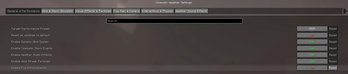
- 🔧 Easy In-Game Menu: Customize leaf density (from 0 to 10 for massive falls), leaf size, and wind volume via ModMenu.
Commands
You can also use the /cw command in chat to control the wind and test presets:
/cw status- View current wind strength, direction, shelter factor, and active storm status./cw wind <strength> <yaw>- Override and set custom wind strength (0.0 to 3.0) and direction angle (0 to 360 degrees)./cw wind clear- Revert wind to normal simulation./cw storm start <intensity> <duration_seconds>- Start a custom cinematic storm./cw storm stop- Stop the active storm./cw preset <low/medium/high/ultra>- Instantly apply performance presets./cw leafdensity <multiplier>- Adjust leaf density multiplier directly./cw testmode <true/false>- Enable test mode for rapid storm cycle testing.
Available Versions
How to Install Cinematic Weather on Your Server
Order Server
Order a Minecraft Java server with at least 4 GB RAM (6 GB recommended).
Set fabric Loader
In the panel under "Egg", select the fabric loader and matching Minecraft version (1.21.1).
Install Mod
Open the mod browser in the dashboard and search for "Cinematic Weather". Click "Install" – done! Alternatively, upload the .jar via SFTP to the /mods folder.
Compatibility
Mod Loaders
Minecraft Versions
1.21.1, 1.20.1
Server-side
✓ RequiredRecommended RAM
6 GB(min. 4 GB)Frequently Asked Questions
Cinematic Weather server crashes on startup – what to do?
Most common cause: wrong fabric version or insufficient RAM. Check the server log (latest.log) for "OutOfMemoryError" or "Mixin" errors. With Mado Hosting: ensure at least 4 GB RAM is allocated and the loader matches the mod version (1.21.1). You can switch loaders with one click in the panel.
Is Cinematic Weather compatible with fabric?
Cinematic Weather officially supports fabric for Minecraft 1.21.1, 1.20.1. The Mado dashboard automatically detects incompatible loader combinations.
Server lagging with Cinematic Weather – how to optimize performance?
Recommended RAM: 6 GB (per 5 players). Use /spark profiler to check if Cinematic Weather consumes the most tick time. Common fixes: reduce server view-distance to 8-10, install "performant" or "starlight" as supplementary mods on Forge. With Mado Hosting, your server runs on NVMe SSDs with dedicated CPU cores for minimal latency.
Similar Mods




Rent Modded Server
Install Cinematic Weather with just one click on your server.