
Cinnamon Client
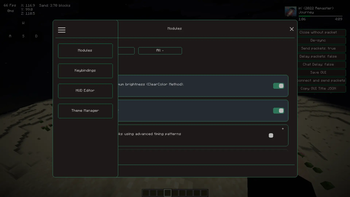
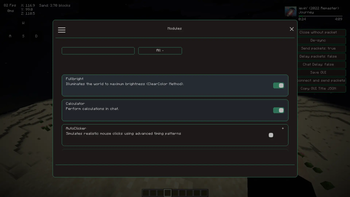
Custom gui with cool hud elements that are great.
Screenshots




About this Mod
CinnamonClient: The Ultimate Client for Minecraft 1.21.6+
CinnamonClient |
CinnamonClient is a powerful utility mod for the Minecraft client, specifically crafted for versions 1.21.6 and beyond, built on the Fabric modding framework. I've poured countless hours into its development, using 90% Kotlin to ensure clarity, easy extensibility, and to give you real-time control over your game. This mod thrives thanks to players like you, and if you appreciate our work and want to support future development.




Why Choose CinnamonClient?
CinnamonClient isn't just another mod; it's designed to give you unparalleled customization and control over your Minecraft experience. Our focus is on enhancing your gameplay with a suite of flexible tools, all while maintaining a lightweight presence in your game.
Unlike other mods that might dictate your setup, CinnamonClient offers wide compatibility within the broader modding ecosystem. And it does so without compromising the authentic Minecraft feel you love—it just helps you make it your Minecraft.
Here's what makes CinnamonClient stand out:
- Lightweight & Modular: Experience minimal impact on your game while having the freedom to toggle features as you need them.
- Fully Customizable HUD: Drag, drop, and reposition elements live in-game to create your perfect display.
- Modern UI Framework: Navigate intuitive, polished screens for effortless control.
- Packet-Level Integration: Get advanced networking utilities and fine-tuned controls under the hood.
- Clean Kotlin Codebase: Built 100% in Kotlin for a codebase that's easy to maintain and expand.
📥 Installation Guide
CinnamonClient is built for Fabric Loader, which we highly recommend for the simplest and most efficient modding experience. If you're using a third-party launcher (like Prism Launcher or GDLauncher), it often has built-in features to help you install mod loaders automatically.
Once you have Fabric Loader installed, simply place CinnamonClient's .jar file (along with the Fabric API and Kotlin Fabric Mod .jar files, as we're built entirely in Kotlin!) directly into your mods folder.
- Not sure if you installed the mod correctly? After launching Minecraft, head into your in-game main menu. You should find a dedicated option to access CinnamonClient's settings and modules. This is your sign that everything's loaded up!
- Not sure how to configure the mod? Don't worry, it's designed to be intuitive. Most of our modules are ready to use out-of-the-box. For deeper customization, simply enter HUD Edit Mode or explore the individual module settings within the GUI. You'll find everything laid out clearly.
🧩 Explore the Modules
Every single module in CinnamonClient is something you can toggle and fine-tune right from your in-game GUI. You get complete control over your experience.
HUD Elements
| Module | What It Does | Key Features |
|---|---|---|
| Keystrokes | Visualizes your keyboard and mouse inputs. | Customizable layout, key remapping, full color control. |
| FPS Display | Shows your current frames per second. | Configurable format, colors, and precise positioning. |
| Ping Display | Displays your latency to the server. | Adjustable style and scaling options. |
| Armor HUD | Renders your armor icons and durability. | Fully customizable layout and positioning. |
| Coordinates HUD | Shows your X, Y, Z coordinates. | Axis labeling, formatting, and screen placement. |
| Spotify HUD | Displays current Spotify track info and status. | Song title, artist, progress bar, customizable colors and position. |
Utility Modules
| Module | What It Does | Key Features |
|---|---|---|
| HUD Edit Mode | Lets you drag and drop HUD elements in real-time. | Snapping helpers, alignment guides, dynamic scaling. |
| Fullbright | Overrides in-game lighting for maximum brightness. | Simple toggle-based lighting control. |
| Simple Auto Clicker | Automates mouse clicks at configurable intervals. | Adjustable clicks per second (CPS), toggle keybind, visual feedback. |
| Packet Handler | Provides utilities for packet-layer interactions. | Powers internal UI interactions and other advanced features. |
🎨 Customization at Your Fingertips
CinnamonClient offers deep customization, putting you in the driver's seat.
Live HUD Editing
Activate HUD Edit Mode through the main menu to transform your interface in real-time:
- Drag & Drop Functionality: Move any element anywhere on your screen.
- Precision Alignment: Use edge snapping and alignment guides for a perfect setup.
- Dynamic Scaling: Resize elements to your exact preference.
- Visual Feedback: See every change instantly as you make it.
Per-Module Configuration
Each module comes with its own dedicated settings, easily accessible via the GUI:
- Scaling: Fine-tune element sizes for ideal display.
- Color Customization: Personalize your aesthetic.
- Screen Positioning: Place elements exactly where you want them.
- Keybinds & Behavior: (e.g., Auto Clicker) Set toggle keys and click speed.
🐛 How to Report Issues
If you encounter any bugs, crashes, or other issues, please use our issue tracker linked at the top of the page. Make sure you include as much detail as possible, such as what other mods you're using, and attach any crash or log files you have. This helps us fix things faster!
📞 Support & Contact
Author: Cinnamonpuma
- GitHub: Issues & Discussions
📝 License
This project is licensed under the Creative Commons Attribution-NonCommercial-ShareAlike 4.0 International (CC BY-NC-SA 4.0). See the LICENSE file for full details.
Thank you for choosing CinnamonClient.
Crafted to enhance your Minecraft experience with powerful, modular utilities.
Available Versions
How to Install Cinnamon Client on Your Server
Order Server
Order a Minecraft Java server with at least 3 GB RAM (4 GB recommended).
Set fabric Loader
In the panel under "Egg", select the fabric loader and matching Minecraft version (1.21.8).
Install Mod
Open the mod browser in the dashboard and search for "Cinnamon Client". Click "Install" – done! Alternatively, upload the .jar via SFTP to the /mods folder.
Compatibility
Mod Loaders
Minecraft Versions
1.21.8, 1.21.7, 1.21.6 (+1 more)
Server-side
✗ UnsupportedRecommended RAM
4 GB(min. 3 GB)Frequently Asked Questions
Cinnamon Client server crashes on startup – what to do?
Most common cause: wrong fabric version or insufficient RAM. Check the server log (latest.log) for "OutOfMemoryError" or "Mixin" errors. With Mado Hosting: ensure at least 3 GB RAM is allocated and the loader matches the mod version (1.21.8). You can switch loaders with one click in the panel.
Is Cinnamon Client compatible with fabric?
Cinnamon Client officially supports fabric for Minecraft 1.21.8, 1.21.7, 1.21.6. The Mado dashboard automatically detects incompatible loader combinations.
Server lagging with Cinnamon Client – how to optimize performance?
Recommended RAM: 4 GB (per 8 players). Use /spark profiler to check if Cinnamon Client consumes the most tick time. Common fixes: reduce server view-distance to 8-10, install "performant" or "starlight" as supplementary mods on Forge. With Mado Hosting, your server runs on NVMe SSDs with dedicated CPU cores for minimal latency.
Similar Mods




Rent Modded Server
Install Cinnamon Client with just one click on your server.
Details
- License
- Creative Commons Attribution Non Commercial Share Alike 4.0 International
- Server-side
- Unsupported