Clangor
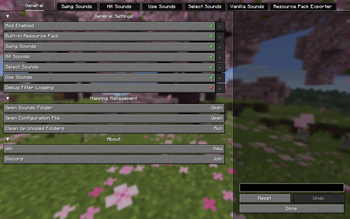
Add your own sounds for weapon swings, uses, hits, and hotbar swaps by simply dropping your audio files into the folder.
Screenshots
About this Mod

Features
A lightweight audio framework allowing you to drop in custom .ogg files to give every weapon and tool its own signature sounds, down to the specific material.
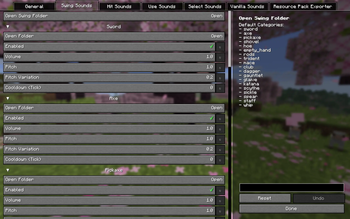
Swing Sounds
Drop in unique swing sounds for every weapon or tool.
Hit Sounds
Bypassing global resource pack limits, drop in unique hit sounds for every weapon, tool, or empty hand.
Use Sounds
Drop in unique use sounds for drawing bows, charging tridents, and more.
Hotbar Swap Sounds
Drop in unique swap sounds for switching weapons or tools.
Vanilla Sound Replacement
Easily override the default audio under the following vanilla sound events:
- item.armor.equip_generic
- item.crossbow.hit
- item.crossbow.loading_start
- item.crossbow.loading_middle
- item.crossbow.loading_end
- item.crossbow.quick_charge_1
- item.crossbow.quick_charge_2
- item.crossbow.quick_charge_3
- item.crossbow.shoot
- item.mace.smash_air
- item.mace.smash_ground
- item.mace.smash_ground_heavy
- item.shield.block
- item.spear_wood.attack
- item.spear_wood.hit
- item.spear_wood.use
- item.spear.attack
- item.spear.hit
- item.spear.use
- item.trident.hit
- item.trident.hit_ground
- item.trident.throw
- item.trident.thunder
- item.trident.return
- item.trident.riptide_1
- item.trident.riptide_2
- item.trident.riptide_3
- entity.arrow.hit
- entity.arrow.shoot
- entity.arrow.hit_player
- entity.experience_orb.pickup
- entity.item.pickup
- entity.player.levelup
Showcase
v2.0
v1.0
Usage
Quick Start (Recommended)
Pairs with the Clangor: Dungeons Soundpack v2.0—just apply it for a ready-to-use experience.
Requirements:
- Fabric:
- Fabric API (Required)
- YetAnotherConfigLib (YACL) (Required)
- Mod Menu (Optional)
- Forge / NeoForge:
- YetAnotherConfigLib (YACL) (Required)
- Fabric:
Manual Setup
- Press
F12(Rebindable) to open the Config Menu:- Click
Open Folderfor the desired item category. - Drop in your
.oggfiles. - Press
F3+Tto apply.
- Click
- Press
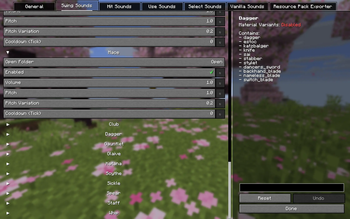
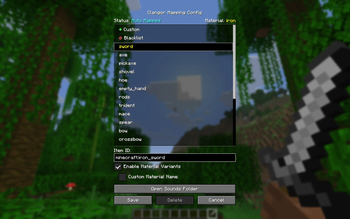
V(Rebindable) to open the Mapping GUI (Advanced):- Freely assign any item to any item category.
- Create custom item categories.
- Create custom material variants.
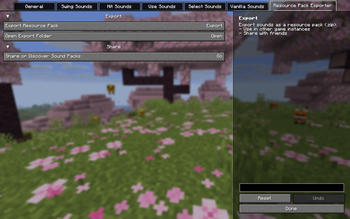
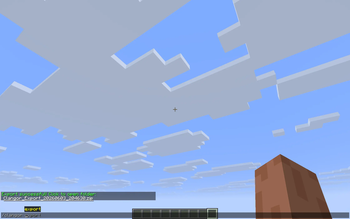
- Export your setup to a
.zipfile using the built-in ResourcePack Exporter or/clangor export:- Apply it to other game instances.
- Share it with your friends.
- Publish it on Modrinth, CurseForge, or our Discord.
- Audio Requirements:
- Format:
.ogg - Channels: Mono
- Sample Rate:
44100or48000Hz - Bitrate:
128or192kbps - Naming: English-only, no special symbols
- Format:
Compatibility
For Any Vanilla or Modded Item
- Automatically recognizes common, properly named weapons and tools, matching them with preset, material-specific sound categories.
- Uncommon or non-standard items can be manually assigned via the Mapping GUI.
| Preset Item Categories | Material Variants | Contain |
|---|---|---|
| sword | ✔ | sword, claymore, cutlass, rapier, saber, scimitar, zweihander |
| axe | ✔ | axe, guisarme, halberd, khopesh, machete, tomahawk |
| pickaxe | ✔ | pickaxe |
| shovel | ✔ | shovel |
| hoe | ✔ | hoe |
| empty_hand | ✘ | air (equal) |
| rods | ✘ | stick (equal), bamboo (equal), bone (equal), torch (equal), _torch, _rod |
| trident | ✘ | trident |
| mace | ✘ | mace, flail, hammer, maul, morgenstern, pernach |
| spear | ✘ | spear, ahlspiess, javelin, lance, pike, ranseur |
| bow | ✘ | bow |
| crossbow | ✘ | crossbow |
| club | ✘ | club, cudgel |
| dagger | ✘ | dagger, estoc, katzbalger, knife, sai, stabber, stylet, dancers_sword, backhand_blade, nameless_blade, switch_blade |
| gauntlet | ✘ | gauntlet, cestus, fist, glove, mauler |
| glaive | ✘ | glaive |
| katana | ✘ | katana, tachi, uchigatana |
| scythe | ✘ | scythe, twinblade |
| sickle | ✘ | sickle |
| staff | ✘ | staff, jingubang, scepter, sceptre, stave, wand |
| whip | ✘ | whip |
*Preset Material Variants: general, wooden, stone, copper, iron, gold, diamond, netherite
For Better Combat
- Dual-wielding has per-hand sounds.
- Better Combat's default weapon swing sounds will overlap with this mod. Toggle them in either config screen as you prefer.

Great Combos
- Sound in Space
- Sound Physics Remastered by henkelmax
- Sound Physics Perfected by RedLifedev
- Sound in Motion
- Punchy! Series
- Punchy! by PunchyDevGuy
- Untitled Punchies by _seoluvs.u
- Hyper Punchy by HamzaDev
- Silly Punchies! by craftandoof
- Modded Swords x Punchy! Compatibility by arwonll
- Modded Swords x Punchy! v2 by arwonll
- HMI Series
- Hold My Items by Tree Corp
- HOLD MY ACTIONS! by ZAIFIX
- Beash's Swing Animations by Beash
- Bow's animation by KREKER_BUBA
- Punchy! Series
Credits
Special thanks to Godku for featuring and sharing this mod in the community.
License
All Rights Reserved
- Redistribution of the
.jarfiles is not allowed. - Please do not modify, patch, or re-release this mod without my prior consent.
Modpack Policy
- Feel free to include this mod in any modpacks on Modrinth or CurseForge.
- Please contact me for permission before hosting such modpacks on external platforms.
Available Versions
How to Install Clangor on Your Server
Order Server
Order a Minecraft Java server with at least 3 GB RAM (4 GB recommended).
Set fabric Loader
In the panel under "Egg", select the fabric loader and matching Minecraft version (26.1.2).
Install Mod
Open the mod browser in the dashboard and search for "Clangor". Click "Install" – done! Alternatively, upload the .jar via SFTP to the /mods folder.
Compatibility
Mod Loaders
Minecraft Versions
26.1.2, 26.1.1, 26.1 (+5 more)
Server-side
✗ UnsupportedRecommended RAM
4 GB(min. 3 GB)Frequently Asked Questions
Clangor server crashes on startup – what to do?
Most common cause: wrong fabric version or insufficient RAM. Check the server log (latest.log) for "OutOfMemoryError" or "Mixin" errors. With Mado Hosting: ensure at least 3 GB RAM is allocated and the loader matches the mod version (26.1.2). You can switch loaders with one click in the panel.
Is Clangor compatible with fabric and forge and neoforge?
Clangor officially supports fabric, forge, neoforge for Minecraft 26.1.2, 26.1.1, 26.1. Note: Forge and Fabric mods are NOT cross-compatible – pick one loader and stick with it. The Mado dashboard automatically detects incompatible loader combinations.
Server lagging with Clangor – how to optimize performance?
Recommended RAM: 4 GB (per 8 players). Use /spark profiler to check if Clangor consumes the most tick time. Common fixes: reduce server view-distance to 8-10, install "performant" or "starlight" as supplementary mods on Forge. With Mado Hosting, your server runs on NVMe SSDs with dedicated CPU cores for minimal latency.
Similar Mods




![[ETF] Entity Texture Features](https://cdn.modrinth.com/data/BVzZfTc1/af683d206d50b05258d865b0d6e4aa2f2cee12f2_96.webp)
![[EMF] Entity Model Features](https://cdn.modrinth.com/data/4I1XuqiY/6e5bbd0d06b1741bfdab6c0cfab6de8fdaf0064c_96.webp)
Rent Modded Server
Install Clangor with just one click on your server.