
Clarity
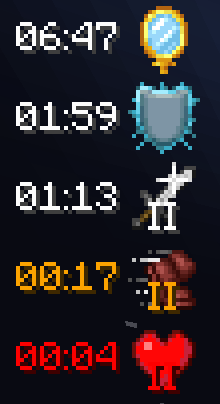
displays your active potion effects with precise, second-accurate countdown timers and amplifier levels.
Screenshots
About this Mod
Clarity: The Potion Effect HUD, Your Way. 🛠️
What it does: Clarity is an essential, highly customizable client-side mod that replaces the standard, bland potion icons with a dedicated Heads-Up Display (HUD). It puts you in complete control of your active effects, ensuring you know your exact status, every second.
Why you need it:
⚡ Always Precise: Stop guessing! Get a crystal-clear, real-time, second-accurate display of potion icons, amplifier levels, and the remaining duration. Perfect for PvPers, speedrunners, and anyone who needs precise timing.
🌈 Limitless Customization: Dive into the Mod Menu and unleash the power of personalization! This is your HUD.
Change text and timer colors.
Adjust the size and scale of the HUD.
Pick its exact location on your screen.
Toggle what information is visible.
🚨 Stay Alert: Intuitive color-coded timers warn you when your buffs or debuffs are running low, giving you a crucial heads-up before expiry.
Stop worrying about timers and focus on playing. Download Clarity and customize your perfect HUD today! 🖱️🚀
Available Versions
How to Install Clarity on Your Server
Order Server
Order a Minecraft Java server with at least 3 GB RAM (4 GB recommended).
Set fabric Loader
In the panel under "Egg", select the fabric loader and matching Minecraft version (26.1.2).
Install Mod
Open the mod browser in the dashboard and search for "Clarity". Click "Install" – done! Alternatively, upload the .jar via SFTP to the /mods folder.
Compatibility
Mod Loaders
Minecraft Versions
26.1.2, 26.1.1, 26.1 (+20 more)
Server-side
✗ UnsupportedRecommended RAM
4 GB(min. 3 GB)Frequently Asked Questions
Clarity server crashes on startup – what to do?
Most common cause: wrong fabric version or insufficient RAM. Check the server log (latest.log) for "OutOfMemoryError" or "Mixin" errors. With Mado Hosting: ensure at least 3 GB RAM is allocated and the loader matches the mod version (26.1.2). You can switch loaders with one click in the panel.
Is Clarity compatible with fabric?
Clarity officially supports fabric for Minecraft 26.1.2, 26.1.1, 26.1. The Mado dashboard automatically detects incompatible loader combinations.
Server lagging with Clarity – how to optimize performance?
Recommended RAM: 4 GB (per 8 players). Use /spark profiler to check if Clarity consumes the most tick time. Common fixes: reduce server view-distance to 8-10, install "performant" or "starlight" as supplementary mods on Forge. With Mado Hosting, your server runs on NVMe SSDs with dedicated CPU cores for minimal latency.
Similar Mods




![[ETF] Entity Texture Features](https://cdn.modrinth.com/data/BVzZfTc1/af683d206d50b05258d865b0d6e4aa2f2cee12f2_96.webp)
![[EMF] Entity Model Features](https://cdn.modrinth.com/data/4I1XuqiY/6e5bbd0d06b1741bfdab6c0cfab6de8fdaf0064c_96.webp)
Rent Modded Server
Install Clarity with just one click on your server.