
Clean Hitbox
A lightweight Fabric client mod that enhances Minecraft’s F3+B hitboxes with clear visuals, customizable colors, and target highlighting for better combat visibility.
Screenshots
About this Mod
🧼 Clean Hitbox
Clean Hitbox is a lightweight Fabric client-side mod for Minecraft 1.21 that enhances the vanilla debug hitbox system (F3 + B) with improved visuals, better clarity, and combat friendly highlighting without changing any gameplay mechanics.
Oe Just Use A "V" Keybind TO Open GuI
✨ Overview
Minecraft’s default hitboxes are useful but very minimal and hard to read during fast-paced combat. Clean Hitbox improves this by making them clear, customizable, and visually optimized so you can better understand entity positioning, range, and targeting in real time.
This mod is strictly visual-only and does not modify hit detection, reach, or combat mechanics.
🔥 Features
🎯 Target-Based Highlighting
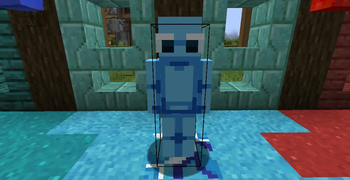
When you aim at an entity, its hitbox is automatically highlighted
Makes it easy to instantly identify your current target in combat
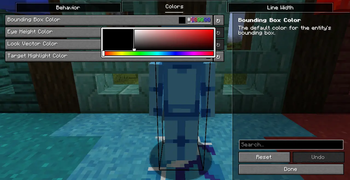
🎨 Fully Customizable Colors
Change colors for different hitbox elements:
Entity bounding box
Eye height line
Look direction vector
Default setup is optimized for visibility, but fully adjustable
📏 Adjustable Line Thickness
Increase or decrease hitbox line width
Helps visibility in PvP, PvE, and crowded environments
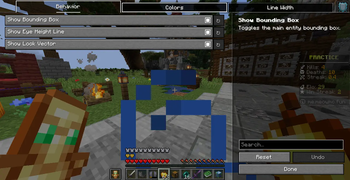
🔲 Toggleable Components
Enable or disable individual parts of the hitbox:
Bounding box
Eye line
Look direction vector
🧩 Vanilla Integration
Works directly with Minecraft’s F3 + B debug hitboxes
No replacement system — only enhances existing rendering
⚙️ Technical Details
Built for Fabric 1.21
Client-side only (no server requirement)
Uses Fabric API + Mixin
Lightweight rendering optimized for performance
No gameplay or combat modifications
🚫 What This Mod Does NOT Do
- ❌ No reach or hitbox manipulation
- ❌ No combat advantage mechanics
- ❌ No server-side changes
- ❌ No FPS-heavy rendering systems
🧠 Why Use Clean Hitbox?
Better visibility during PvP fights
Easier tracking of entity positions
Cleaner debugging experience
Lightweight and performance-friendly
📦 Installation
Install Fabric Loader (1.21)
Install Fabric API
Drop Clean Hitbox into your /mods folder
Launch the game and press F3 + B
📜 License
Free to use. No modifying, selling, or reuploading.
🌐 Socials
Modrinth: https://modrinth.com/user/MineBoost
GitHub: https://github.com/ShirjeelPlays
Discord: https://discord.gg/KbG9bs5pzQ
Available Versions
How to Install Clean Hitbox on Your Server
Order Server
Order a Minecraft Java server with at least 3 GB RAM (4 GB recommended).
Set fabric Loader
In the panel under "Egg", select the fabric loader and matching Minecraft version (1.21.11).
Install Mod
Open the mod browser in the dashboard and search for "Clean Hitbox". Click "Install" – done! Alternatively, upload the .jar via SFTP to the /mods folder.
Compatibility
Mod Loaders
Minecraft Versions
1.21.11, 1.21.10, 1.21.9 (+9 more)
Server-side
✗ UnsupportedRecommended RAM
4 GB(min. 3 GB)Frequently Asked Questions
Clean Hitbox server crashes on startup – what to do?
Most common cause: wrong fabric version or insufficient RAM. Check the server log (latest.log) for "OutOfMemoryError" or "Mixin" errors. With Mado Hosting: ensure at least 3 GB RAM is allocated and the loader matches the mod version (1.21.11). You can switch loaders with one click in the panel.
Is Clean Hitbox compatible with fabric?
Clean Hitbox officially supports fabric for Minecraft 1.21.11, 1.21.10, 1.21.9. The Mado dashboard automatically detects incompatible loader combinations.
Server lagging with Clean Hitbox – how to optimize performance?
Recommended RAM: 4 GB (per 8 players). Use /spark profiler to check if Clean Hitbox consumes the most tick time. Common fixes: reduce server view-distance to 8-10, install "performant" or "starlight" as supplementary mods on Forge. With Mado Hosting, your server runs on NVMe SSDs with dedicated CPU cores for minimal latency.
Similar Mods

![[ETF] Entity Texture Features](https://cdn.modrinth.com/data/BVzZfTc1/af683d206d50b05258d865b0d6e4aa2f2cee12f2_96.webp)
![[EMF] Entity Model Features](https://cdn.modrinth.com/data/4I1XuqiY/6e5bbd0d06b1741bfdab6c0cfab6de8fdaf0064c_96.webp)



Rent Modded Server
Install Clean Hitbox with just one click on your server.