
Clickify
Clickify combines a dual-button auto clicker with a smart bridge assistant for effortless AFK automation and building.
Screenshots
About this Mod



Dual-button auto clicker + bridge assistant for Fabric 1.20.0–1.20.6.
Core Features
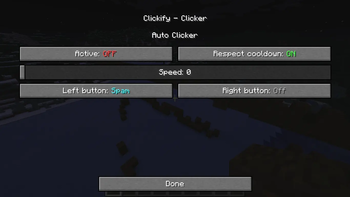
- Auto Clicker: Separate LMB/RMB profiles with three modes (
OFF,HOLD,SPAM) and a speed slider (0–10). Optional cooldown tracking keeps redstone farms from desyncing. Global toggle keyI. - Bridge Assistant: Hold/toggle key
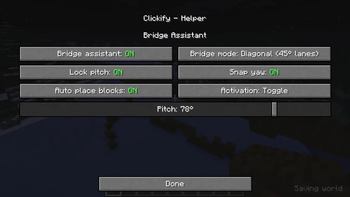
Yto auto place blocks, move, sneak, sprint, and (when needed) auto jump. Helper screen (U) exposes every switch. - Camera Helpers: Pitch lock (45°–85°) and yaw snapping (45°/90°) for perfectly straight or diagonal runs.
Built-in Bridge Modes
| Mode | Movement | Notes |
|---|---|---|
| Nub Bridging | Straight backpedal | Always sneaks + adaptive edge safety, yaw snaps to 90°. |
| Cha Cha Bridging | Backpedal sprint + jump | Auto jumps every 4 ticks, sprinting, sneak pulses for rhythm. |
| Pro Nub Bridging | Diagonal back-left | Sneaks while strafing left, yaw snaps to 45° for diagonals. |
| Free Mode | Backpedal manual speed | Sneaks with adaptive safety; sprint/jump left to the player. |
Key Toggles & Controls
- Clicker screen (
O): Active toggle, Respect Cooldown, speed slider, LMB/RMB mode selectors. - Helper screen (
U): Bridge enabled, bridge mode cycle, Lock Pitch, Snap Yaw, Auto Place, Auto Refill, Hold vs Toggle activation, Pitch slider. - Hotkeys:
I(Quick toggle),Y(Bridge helper hold/toggle),O/U(open GUIs). All bindings live underOptions → Controls → Clickify.
Compatibility & Support
- Single Fabric jar supports Minecraft 1.20.0 through 1.20.6.
- Code sticks to 1.20 mappings to keep API calls stable.
- Runtime guards warn if Minecraft falls outside the supported range.
License & Usage
- All rights reserved. No public license is granted for Clickify.
- Viewing or running the distributed binaries is permitted, but redistribution, modification, or derivative work is forbidden without explicit written permission.
- Contact the author if you need a custom agreement or a commercial exception.
Available Versions
How to Install Clickify on Your Server
Order Server
Order a Minecraft Java server with at least 3 GB RAM (4 GB recommended).
Set fabric Loader
In the panel under "Egg", select the fabric loader and matching Minecraft version (1.20.6).
Install Mod
Open the mod browser in the dashboard and search for "Clickify". Click "Install" – done! Alternatively, upload the .jar via SFTP to the /mods folder.
Compatibility
Mod Loaders
Minecraft Versions
1.20.6, 1.20.5, 1.20.4 (+4 more)
Server-side
✗ UnsupportedRecommended RAM
4 GB(min. 3 GB)Frequently Asked Questions
Clickify server crashes on startup – what to do?
Most common cause: wrong fabric version or insufficient RAM. Check the server log (latest.log) for "OutOfMemoryError" or "Mixin" errors. With Mado Hosting: ensure at least 3 GB RAM is allocated and the loader matches the mod version (1.20.6). You can switch loaders with one click in the panel.
Is Clickify compatible with fabric?
Clickify officially supports fabric for Minecraft 1.20.6, 1.20.5, 1.20.4. The Mado dashboard automatically detects incompatible loader combinations.
Server lagging with Clickify – how to optimize performance?
Recommended RAM: 4 GB (per 8 players). Use /spark profiler to check if Clickify consumes the most tick time. Common fixes: reduce server view-distance to 8-10, install "performant" or "starlight" as supplementary mods on Forge. With Mado Hosting, your server runs on NVMe SSDs with dedicated CPU cores for minimal latency.
Similar Mods




![[ETF] Entity Texture Features](https://cdn.modrinth.com/data/BVzZfTc1/af683d206d50b05258d865b0d6e4aa2f2cee12f2_96.webp)
![[EMF] Entity Model Features](https://cdn.modrinth.com/data/4I1XuqiY/6e5bbd0d06b1741bfdab6c0cfab6de8fdaf0064c_96.webp)
Rent Modded Server
Install Clickify with just one click on your server.