
Client Backpack
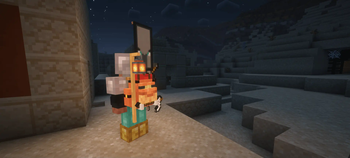
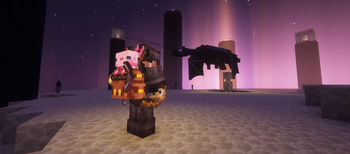
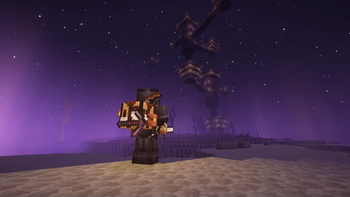
THIS MOD DOES NOT ADD ANY FUNCTIONAL BACKPACKS, ONLY VISUAL IN CLIENT-SIDE. A cosmetic mod that adds dynamic visual backpacks; Replaces existing backpack model from other backpack mods.
Screenshots



About this Mod




⚠️ ATTENTION: THIS MOD DOES NOT ADD ANY FUNCTIONAL BACKPACKS, ONLY VISUAL IN CLIENT-SIDE
📖 Overview
Client Wearables is a cosmetic mod that adds dynamic visual backpacks;
Replaces existing backpack model from other backpack mods.
This mod is purely client-side and does not require a server-side installation.

✨ Features
- Replace backpack model from other backpack mod like: sophisticate backpacks, travelers backpacks, inmis backpacks.
- Dynamic Appearance: Models and visuals are changed on player's inventory content.
- Only require in Client-side
- Works in single-player and multiplayer.
- Does not affect gameplay mechanics, ensuring a fair experience.
⛓️💥 Compatibility
The mod is designed to be compatible with other mods.
If you encounter any issues, please report them on the
mod's issues tracker.
Current backpack mod that supported:
- Traveler's Backpack
- Inmis
- Sophisticated Backpacks
- Sophisticated Backpacks (Unoffical Fabric port)
🖼️ Screenshots

Click here to see more


⚠️ Warning
- For fair play, cosmetic content from other players is only visible if the server also has the mod installed.
⚙️ Config
Config file location: config/client_backpack.toml
📌 Required mods
- Faewulf's Lib
- Fabric API (for Fabric loader only)
- LambDynamicLights (Optional, for dynamic light support)
👍 Support
For support, feature requests, or bug reports, please visit the mod's GitHub issues page.
or join my Discord server: link

📃 License
You can use this mod in your modpack as long as giving proper credits.
Available Versions
How to Install Client Backpack on Your Server
Order Server
Order a Minecraft Java server with at least 3 GB RAM (4 GB recommended).
Set fabric Loader
In the panel under "Egg", select the fabric loader and matching Minecraft version (1.21.1).
Install Mod
Open the mod browser in the dashboard and search for "Client Backpack". Click "Install" – done! Alternatively, upload the .jar via SFTP to the /mods folder.
Compatibility
Mod Loaders
Minecraft Versions
1.21.1
Server-side
~ OptionalRecommended RAM
4 GB(min. 3 GB)Frequently Asked Questions
Client Backpack server crashes on startup – what to do?
Most common cause: wrong fabric version or insufficient RAM. Check the server log (latest.log) for "OutOfMemoryError" or "Mixin" errors. With Mado Hosting: ensure at least 3 GB RAM is allocated and the loader matches the mod version (1.21.1). You can switch loaders with one click in the panel.
Is Client Backpack compatible with fabric and forge and neoforge and quilt?
Client Backpack officially supports fabric, forge, neoforge, quilt for Minecraft 1.21.1. Note: Forge and Fabric mods are NOT cross-compatible – pick one loader and stick with it. The Mado dashboard automatically detects incompatible loader combinations.
Server lagging with Client Backpack – how to optimize performance?
Recommended RAM: 4 GB (per 8 players). Use /spark profiler to check if Client Backpack consumes the most tick time. Common fixes: reduce server view-distance to 8-10, install "performant" or "starlight" as supplementary mods on Forge. With Mado Hosting, your server runs on NVMe SSDs with dedicated CPU cores for minimal latency.
Similar Mods

![[ETF] Entity Texture Features](https://cdn.modrinth.com/data/BVzZfTc1/af683d206d50b05258d865b0d6e4aa2f2cee12f2_96.webp)
![[EMF] Entity Model Features](https://cdn.modrinth.com/data/4I1XuqiY/6e5bbd0d06b1741bfdab6c0cfab6de8fdaf0064c_96.webp)



Rent Modded Server
Install Client Backpack with just one click on your server.
Details
- License
- Creative Commons Attribution Non Commercial Share Alike 4.0 International
- Server-side
- Optional