
Client Effect Remover
Remove effects in client-side.
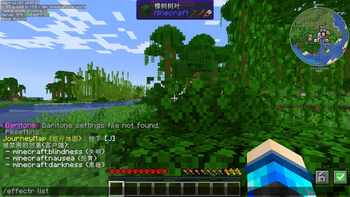
Screenshots
About this Mod
Client Effect Remover
This mod can disable some status effects in the client-side, such as blindness, darkness and others you don't like(including effects of mods).
If a type of status effects is disabled, you will not see the icon in your client.But they are still existent in the server.
For example, you have disabled the slowness effect, but you walk slow still.
Commands
The main command: effectr
effectr disable <effect>: Append the effect to the disabled list.
effectr enable <effect>: Remove the effect from the disabled list.
effectr list: Show the disabled list.
effectr remove <effect>: Remove the effect in your client for once.
Config File
Config file path: config/effectremover.json
The file should be like this:
{
  "disabled_effects": [
    "minecraft:effect"
    // ...more
  ]
}
Chinese version:
Client Effect Remover (客户端效果移除)
该mod可以在客户端屏蔽某些效果,例如失明、黑暗或者其他你不喜欢的(包括mod效果)。
如果你禁用了一种状态效果,你将不会看到它的图标。但是它们仍然在服务端存在。
例如,即使你已经禁用了缓慢效果,但是你仍然会走得很慢。
命令
主命令: effectr
effectr disable <效果>: 将效果添加到屏蔽列表。
effectr enable <效果>: 将效果从屏蔽列表删除。
effectr list: 查看屏蔽列表。
effectr remove <效果>: 在客户端一次性删除状态效果。
配置文件
配置文件路径: config/effectremover.json
这个文件应该是像这样的:
{
  "disabled_effects": [
    "minecraft:effect"
    // ...more
  ]
}
Available Versions
How to Install Client Effect Remover on Your Server
Order Server
Order a Minecraft Java server with at least 3 GB RAM (4 GB recommended).
Set fabric Loader
In the panel under "Egg", select the fabric loader and matching Minecraft version (1.21.4).
Install Mod
Open the mod browser in the dashboard and search for "Client Effect Remover". Click "Install" – done! Alternatively, upload the .jar via SFTP to the /mods folder.
Compatibility
Mod Loaders
Minecraft Versions
1.21.4, 1.21.3, 1.21.1 (+1 more)
Server-side
✗ UnsupportedRecommended RAM
4 GB(min. 3 GB)Frequently Asked Questions
Client Effect Remover server crashes on startup – what to do?
Most common cause: wrong fabric version or insufficient RAM. Check the server log (latest.log) for "OutOfMemoryError" or "Mixin" errors. With Mado Hosting: ensure at least 3 GB RAM is allocated and the loader matches the mod version (1.21.4). You can switch loaders with one click in the panel.
Is Client Effect Remover compatible with fabric?
Client Effect Remover officially supports fabric for Minecraft 1.21.4, 1.21.3, 1.21.1. The Mado dashboard automatically detects incompatible loader combinations.
Server lagging with Client Effect Remover – how to optimize performance?
Recommended RAM: 4 GB (per 8 players). Use /spark profiler to check if Client Effect Remover consumes the most tick time. Common fixes: reduce server view-distance to 8-10, install "performant" or "starlight" as supplementary mods on Forge. With Mado Hosting, your server runs on NVMe SSDs with dedicated CPU cores for minimal latency.
Similar Mods




![[ETF] Entity Texture Features](https://cdn.modrinth.com/data/BVzZfTc1/af683d206d50b05258d865b0d6e4aa2f2cee12f2_96.webp)
![[EMF] Entity Model Features](https://cdn.modrinth.com/data/4I1XuqiY/6e5bbd0d06b1741bfdab6c0cfab6de8fdaf0064c_96.webp)
Rent Modded Server
Install Client Effect Remover with just one click on your server.