
ClientSide Commands
Adds a bunch of useful client side commands to your game. For players and developers.
Screenshots



About this Mod

ClientSide Commands


Adds a bunch of useful non-cheat clientside commands to your game such as
- QOL features
- settings commands
- f3 menu display on keyboard layout with no f3 key
- debugging commands for developers
🔎 Full list of commands
List of commands
- /calc ... : calculate an expression
- /copy mypos/myrot/myUUID : copy values to the clipboard
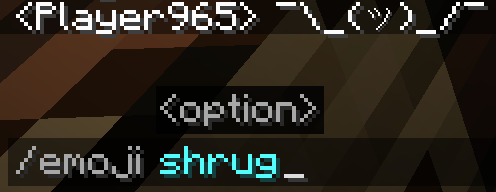
- /emoji ... : send an emoji in the chat (such as ¯\(ツ)/¯ or (⊙ _ ⊙ ) )
- /lookat ... ... : rotate your camera to the specified yaw and pitch
- /mynetherpos convert your coordinates to the nether (/8 if the player is not already in the nether)
- /myoverworldpos convert your coordinates to the overworld (*8 if the player is not already in the overworld)
- /clearchat : clear the chat
- /wiki : open the wiki's page of the held item
- /rc : reload chunks
- /rr : reload ressourcepacks
- /ss : takes a screenshot
- /quit : quit the world/server and go back to the main menu
- /set fov ... : set a fov value (allow for values outside of the expected range)
- /set gamma ... : set a gamma value (allow for values outside of the expected range)
- /set hudscale ... : scale the hud
- /toggle fog : toggle in-game fog
- /toggle advancedtooltips : toggle advanced item tooltips
- /toggle f3menu (/f3) : toggle the f3 menu, useful for keyboards without the f3 key
- /toggle debugrenderer ... : toggle one of the debug renderers, not accessible from inside of the vanilla game
- All the /copy command arguments also exists as standalone command to display the value
📦 Modpack
Feel free to add this mod in your modpacks.
Available Versions
How to Install ClientSide Commands on Your Server
Order Server
Order a Minecraft Java server with at least 3 GB RAM (4 GB recommended).
Set fabric Loader
In the panel under "Egg", select the fabric loader and matching Minecraft version (1.21.11).
Install Mod
Open the mod browser in the dashboard and search for "ClientSide Commands". Click "Install" – done! Alternatively, upload the .jar via SFTP to the /mods folder.
Compatibility
Mod Loaders
Minecraft Versions
1.21.11, 1.21.10, 1.21.9 (+16 more)
Server-side
✗ UnsupportedRecommended RAM
4 GB(min. 3 GB)Frequently Asked Questions
ClientSide Commands server crashes on startup – what to do?
Most common cause: wrong fabric version or insufficient RAM. Check the server log (latest.log) for "OutOfMemoryError" or "Mixin" errors. With Mado Hosting: ensure at least 3 GB RAM is allocated and the loader matches the mod version (1.21.11). You can switch loaders with one click in the panel.
Is ClientSide Commands compatible with fabric and forge and neoforge and quilt?
ClientSide Commands officially supports fabric, forge, neoforge, quilt for Minecraft 1.21.11, 1.21.10, 1.21.9. Note: Forge and Fabric mods are NOT cross-compatible – pick one loader and stick with it. The Mado dashboard automatically detects incompatible loader combinations.
Server lagging with ClientSide Commands – how to optimize performance?
Recommended RAM: 4 GB (per 8 players). Use /spark profiler to check if ClientSide Commands consumes the most tick time. Common fixes: reduce server view-distance to 8-10, install "performant" or "starlight" as supplementary mods on Forge. With Mado Hosting, your server runs on NVMe SSDs with dedicated CPU cores for minimal latency.
Similar Mods




![[ETF] Entity Texture Features](https://cdn.modrinth.com/data/BVzZfTc1/af683d206d50b05258d865b0d6e4aa2f2cee12f2_96.webp)
![[EMF] Entity Model Features](https://cdn.modrinth.com/data/4I1XuqiY/6e5bbd0d06b1741bfdab6c0cfab6de8fdaf0064c_96.webp)
Rent Modded Server
Install ClientSide Commands with just one click on your server.