
Clutch
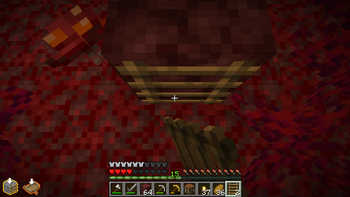
In some cases a clutch will be impossible. This mod shows whether a clutch is doable and how difficult it will be.
Screenshots
About this Mod
Clutch by AbyssalMC
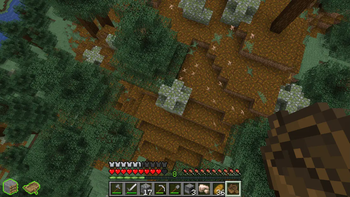
Did you know that at certain heights it is impossible to clutch?
Source code: Github Repository | Youtube: AbyssalMC
This mod shows whether it is possible to block ladder clutch (bladder) and boat clutch. It also contains many quality of life competitive clutching features.
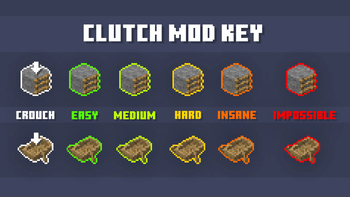
Clutch possibility indicator and difficulty scale
- Can be toggled on and off with O and configured in controls)
- The block in which the player is looking at is assumed to be where the player lands, and the clutch possibility is based on this.
- It uses the player's position and speed and calculates whether the clutch is possible or not based on the following colors:
- Red: impossible to clutch
- Orange: (difficult) bladder peak tier greater than 3 blocks | 2t no stall boat
- Yellow: (medium) bladder peak tier greater than 2.75 blocks | 3t no stall boat
- Lime: (easy) bladder peak tier greater than 2.25 blocks | 3t stall boat
- Green: (very easy) all other possible bladders | 2t stall boat
Better resets
- A reset hotkey can be configured in controls
- The reset point can be set using /clutch platform (no arguments) which is stored in persistent data.
- It teleports you back to the starting platform with a good position and angle.
- You can change the offset from the default position by using /clutch platform [int offset].
- Pressing the reset hotkey also works in guis unlike standard auto text hotkeys
- Positioned farther forward for faster resets than /kill
- The pitch by default is set to 77.0 degrees, but this can be changed through /clutch pitch [angle] which is stored locally.
- Automatic movement can also be enabled through /clutch automov enable, which makes the player move backwards and jump when reset.
Setup generation
- Setups can be tedious to set up, so the command /clutch setupgen [setupid] allows them to be generated automatically.
- The ids consist of the items and slots of the clutch split by S.
- Enchants can be added by adding E around the enchant
- Examples: /clutch setupgen 13oak_log1 (log ladder), /clutch setupgen 13netherite_hoe1S14enchanted_bookEefficiency5E1 (single enchant)
Cursor offset
- There is a way to offset your cursor in GUIs from its original position in the center of the screen (960,540)
- However it is tedious to set up after each attempt, so this mod replicates it exactly to save time
- This can be done with /clutch cursoroffset [cursorX] [cursorY], and can be disabled using /clutch disableoffset
Recipe book disabling
- For difficult crafts it can get quite annoying when you accidentally open the recipe book.
- To stop the recipe book from opening, use /clutch recipebook disable
- To completely obscure the button as well, use /clutch recipebook occlude instead.
Input locators
- Show where you click in guis using /clutch inputloc.
- 3 different locator styles.
- Can be always shown, only on misses, or disabled.
GUI input sounds
- Set a sound to play when you make an input using /clutch inputsounds [sound].
- This sound may be set to either "osu" or "basskick".
Custom GUI time
- A custom gui time in ticks can be set using /clutch guitime set [time].
- It may be disabled using /clutch guitime default or /clutch guitime set 0.
Attempt tracker
- Track the number of attempts a clutch takes using /clutch attempts get.
- Remove a platform's attempts using /clutch attempts remove.
- Clear all persistent attempts using /clutch attempts clear.
Health, hunger, and saturation modifiers
- Set the player health using /clutch health [health]
- The same can be done with hunger and saturation using /clutch hunger and /clutch saturation.
Velocity command
- Use /clutch velocity
to set the player's velocity vector.
Join the clutching tierlists discord! https://discord.gg/Tb46bthcFX

Available Versions
How to Install Clutch on Your Server
Order Server
Order a Minecraft Java server with at least 3 GB RAM (4 GB recommended).
Set fabric Loader
In the panel under "Egg", select the fabric loader and matching Minecraft version (1.21.11).
Install Mod
Open the mod browser in the dashboard and search for "Clutch". Click "Install" – done! Alternatively, upload the .jar via SFTP to the /mods folder.
Compatibility
Mod Loaders
Minecraft Versions
1.21.11, 1.21.10, 1.21.9 (+9 more)
Server-side
✓ RequiredRecommended RAM
4 GB(min. 3 GB)Frequently Asked Questions
Clutch server crashes on startup – what to do?
Most common cause: wrong fabric version or insufficient RAM. Check the server log (latest.log) for "OutOfMemoryError" or "Mixin" errors. With Mado Hosting: ensure at least 3 GB RAM is allocated and the loader matches the mod version (1.21.11). You can switch loaders with one click in the panel.
Is Clutch compatible with fabric?
Clutch officially supports fabric for Minecraft 1.21.11, 1.21.10, 1.21.9. The Mado dashboard automatically detects incompatible loader combinations.
Server lagging with Clutch – how to optimize performance?
Recommended RAM: 4 GB (per 8 players). Use /spark profiler to check if Clutch consumes the most tick time. Common fixes: reduce server view-distance to 8-10, install "performant" or "starlight" as supplementary mods on Forge. With Mado Hosting, your server runs on NVMe SSDs with dedicated CPU cores for minimal latency.
Similar Mods




Rent Modded Server
Install Clutch with just one click on your server.