
Cobble Spawn Tracker
Client-side mod designed for hunting specific Cobblemon pokemon
Screenshots
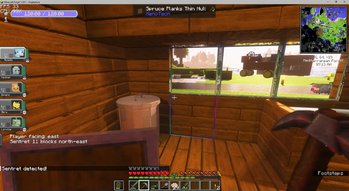
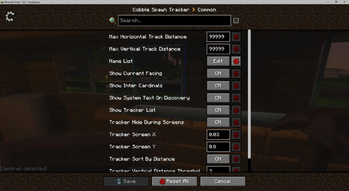
About this Mod
'Cobble Spawn Tracker' is general-purpose client-side tracking mod. While it was originally made for locating Cobblemon Pokemon, it can technically locate any entity you want.
The mod is configuration-driven and by default does not track any specific entity. To begin using it, you will need to open the config and add the pokemon you want to track, by their full name. Here is an example:
File: config/cobble_spawn_tracker-common.toml
List of mob names to track
name_list = ["Sentret", "Copperajah", "Torchic"]
Update 1.02:
4 New config options added, all enabled by default, but can be disabled.
Shinies are automatically tracked.
Legendaries are automatically tracked.
The tracker will no longer track player-owned pokemon
Tracker will hide entities if you change dimensions
You can track as many entities as you would like. By default the tracker will display a system message the first time it spots a new entity, but this can be disabled. The tracker will then track the distance and direction to the entity for you.
The mod can be installed on the server-side but it will not do anything there.
Note that for the tracker to work, the name in the config must be an exact match with the name of the entity. Casing does not matter.
Special note:
When you first add a name to the list it may not immediately detect that pokemon if it's near you. But if you explore and that pokemon appears, it should automatically detect it.
Available Versions
How to Install Cobble Spawn Tracker on Your Server
Order Server
Order a Minecraft Java server with at least 3 GB RAM (4 GB recommended).
Set forge Loader
In the panel under "Egg", select the forge loader and matching Minecraft version (1.21.1).
Install Mod
Open the mod browser in the dashboard and search for "Cobble Spawn Tracker". Click "Install" – done! Alternatively, upload the .jar via SFTP to the /mods folder.
Compatibility
Mod Loaders
Minecraft Versions
1.21.1, 1.20.1
Server-side
✗ UnsupportedRecommended RAM
4 GB(min. 3 GB)Frequently Asked Questions
Cobble Spawn Tracker server crashes on startup – what to do?
Most common cause: wrong forge version or insufficient RAM. Check the server log (latest.log) for "OutOfMemoryError" or "Mixin" errors. With Mado Hosting: ensure at least 3 GB RAM is allocated and the loader matches the mod version (1.21.1). You can switch loaders with one click in the panel.
Is Cobble Spawn Tracker compatible with forge and neoforge?
Cobble Spawn Tracker officially supports forge, neoforge for Minecraft 1.21.1, 1.20.1. The Mado dashboard automatically detects incompatible loader combinations.
Server lagging with Cobble Spawn Tracker – how to optimize performance?
Recommended RAM: 4 GB (per 8 players). Use /spark profiler to check if Cobble Spawn Tracker consumes the most tick time. Common fixes: reduce server view-distance to 8-10, install "performant" or "starlight" as supplementary mods on Forge. With Mado Hosting, your server runs on NVMe SSDs with dedicated CPU cores for minimal latency.
Similar Mods
![[EMF] Entity Model Features](https://cdn.modrinth.com/data/4I1XuqiY/6e5bbd0d06b1741bfdab6c0cfab6de8fdaf0064c_96.webp)


Rent Modded Server
Install Cobble Spawn Tracker with just one click on your server.