
CobbleHunter
CobbleHunter is a client-side mod to notify spawns of Pokemon on the wishlist. This has a menu where you can select Pokemon (default key H) and filter by gender and shiny.
Screenshots
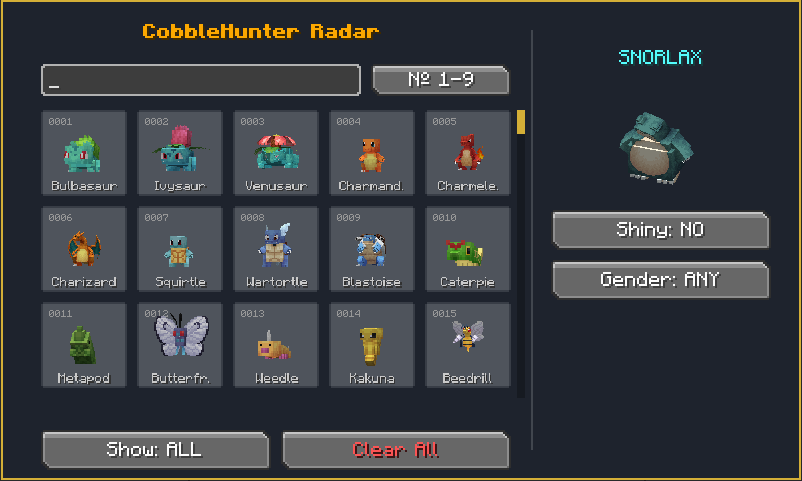
About this Mod
Cobble Hunter
Cobble Hunter is the essential companion for every trainer looking to optimize their hunting and collection experience within the Cobblemon ecosystem.
Have you ever found yourself exploring vast biomes in search of a specific Pokémon, only to realize you walked right past it without noticing? This mod was created to eliminate that frustration, allowing you to focus on your journey while the system monitors your surroundings for you.
Why use Cobble Hunter?
- Selective & Personalized Tracking: Unlike global notification systems that can clutter your screen with irrelevant information, Cobble Hunter allows you to define exactly which creatures you are looking for. You set your own goals; the mod takes care of the rest.
- Intelligent Detection: Forget the need to constantly watch a minimap or open external menus. The mod utilizes a proactive alert system that informs you immediately when one of your targets is detected within your range, allowing you to react instantly.
- Enhanced Immersion: By delegating the search to the radar, you can fully enjoy the Minecraft landscape and Cobblemon gameplay. The tool acts as a "sixth sense" for the trainer, notifying you through visual and auditory cues that blend seamlessly with the game's aesthetic.
- Exploration Efficiency: Designed for both solo players and users on competitive servers, Cobble Hunter streamlines Pokédex completion and the hunt for specific encounters, saving you hours of aimless wandering.
Cobble Hunter is more than just a tracking tool; it is a significant quality-of-life improvement for any Cobblemon player who values their time and wants to ensure that no capture opportunity goes unnoticed.
Compatibility & Requirements
- Platform: Fabric
- Side: Client-Side (Works on servers even if they don't have the mod)
- Dependencies:
- Cobblemon
- Fabric API
- Fabric Language Kotlin
Available Versions
How to Install CobbleHunter on Your Server
Order Server
Order a Minecraft Java server with at least 3 GB RAM (4 GB recommended).
Set fabric Loader
In the panel under "Egg", select the fabric loader and matching Minecraft version (1.21.1).
Install Mod
Open the mod browser in the dashboard and search for "CobbleHunter". Click "Install" – done! Alternatively, upload the .jar via SFTP to the /mods folder.
Compatibility
Mod Loaders
Minecraft Versions
1.21.1
Server-side
✗ UnsupportedRecommended RAM
4 GB(min. 3 GB)Frequently Asked Questions
CobbleHunter server crashes on startup – what to do?
Most common cause: wrong fabric version or insufficient RAM. Check the server log (latest.log) for "OutOfMemoryError" or "Mixin" errors. With Mado Hosting: ensure at least 3 GB RAM is allocated and the loader matches the mod version (1.21.1). You can switch loaders with one click in the panel.
Is CobbleHunter compatible with fabric?
CobbleHunter officially supports fabric for Minecraft 1.21.1. The Mado dashboard automatically detects incompatible loader combinations.
Server lagging with CobbleHunter – how to optimize performance?
Recommended RAM: 4 GB (per 8 players). Use /spark profiler to check if CobbleHunter consumes the most tick time. Common fixes: reduce server view-distance to 8-10, install "performant" or "starlight" as supplementary mods on Forge. With Mado Hosting, your server runs on NVMe SSDs with dedicated CPU cores for minimal latency.
Similar Mods




Rent Modded Server
Install CobbleHunter with just one click on your server.