
Cobblemon: Clear View
Clears the foliage in a customizeable radius around your Cobblemon battle!
Screenshots
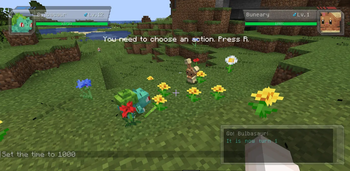
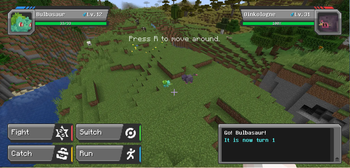
About this Mod
An addon for Cobblemon that hides obscuring foliage during battles and restores it afterward.
In vanilla Cobblemon, battles start wherever you happen to be standing; which is often in tall grass, a flower patch, or dense undergrowth. The player camera doesn't account for this, so any foliage between you and the Pokémon ends blocking your view of the encounter. Clear View removes that foliage for the duration of the battle and puts every block back when the battle ends.
Features
Automatic foliage removal at battle start. When a Cobblemon battle begins, the mod scans the area around the battle and replaces short grass, ferns, flowers, and other intangible plant blocks with air. You can see your Pokémon and the opposing Pokémon clearly for the entire encounter, without standing up to clear the area first or breaking blocks you'd rather keep.
Full per-block restoration at battle end. Every block the mod removes is recorded with its exact block state. When the battle ends (by victory, defeat, capture, or running) each block is placed back in its original position.
Works for wild encounters and trainer battles. The mod treats both battle types the same way, so the view-clearing behavior is consistent no matter what kind of fight you're in.
Only affects replaceable foliage. Solid blocks, terrain, crops, and player-placed builds are never touched, so your battle arenas, your farms, and your decorative builds are untouched.
Open config menu (default: Y) to select either 3, 6, 9, and 18 block radius, centered between pokemon, (default is 18); Pokemon only mode which clears a two block radius sphere centered on each pokemon; or Trimmed, which replaces all grass in an 18-block radius with Trimmed Grass, and leaves flowers and crops alone, great for naturalized arenas like grass or bug type gyms!
Requires: NeoForge, Cobblemon
Uninstalling: Restoration data is tracked in memory for the duration of each battle. If the mod is removed mid-battle, or if the server crashes during a battle, the temporarily-cleared blocks will remain as air and will not restore on their own. To uninstall safely, ensure no battles are active first, then remove the mod between battles.
Feel free to use in any modpack!
Available Versions
How to Install Cobblemon: Clear View on Your Server
Order Server
Order a Minecraft Java server with at least 4 GB RAM (6 GB recommended).
Set fabric Loader
In the panel under "Egg", select the fabric loader and matching Minecraft version (1.21.1).
Install Mod
Open the mod browser in the dashboard and search for "Cobblemon: Clear View". Click "Install" – done! Alternatively, upload the .jar via SFTP to the /mods folder.
Compatibility
Mod Loaders
Minecraft Versions
1.21.1
Server-side
✗ UnsupportedRecommended RAM
6 GB(min. 4 GB)Frequently Asked Questions
Cobblemon: Clear View server crashes on startup – what to do?
Most common cause: wrong fabric version or insufficient RAM. Check the server log (latest.log) for "OutOfMemoryError" or "Mixin" errors. With Mado Hosting: ensure at least 4 GB RAM is allocated and the loader matches the mod version (1.21.1). You can switch loaders with one click in the panel.
Is Cobblemon: Clear View compatible with fabric and neoforge?
Cobblemon: Clear View officially supports fabric, neoforge for Minecraft 1.21.1. The Mado dashboard automatically detects incompatible loader combinations.
Server lagging with Cobblemon: Clear View – how to optimize performance?
Recommended RAM: 6 GB (per 5 players). Use /spark profiler to check if Cobblemon: Clear View consumes the most tick time. Common fixes: reduce server view-distance to 8-10, install "performant" or "starlight" as supplementary mods on Forge. With Mado Hosting, your server runs on NVMe SSDs with dedicated CPU cores for minimal latency.
Similar Mods




![[ETF] Entity Texture Features](https://cdn.modrinth.com/data/BVzZfTc1/af683d206d50b05258d865b0d6e4aa2f2cee12f2_96.webp)

Rent Modded Server
Install Cobblemon: Clear View with just one click on your server.