
Cobblemon Customizables
Manager and Support of Cobblemon Skins
Screenshots
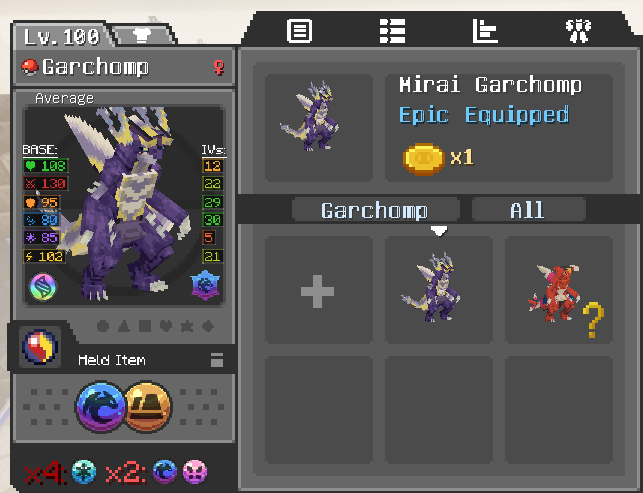
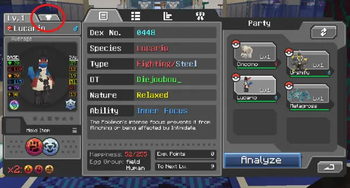
About this Mod
Cobblemon Customizables
Cobblemon Customizables is a Cobblemon addon built to make Pokémon skin packs easier to use, manage, and enjoy.
The main goal of this mod is broad compatibility: it can detect and load skins from many Cobblemon datapacks/resourcepacks, even when different packs structure their skins in different ways. Instead of every skin pack needing its own custom UI or item flow, Cobblemon Customizables gives players one dedicated skin browser inside the Pokémon Summary screen.
Players can preview skins, see which ones they own, unlock new ones through quests, and apply them directly from the Summary UI.
Core Features
- Detects skins from many Cobblemon datapacks/resourcepacks.
- Adds a dedicated skin browser to the Pokémon Summary screen.
- Lets servers control which skins are public, private, or unlockable.
- Supports unlock with quests using:
- Item costs
- Scoreboard objectives
- Player tags
- Teams
- Supports custom metadata for each skin:
- Display name
- Description
- Tier
- Unlock quest
- Can sync server skin packs to clients with hash checks. (So the packs in the server are not needed in the client and will be automatically sync)
- Prevents supported quest-controlled skins from being bypassed through normal cosmetic item application.
Tested Skin Packs
The following packs have been tested and include built-in/default metadata compatibility:
- CobbleCafe
- FireFits for Fire Cats
- Lucario Overhaul
- Failskins
More packs may work automatically if they use Cobblemon-compatible skin structures.
For Servers
Server owners can place supported skin packs in:
config/cobblemon_customizables/skins
Available Versions
How to Install Cobblemon Customizables on Your Server
Order Server
Order a Minecraft Java server with at least 3 GB RAM (4 GB recommended).
Set fabric Loader
In the panel under "Egg", select the fabric loader and matching Minecraft version (1.21.1).
Install Mod
Open the mod browser in the dashboard and search for "Cobblemon Customizables". Click "Install" – done! Alternatively, upload the .jar via SFTP to the /mods folder.
Compatibility
Mod Loaders
Minecraft Versions
1.21.1
Server-side
✓ RequiredRecommended RAM
4 GB(min. 3 GB)Frequently Asked Questions
Cobblemon Customizables server crashes on startup – what to do?
Most common cause: wrong fabric version or insufficient RAM. Check the server log (latest.log) for "OutOfMemoryError" or "Mixin" errors. With Mado Hosting: ensure at least 3 GB RAM is allocated and the loader matches the mod version (1.21.1). You can switch loaders with one click in the panel.
Is Cobblemon Customizables compatible with fabric?
Cobblemon Customizables officially supports fabric for Minecraft 1.21.1. The Mado dashboard automatically detects incompatible loader combinations.
Server lagging with Cobblemon Customizables – how to optimize performance?
Recommended RAM: 4 GB (per 8 players). Use /spark profiler to check if Cobblemon Customizables consumes the most tick time. Common fixes: reduce server view-distance to 8-10, install "performant" or "starlight" as supplementary mods on Forge. With Mado Hosting, your server runs on NVMe SSDs with dedicated CPU cores for minimal latency.
Similar Mods

![[ETF] Entity Texture Features](https://cdn.modrinth.com/data/BVzZfTc1/af683d206d50b05258d865b0d6e4aa2f2cee12f2_96.webp)
![[EMF] Entity Model Features](https://cdn.modrinth.com/data/4I1XuqiY/6e5bbd0d06b1741bfdab6c0cfab6de8fdaf0064c_96.webp)



Rent Modded Server
Install Cobblemon Customizables with just one click on your server.