
Cobblestone Generator Tweak
Tweaks the vanilla cobblestone generator to produce multiple stone variants (fully datapack-driven)
Screenshots
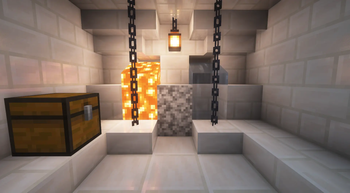

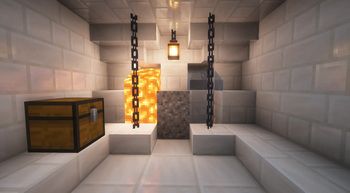
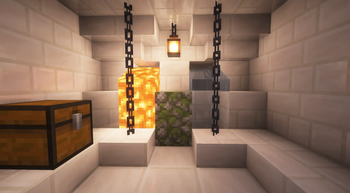


About this Mod
Intro :
Tired of your cobblestone generator always giving the same block? This mod tweaks it so generators can produce various stone types and even rare ores.
Features :
- Cobblestone generators don’t just make cobble anymore, they can also give you stone, andesite, diorite and a few other blocks.
- The odds of getting ores are balanced to keep things close to vanilla progression, nothing too crazy.
- Works fine in singleplayer and multiplayer, no special setup needed.
- Super lightweight: no extra items, no menus, no configs. Just drop it in and it’s ready.
- This mod is fully datapack-driven, which means you can add your own generators without touching the code.
How To Use :
It works very simply: start by building a regular cobblestone generator and let it produce its first block. Then, replace the block under the generated cobblestone with the one you want to use as a generator.

Advanced Generators :
Some generators require special setups to work properly :
- Generators with a hopper (🔗🖼️) : The block that defines the generator type must be placed under the hopper.
- Generators with a normal piston (🔗🖼️) : You need two blocks that define the generator type placed under the piston. Both blocks are required.
- Generators with a sticky piston (🔗🖼️) : The block above the sticky piston must be a glass block (any type of glass, tinted or not). In addition, you must place two blocks that define the generator type under the piston. Both blocks are required.
Create Custom Generator :
This mod is fully datapack-driven, which means you can add your own generators without touching the code. You can find an example datapack for Biomes O Plenty at the following URL :
💡 Example With Biomes O Plenty
You may also want to read the GitHub README, which explains how to create a datapack and details how the system works :
💡 Creating Custom Generators with Datapacks
💡 About Weight Rules
Default Generators :
The mod comes with a set of ready-to-use generators so you can start right away without any configuration.
| name | file |
|---|---|
| cobblestone | cobblestone.json |
| andesite | andesite.json |
| diorite | diorite.json |
| gravel | gravel.json |
| sandstone | sandstone.json |
| stone | stone.json |
| mossy cobblestone | mossy_cobblestone.json |
| coal ore | coal_ore.json |
| deepslate coal ore | coal_ore_deepslate.json |
| copper ore | copper_ore.json |
| deepslate copper ore | copper_ore_deepslate.json |
| lapis ore | lapis_ore.json |
| deepslate lapis ore | lapis_ore_deepslate.json |
| redstone ore | redstone_ore.json |
| deepslate redstone ore | redstone_ore_deepslate.json |
Showcase :
Enjoy!
Discover More Amazing Mods!


Enjoy this mod? Don’t miss future updates! Click the Follow button on the project page to get notified when new content is released. 💚🚀
Partners :
href=""
target="_blank"
rel="noopener noreferrer"><img
src=""
width="1168" height="155"/>
Join us :
Have questions? Need help? Join us on Discord or visit our GitHub to get involved with the community and contribute!
Available Versions
How to Install Cobblestone Generator Tweak on Your Server
Order Server
Order a Minecraft Java server with at least 3 GB RAM (4 GB recommended).
Set fabric Loader
In the panel under "Egg", select the fabric loader and matching Minecraft version (1.21.1).
Install Mod
Open the mod browser in the dashboard and search for "Cobblestone Generator Tweak". Click "Install" – done! Alternatively, upload the .jar via SFTP to the /mods folder.
Compatibility
Mod Loaders
Minecraft Versions
1.21.1
Server-side
✓ RequiredRecommended RAM
4 GB(min. 3 GB)Frequently Asked Questions
Cobblestone Generator Tweak server crashes on startup – what to do?
Most common cause: wrong fabric version or insufficient RAM. Check the server log (latest.log) for "OutOfMemoryError" or "Mixin" errors. With Mado Hosting: ensure at least 3 GB RAM is allocated and the loader matches the mod version (1.21.1). You can switch loaders with one click in the panel.
Is Cobblestone Generator Tweak compatible with fabric and forge and neoforge?
Cobblestone Generator Tweak officially supports fabric, forge, neoforge for Minecraft 1.21.1. Note: Forge and Fabric mods are NOT cross-compatible – pick one loader and stick with it. The Mado dashboard automatically detects incompatible loader combinations.
Server lagging with Cobblestone Generator Tweak – how to optimize performance?
Recommended RAM: 4 GB (per 8 players). Use /spark profiler to check if Cobblestone Generator Tweak consumes the most tick time. Common fixes: reduce server view-distance to 8-10, install "performant" or "starlight" as supplementary mods on Forge. With Mado Hosting, your server runs on NVMe SSDs with dedicated CPU cores for minimal latency.
Similar Mods




Rent Modded Server
Install Cobblestone Generator Tweak with just one click on your server.