
Colored Slimes
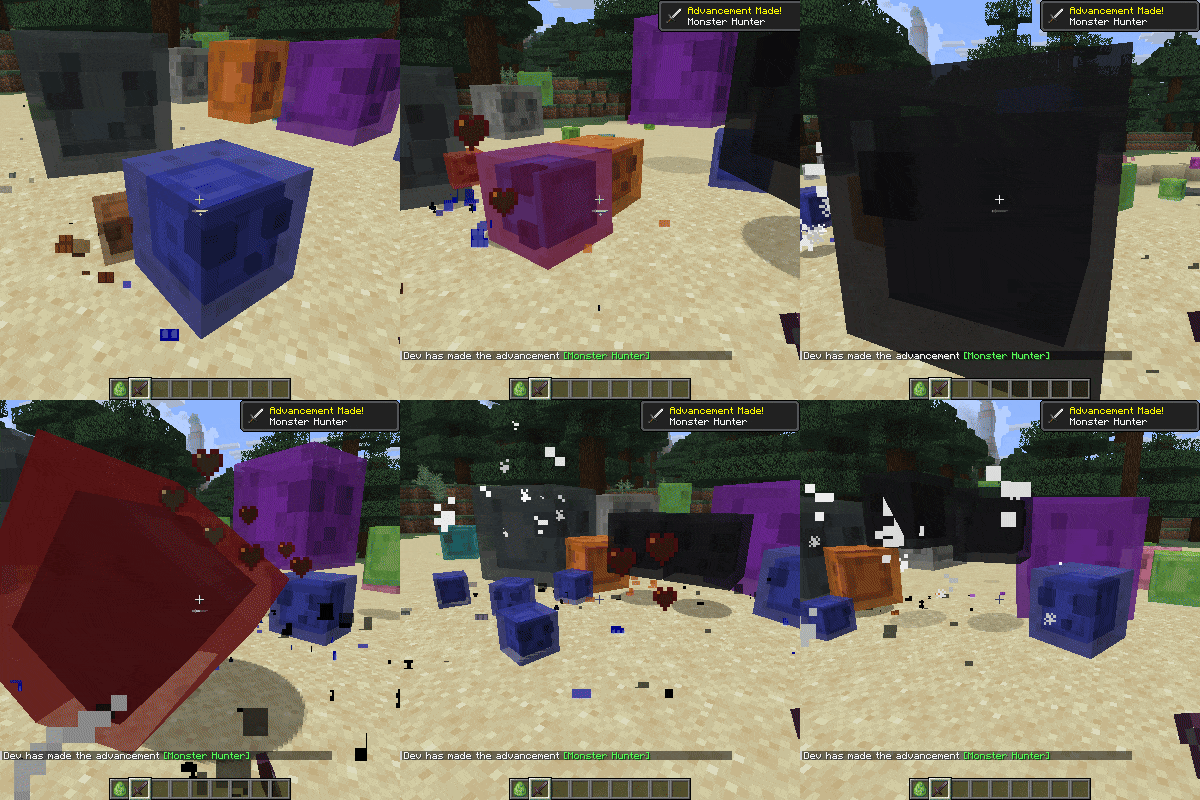
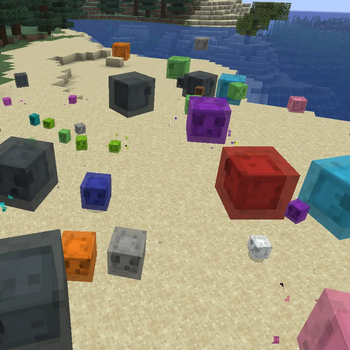
This mod changes the color of the slimes when they are spawning to make the world more colorful.
Screenshots
About this Mod
This mod changes the color of the slimes when they are spawning to make the world more colorful
and to make the slimes a bit more unique!
The color it gets is chosen randomly from the 16 dye color minecraft has
(based on their id from 0-15)
If a big slime gets killed, the smaller ones will inherit its color.
And when they jump around the particles will use the color of the slime too!
Config option to disable the random colors on spawning
summon slime via command for the mod loaders
Spoiler
you need a color id from 0 to 15, for example 15 is black
neoforge 26.1.1:
/summon minecraft:slime ~ ~ ~ {"neoforge:attachments":{"coloredslimes:color":{color:15}}}
fabric 26.1.1
/summon minecraft:slime ~ ~ ~ {"fabric:attachments":{"coloredslimes:color":15}}
forge 26.1.1
/summon minecraft:slime ~ ~ ~ {Color:15}
Spawnrule changer config options:
Spoiler
replace_spawnrule=false
which is false by default so other users wont get the spawn feature by default.
Then spawn_on_surface_only=false (forge/neoforge only)
by default they dont spawn only at the surface but you can now force it.
After that 2 other number for the spawn condition which will make them spawn only when the sky light level is between the 2 number.
By default the number will be from 0 to 15 so they spawn all day.
(sky_brightness_level_min=0, sky_brightness_level_max=15)
Another option is weight=0
0 means it wont spawn, the more number you write here the more chance this monster will spawn instead of others, so more chance to spawn.
With this the replace_spawnrule is not even needed but i still added this two so you can leave the weight at the number you want and just disable the new spawn rule with replace_spawnrule when you dont want them anymore
After these they use the modified slime spawn rule
which gives us again more options like:
can_spawn_in_any_biome=false
which is false by default,
if its false it will use the biome tag allows_surface_slime_spawns
which is a vanilla minecraft json file which you can edit
And as you know slimes can spawn from the height of 50 --> 70
So we have now spawn_height_min=50 and spawn_height_max=255
The slime chunk thing is untouched.
You will have to delete your old config to use the new one if you had one or paste someone else configs data
I used these settings in my coloredslimesconfig.properties config file while testing to make it work:
random_color_when_spawning=true #boolean | default: true
weight=100 #int | default: 0
replace_spawnrule=true #boolean | default: false
spawn_on_surface_only=false #boolean | default: false
sky_brightness_level_min=0 #int | default: 0
sky_brightness_level_max=15 #int | default: 15
can_spawn_in_any_biome=true #boolean | default: false
spawn_height_min=50 #int | default: 50
spawn_height_max=255 #int | default: 255
check_area_size_for_mobs_of_same_type_when_spawning=0 #int | default: 0
max_mob_number_of_same_type_around_area_when_spawning=3 #int | default: 3
You might want to reduce the weight if there are too many out there as Monsters spawn at a fast rate.
Mod currently supports
Forge 26.1.x | 1.21.11 | 1.21.10 | 1.21.9 | 1.21.8 | 1.21.7 | 1.21.6 | 1.21.4 | 1.21.1 | 1.20.1
Fabric 26.1.x | 1.21.11 | 1.21.10 | 1.21.9 | 1.21.8 | 1.21.7 | 1.21.6 | 1.21.1 | 1.20.1
Neoforge 26.1.x | 1.21.11 | 1.21.1
SEND ME A PRIVATE MESSAGE IF YOU NEED THE MOD IN A DIFFERENT VERSION OR IF YOU ENCOUNTER ANY BUGS AT CURSEFORGE
https://legacy.curseforge.com/members/aquarius_playz/projects
Follow me on X (twitter)

Available Versions
How to Install Colored Slimes on Your Server
Order Server
Order a Minecraft Java server with at least 3 GB RAM (4 GB recommended).
Set fabric Loader
In the panel under "Egg", select the fabric loader and matching Minecraft version (26.1.2).
Install Mod
Open the mod browser in the dashboard and search for "Colored Slimes". Click "Install" – done! Alternatively, upload the .jar via SFTP to the /mods folder.
Compatibility
Mod Loaders
Minecraft Versions
26.1.2, 26.1.1, 26.1 (+9 more)
Server-side
✓ RequiredRecommended RAM
4 GB(min. 3 GB)Frequently Asked Questions
Colored Slimes server crashes on startup – what to do?
Most common cause: wrong fabric version or insufficient RAM. Check the server log (latest.log) for "OutOfMemoryError" or "Mixin" errors. With Mado Hosting: ensure at least 3 GB RAM is allocated and the loader matches the mod version (26.1.2). You can switch loaders with one click in the panel.
Is Colored Slimes compatible with fabric and forge and neoforge?
Colored Slimes officially supports fabric, forge, neoforge for Minecraft 26.1.2, 26.1.1, 26.1. Note: Forge and Fabric mods are NOT cross-compatible – pick one loader and stick with it. The Mado dashboard automatically detects incompatible loader combinations.
Server lagging with Colored Slimes – how to optimize performance?
Recommended RAM: 4 GB (per 8 players). Use /spark profiler to check if Colored Slimes consumes the most tick time. Common fixes: reduce server view-distance to 8-10, install "performant" or "starlight" as supplementary mods on Forge. With Mado Hosting, your server runs on NVMe SSDs with dedicated CPU cores for minimal latency.
Similar Mods
![[EMF] Entity Model Features](https://cdn.modrinth.com/data/4I1XuqiY/6e5bbd0d06b1741bfdab6c0cfab6de8fdaf0064c_96.webp)


Rent Modded Server
Install Colored Slimes with just one click on your server.