Colorful Trims
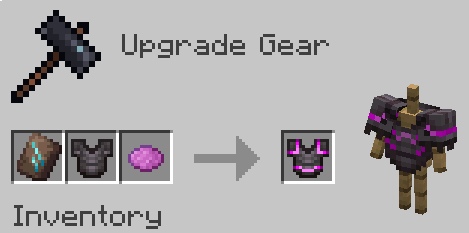
Adds the ability to use dyes in the smithing table
Screenshots
About this Mod
Information
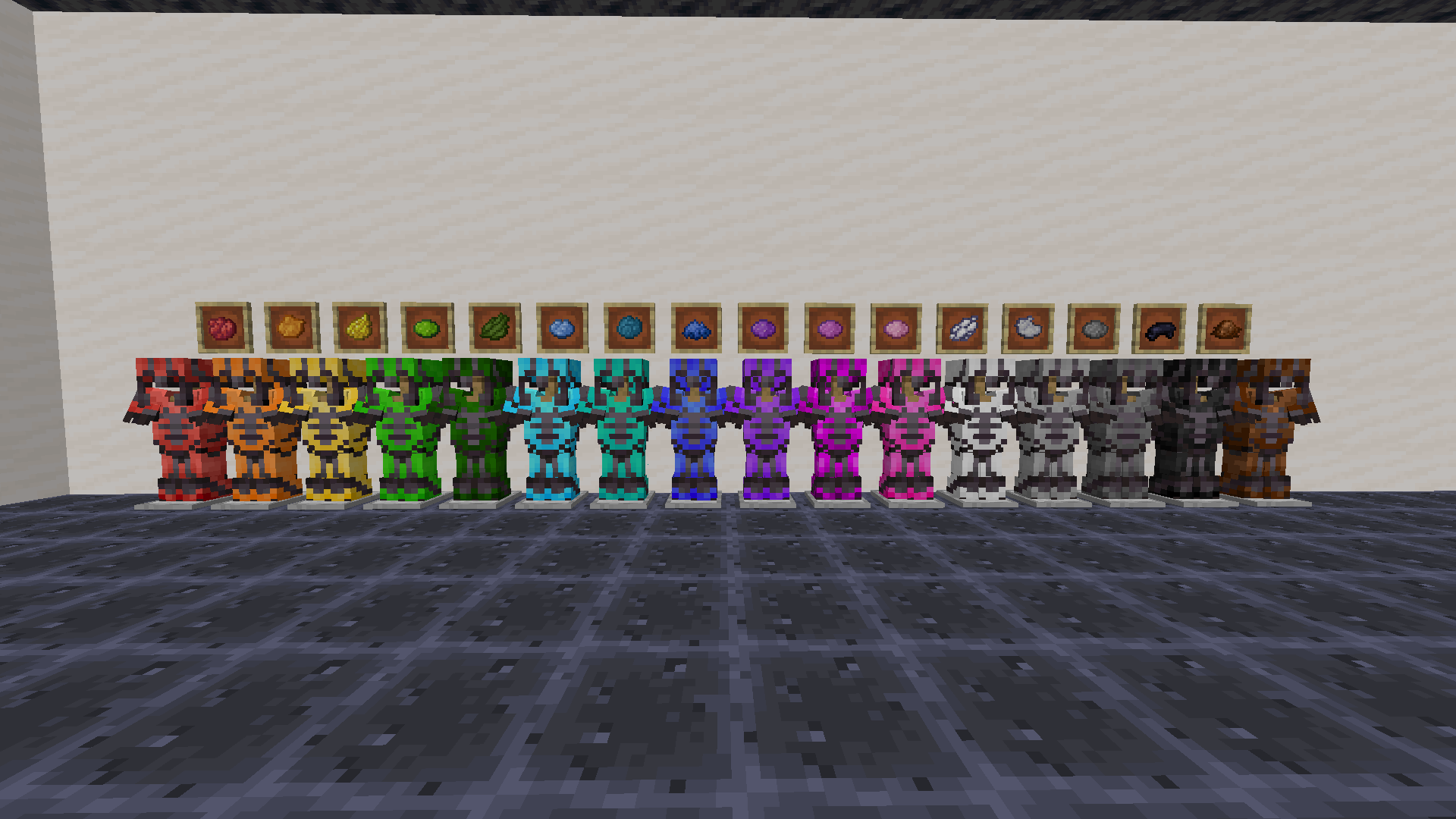
Use any dye along with trims to customize your armor. This works with all trims and armor like how you would do it with any other material.
You need the resource pack in order for you to see the custom armor trims. Without it you would see the missing texture texture. If something doesn't work check the FAQ below. If you find any bugs you can report them to my discord server.
1.21.5+ Note
In order to be able to trim items, you may need to drop them on the ground first.
Want the trims to glow? Use my other pack, Emissive Trims!
FAQ
Q: Why does it have a red X over the smithing table when trying to craft it?
A: Drop the dye on the ground, pick it up, and try it again. If that doesnt work restart the server. If neither of those worked report it in the discord
Q: Why can't I put the dye in the smithing table?
A: If it still doesn't work make sure you have installed the datapack correctly. If you are sure you did then report it in the discord
Q: Why do all the dye recipes not work?
A: You have to restart your world/server/realm. It should then work after you do that
Q: I get a missing texture when trying to use this how do I fix it?
A: Make sure to download the resourcepack
Q: Where can I download the resourcepack?
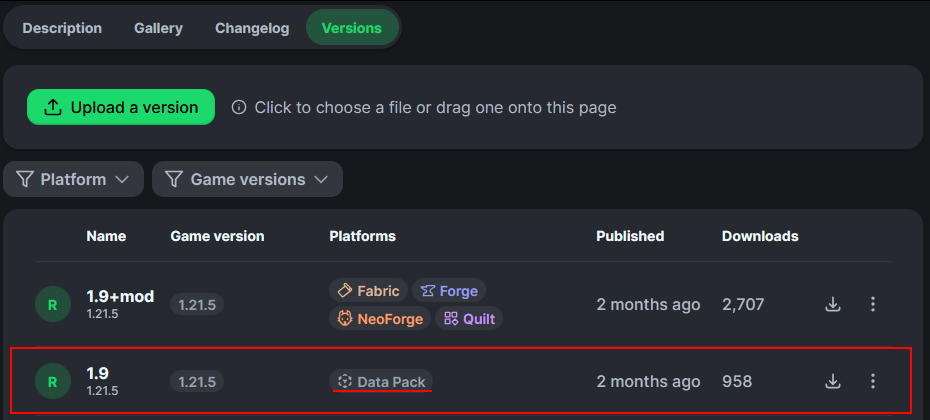
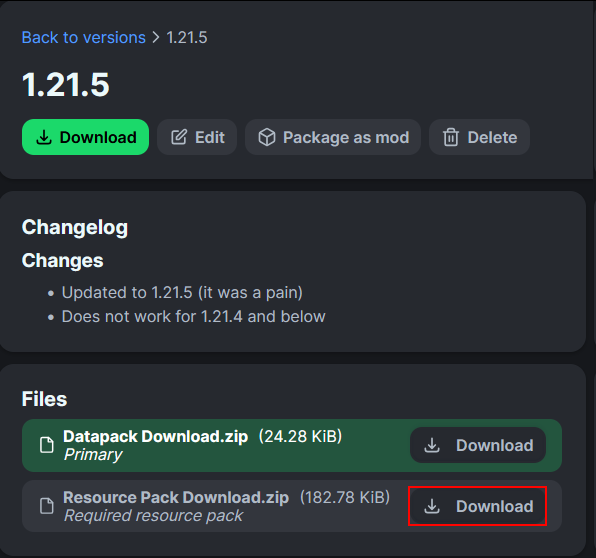
A: Those who click the big download button at the top of the screen are only prompted to download the datapack and not the resourcepack. Modrinth does not show both of them in that menu. You instead have to go to the versions tab.
Where to download the resourcepack
First you have to go to the versions tab

Then you go to the version you want
Then underneath the datapack download is the resourcepack download
How to install
On the server / singleplayer install the datapack and enable it. Restart the server afterwards for the smithing table to work.
On the client equip the resource pack in order to see the textures. This is required to do.
You could also just use the mod on both the client and server
Available Versions
How to Install Colorful Trims on Your Server
Order Server
Order a Minecraft Java server with at least 3 GB RAM (4 GB recommended).
Set datapack Loader
In the panel under "Egg", select the datapack loader and matching Minecraft version (26.1.2).
Install Mod
Open the mod browser in the dashboard and search for "Colorful Trims". Click "Install" – done! Alternatively, upload the .jar via SFTP to the /mods folder.
Compatibility
Mod Loaders
Minecraft Versions
26.1.2, 26.1.1, 26.1 (+19 more)
Server-side
✓ RequiredRecommended RAM
4 GB(min. 3 GB)Frequently Asked Questions
Colorful Trims server crashes on startup – what to do?
Most common cause: wrong datapack version or insufficient RAM. Check the server log (latest.log) for "OutOfMemoryError" or "Mixin" errors. With Mado Hosting: ensure at least 3 GB RAM is allocated and the loader matches the mod version (26.1.2). You can switch loaders with one click in the panel.
Is Colorful Trims compatible with datapack and fabric and forge and neoforge and quilt?
Colorful Trims officially supports datapack, fabric, forge, neoforge, quilt for Minecraft 26.1.2, 26.1.1, 26.1. Note: Forge and Fabric mods are NOT cross-compatible – pick one loader and stick with it. The Mado dashboard automatically detects incompatible loader combinations.
Server lagging with Colorful Trims – how to optimize performance?
Recommended RAM: 4 GB (per 8 players). Use /spark profiler to check if Colorful Trims consumes the most tick time. Common fixes: reduce server view-distance to 8-10, install "performant" or "starlight" as supplementary mods on Forge. With Mado Hosting, your server runs on NVMe SSDs with dedicated CPU cores for minimal latency.
Similar Mods

![[ETF] Entity Texture Features](https://cdn.modrinth.com/data/BVzZfTc1/af683d206d50b05258d865b0d6e4aa2f2cee12f2_96.webp)
![[EMF] Entity Model Features](https://cdn.modrinth.com/data/4I1XuqiY/6e5bbd0d06b1741bfdab6c0cfab6de8fdaf0064c_96.webp)



Rent Modded Server
Install Colorful Trims with just one click on your server.