
CombatDistanceHUD
A lightweight, fully customizable Fabric client-side HUD mod that displays real-time combat distance information directly on your screen.
Screenshots
About this Mod
⚔️ Combat Distance HUD
A lightweight, fully customizable Fabric client-side HUD mod for Minecraft 1.21.9 – 1.21.11 that displays real-time combat distance information directly on your screen.
Track enemy distance, hit reach, incoming hits, and combat opponents with fully customizable text, colors, positions, and styling.
✨ Features
🎯 Target Distance HUD
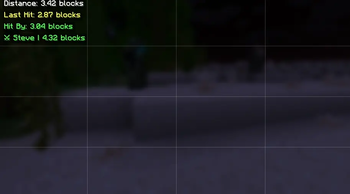
Displays the distance to the player you're currently looking at.
Examples:
Distance: 3.42 blocks
🎯 3.42
Target → 3.42 Blocks Away
⚔ Steve | 3.42
⚔ Last Hit Distance HUD
Shows the exact distance when you successfully hit another player.
Examples:
Last Hit: 3.12 blocks
⚔ Reach: 3.12
Hit Steve: 3.12b
☠ Hit-By Distance HUD
Shows the distance at which another player hit you.
Examples:
Hit By: 2.98 blocks
☠ Enemy Reach: 2.98
Steve hit you: 2.98b
👤 Opponent Tracker HUD
Tracks the most recent player you entered combat with and updates their distance in real time.
Examples:
⚔ Steve | 4.32 blocks
Tracking: Steve - 4.32
🎯 Steve: 4.32 blocks
🔥 Main Features
- 4 independent HUD modules
- Real-time distance updates
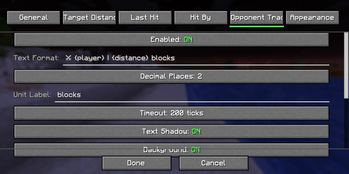
- Fully customizable text formatting
- Drag-and-drop HUD editor
- Per-module settings
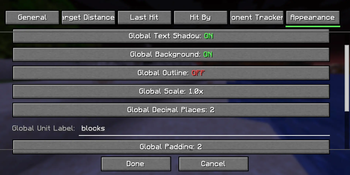
- Global appearance settings
- Unicode symbol support
- Emoji support
- Mod Menu integration
- Multi-language support
- Zero server installation required
- Client-side only
- Extremely lightweight
📝 Placeholder Support
Use placeholders anywhere in your HUD text.
| Placeholder | Description |
|---|---|
{distance} |
Distance value |
{player} |
Player name |
{unit} |
Unit label |
Example:
⚔ {player}: {distance} {unit}
Output:
⚔ Steve: 3.42 blocks
🎨 Customization
Every module supports:
Position
- X Offset
- Y Offset
- Anchor Selection
- Drag & Drop Placement
Appearance
- Text Color
- Background Color
- Outline Color
- Shadow Color
- Opacity
- Padding
- Scale
- Font Scale
Formatting
- Custom Text Templates
- Decimal Precision
- Unit Labels
- Visibility Options
⚙️ Commands
| Command | Description |
|---|---|
/combatdistance |
Mod information |
/combatdistance config |
Open config screen |
/combatdistance reload |
Reload config |
/combatdistance toggle |
Enable / disable mod |
/combatdistance reset |
Reset HUD positions |
/combatdistance resetall |
Reset all settings |
📥 Installation
Requirements
- Minecraft 1.21.9–1.21.11
- Fabric Loader 0.17.2+
- Fabric API
- Java 21+
Optional
- Mod Menu
Installation Steps
- Install Fabric Loader.
- Install Fabric API.
- Download Combat Distance HUD.
- Place the mod inside your
modsfolder. - Launch Minecraft.
📌 Supported Versions
| Version | Status |
|---|---|
| 1.21.9 | ✅ |
| 1.21.10 | ✅ |
| 1.21.11 | ✅ |
⚡ Performance
Designed to have virtually no FPS impact.
- CPU Usage: Negligible
- Memory Usage: < 2 MB
- Render Time: < 0.01ms/frame
- Safe for 500+ FPS clients
🔧 Compatibility
Works on:
- Vanilla Servers
- Fabric Servers
- Paper Servers
- Spigot Servers
- PvP Servers
- Minigame Servers
No server-side installation required.
❓ FAQ
- Does this work on servers?
Yes. The mod is entirely client-side and works on virtually any server.
- Is this allowed?
The mod only displays information already available to your client. Always follow individual server rules regarding client modifications.
- Can I move HUD elements?
Yes. Use the built-in HUD editor or configure positions manually.
- Can I use custom symbols?
Yes. Unicode symbols and emojis are supported.
- Does it affect performance?
No measurable impact during normal gameplay.
❤️ Credits
- Fabric Team
- Mojang
- TerraformersMC (Mod Menu)
📄 License
All Rights Reserved.
Combat Distance HUD — Know your reach, track your combat, dominate every fight. ⚔️
Available Versions
How to Install CombatDistanceHUD on Your Server
Order Server
Order a Minecraft Java server with at least 3 GB RAM (4 GB recommended).
Set fabric Loader
In the panel under "Egg", select the fabric loader and matching Minecraft version (1.21.11).
Install Mod
Open the mod browser in the dashboard and search for "CombatDistanceHUD". Click "Install" – done! Alternatively, upload the .jar via SFTP to the /mods folder.
Compatibility
Mod Loaders
Minecraft Versions
1.21.11, 1.21.10, 1.21.9
Server-side
✗ UnsupportedRecommended RAM
4 GB(min. 3 GB)Frequently Asked Questions
CombatDistanceHUD server crashes on startup – what to do?
Most common cause: wrong fabric version or insufficient RAM. Check the server log (latest.log) for "OutOfMemoryError" or "Mixin" errors. With Mado Hosting: ensure at least 3 GB RAM is allocated and the loader matches the mod version (1.21.11). You can switch loaders with one click in the panel.
Is CombatDistanceHUD compatible with fabric?
CombatDistanceHUD officially supports fabric for Minecraft 1.21.11, 1.21.10, 1.21.9. The Mado dashboard automatically detects incompatible loader combinations.
Server lagging with CombatDistanceHUD – how to optimize performance?
Recommended RAM: 4 GB (per 8 players). Use /spark profiler to check if CombatDistanceHUD consumes the most tick time. Common fixes: reduce server view-distance to 8-10, install "performant" or "starlight" as supplementary mods on Forge. With Mado Hosting, your server runs on NVMe SSDs with dedicated CPU cores for minimal latency.
Similar Mods






Rent Modded Server
Install CombatDistanceHUD with just one click on your server.