
Command GUI Buttons
A fabric mod can create custom command buttons on players' clients.
Screenshots
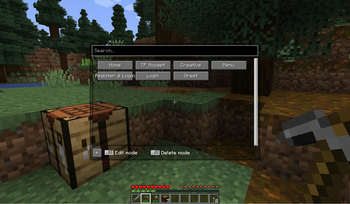
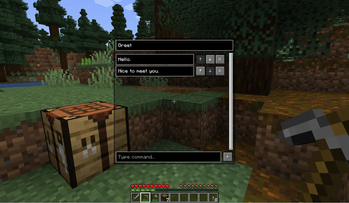
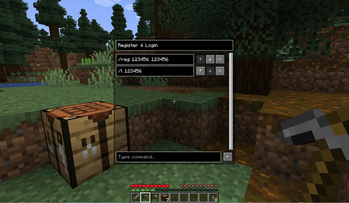
About this Mod
Command GUI Buttons
Remade from https://github.com/joseph-garcia/command-gui-buttons


Description
Command GUI Buttons is a fabric mod for Minecraft that allows users to create buttons on their clients
for preset chat messages, commands such as /warp home, or anything in the chat box.
Users can bring up this menu in-game with the key G, type in the button's Name and Command they want to
create, and press the button + to create. Then, the button will appear on users' screen for use whenever they want.
Dependencies
Dependencies
| Dependency | Type | Link |
|---|---|---|
| Fabric API | Required | CurseForge | Modrinth |
| LibGui | Required | GitHub | Maven(Not recommend) |
For your convenience, download links are listed below:
| Minecraft Version | Fabric API | LibGui (Please use the given version) |
|---|---|---|
| 1.16.5 | CurseForge | Modrinth | 3.4.0 GitHub |
| 1.17.1 | CurseForge | Modrinth | 4.2.3 GitHub |
| 1.18.2 | CurseForge | Modrinth | 5.4.2 GitHub |
| 1.19.2 | CurseForge | Modrinth | 6.4.0 GitHub |
| 1.19.3 | CurseForge | Modrinth | 6.5.3 GitHub |
| 1.19.4 | CurseForge | Modrinth | 7.1.1 GitHub |
| 1.20.6 | CurseForge | Modrinth | 10.0.0 GitHub |
| 1.21.1 | CurseForge | Modrinth | 11.1.0+1.21 GitHub |
| 1.21.5 | CurseForge | Modrinth | 13.1.0+1.21.5 GitHub |
| 1.21.8 | CurseForge | Modrinth | 14.0.0+1.21.6 GitHub |
| 1.21.10 | CurseForge | Modrinth | 15.0.0 GitHub |
| 1.21.11 | CurseForge | Modrinth | 15.0.0 GitHub |
Features
- Unlimited number of buttons
- Multiple commands or chat messages in one button
- Custom order execute commands or send messages
- Search for buttons (Case sensitive)


How to Use
- Bring up the menu in-game with the G key
- Type in the Name and Command you want to save into a button
- Press the
+button
How It Works
The list of commands are serialized into a JSON format and stored locally on the users’ systems. The mod writes any new
commands into the JSON as new buttons are created, and loads the JSON at the next start of the game.
Development
Support
Current main development for Minecraft version: 1.21.11
And use preprocess to be compatible with the following versions.
Note: We only accept the following versions of issues.
Please note that this information is time-sensitive and any version of the issue not listed here will be closed.
- Minecraft
1.16.5 - Minecraft
1.17.1 - Minecraft
1.18.2 - Minecraft
1.19.2 - Minecraft
1.19.3 - Minecraft
1.19.4 - Minecraft
1.20.6 - Minecraft
1.21.1 - Minecraft
1.21.5 - Minecraft
1.21.8 - Minecraft
1.21.10 - Minecraft
1.21.11
Mappings
We are using the Mojang official mappings to de-obfuscate Minecraft and insert patches.
Available Versions
How to Install Command GUI Buttons on Your Server
Order Server
Order a Minecraft Java server with at least 3 GB RAM (4 GB recommended).
Set fabric Loader
In the panel under "Egg", select the fabric loader and matching Minecraft version (1.21.11).
Install Mod
Open the mod browser in the dashboard and search for "Command GUI Buttons". Click "Install" – done! Alternatively, upload the .jar via SFTP to the /mods folder.
Compatibility
Mod Loaders
Minecraft Versions
1.21.11, 1.21.10, 1.21.9 (+29 more)
Server-side
✗ UnsupportedRecommended RAM
4 GB(min. 3 GB)Frequently Asked Questions
Command GUI Buttons server crashes on startup – what to do?
Most common cause: wrong fabric version or insufficient RAM. Check the server log (latest.log) for "OutOfMemoryError" or "Mixin" errors. With Mado Hosting: ensure at least 3 GB RAM is allocated and the loader matches the mod version (1.21.11). You can switch loaders with one click in the panel.
Is Command GUI Buttons compatible with fabric and quilt?
Command GUI Buttons officially supports fabric, quilt for Minecraft 1.21.11, 1.21.10, 1.21.9. The Mado dashboard automatically detects incompatible loader combinations.
Server lagging with Command GUI Buttons – how to optimize performance?
Recommended RAM: 4 GB (per 8 players). Use /spark profiler to check if Command GUI Buttons consumes the most tick time. Common fixes: reduce server view-distance to 8-10, install "performant" or "starlight" as supplementary mods on Forge. With Mado Hosting, your server runs on NVMe SSDs with dedicated CPU cores for minimal latency.
Similar Mods




![[ETF] Entity Texture Features](https://cdn.modrinth.com/data/BVzZfTc1/af683d206d50b05258d865b0d6e4aa2f2cee12f2_96.webp)
![[EMF] Entity Model Features](https://cdn.modrinth.com/data/4I1XuqiY/6e5bbd0d06b1741bfdab6c0cfab6de8fdaf0064c_96.webp)
Rent Modded Server
Install Command GUI Buttons with just one click on your server.