
Command Helper
This mod helps players who want to explore the versatility of Minecraft commands without reading long documentation.
Screenshots
About this Mod
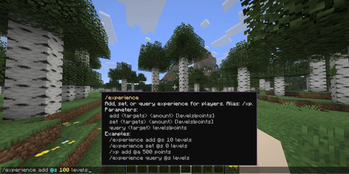
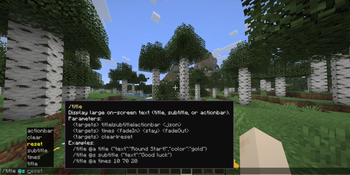
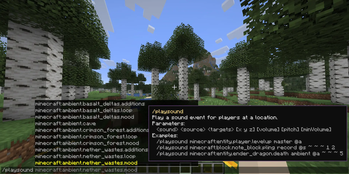
Explore Minecraft commands quickly and easily! Command Helper displays concise command information right in your HUD, helping you understand parameters and usage without reading long documentation.
Features
Hold Alt (or any key you set in Keybinds) to show a tooltip at your cursor, which displays information about the command you're trying to run. Info includes what the command will do and its parameters.
Ask the assistant
In the help window, you'll find an Ask Assistant button. By entering your own Gemini API key, you can chat directly with the AI in-game to get help with commands and parameters.
(Note: To use this feature, you must acknowledge the geolocational availability and agree to Google's Privacy Policy and Terms of Service).
Important Disclaimer
The AI features are powered by Google's Gemini 2.0 Flash model. To comply with the Minecraft EULA and standard platform guidelines, you must provide your own API key – we cannot bundle a shared or developer API key with the mod.
Privacy & Data Security: Your API key is stored safely on your local machine and is only used to communicate with Google's servers. When you use the assistant, only your written prompt, your current Minecraft version, and your local time/date are sent to Google to provide accurate context. Absolutely no data is collected by the mod creators, and nothing is shared with any other third parties.
Don't know how to get an API key?
Check the mod's website for more information.
Collaboration
Other developers can use Command Helper to display help information for their custom commands too. Visit the GitHub site for more information.
Available Versions
How to Install Command Helper on Your Server
Order Server
Order a Minecraft Java server with at least 3 GB RAM (4 GB recommended).
Set fabric Loader
In the panel under "Egg", select the fabric loader and matching Minecraft version (26.1.1).
Install Mod
Open the mod browser in the dashboard and search for "Command Helper". Click "Install" – done! Alternatively, upload the .jar via SFTP to the /mods folder.
Compatibility
Mod Loaders
Minecraft Versions
26.1.1, 26.1
Server-side
✗ UnsupportedRecommended RAM
4 GB(min. 3 GB)Frequently Asked Questions
Command Helper server crashes on startup – what to do?
Most common cause: wrong fabric version or insufficient RAM. Check the server log (latest.log) for "OutOfMemoryError" or "Mixin" errors. With Mado Hosting: ensure at least 3 GB RAM is allocated and the loader matches the mod version (26.1.1). You can switch loaders with one click in the panel.
Is Command Helper compatible with fabric?
Command Helper officially supports fabric for Minecraft 26.1.1, 26.1. The Mado dashboard automatically detects incompatible loader combinations.
Server lagging with Command Helper – how to optimize performance?
Recommended RAM: 4 GB (per 8 players). Use /spark profiler to check if Command Helper consumes the most tick time. Common fixes: reduce server view-distance to 8-10, install "performant" or "starlight" as supplementary mods on Forge. With Mado Hosting, your server runs on NVMe SSDs with dedicated CPU cores for minimal latency.
Similar Mods




![[ETF] Entity Texture Features](https://cdn.modrinth.com/data/BVzZfTc1/af683d206d50b05258d865b0d6e4aa2f2cee12f2_96.webp)
![[EMF] Entity Model Features](https://cdn.modrinth.com/data/4I1XuqiY/6e5bbd0d06b1741bfdab6c0cfab6de8fdaf0064c_96.webp)
Rent Modded Server
Install Command Helper with just one click on your server.