
Command Show Skin
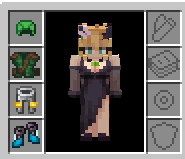
Command Show Skin — Hides armor visuals via commands while fully preserving protection, stats, and compatibility with player model mods.
Screenshots
About this Mod
🛡️ Command Show Skin
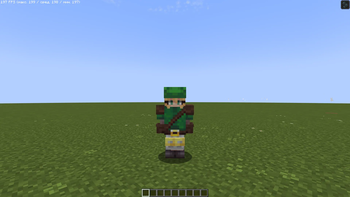
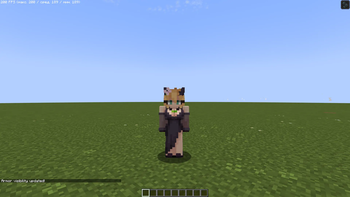
Ever wanted to show off your unique skin without sacrificing the protection of your diamond chestplate? Command Show Skin allows you to hide any piece of armor with a simple command while keeping all its stats, enchantments, and bonuses.
✨ Key Features
- Total Invisibility: Hide/Show your helmet, chestplate, leggings, or boots individually—or all at once.
- Keep Your Stats: Armor stays equipped and provides full protection even when visually hidden/shown.
- Global Sync: Your Hide/Show settings are instantly synced with other players—they see your skin, not your armor.
- Smart Compatibility: Featuring a "Render Guard" system, the mod correctly hides/shows armor even when using player model mods (like Female Gender Mod).
🎮 Commands
Manage your armor's visibility directly from the chat:
| Command | Description |
|---|---|
/showskin all off/on |
Hide/Show all armor |
/showskin head off/on |
Hide/Show helmet |
/showskin chest off/on |
Hide/Show chestplate |
/showskin legs off/on |
Hide/Show leggings |
/showskin feet off/on |
Hide/Show boots |
Available Versions
How to Install Command Show Skin on Your Server
Order Server
Order a Minecraft Java server with at least 3 GB RAM (4 GB recommended).
Set fabric Loader
In the panel under "Egg", select the fabric loader and matching Minecraft version (1.21.1).
Install Mod
Open the mod browser in the dashboard and search for "Command Show Skin". Click "Install" – done! Alternatively, upload the .jar via SFTP to the /mods folder.
Compatibility
Mod Loaders
Minecraft Versions
1.21.1
Server-side
✓ RequiredRecommended RAM
4 GB(min. 3 GB)Frequently Asked Questions
Command Show Skin server crashes on startup – what to do?
Most common cause: wrong fabric version or insufficient RAM. Check the server log (latest.log) for "OutOfMemoryError" or "Mixin" errors. With Mado Hosting: ensure at least 3 GB RAM is allocated and the loader matches the mod version (1.21.1). You can switch loaders with one click in the panel.
Is Command Show Skin compatible with fabric?
Command Show Skin officially supports fabric for Minecraft 1.21.1. The Mado dashboard automatically detects incompatible loader combinations.
Server lagging with Command Show Skin – how to optimize performance?
Recommended RAM: 4 GB (per 8 players). Use /spark profiler to check if Command Show Skin consumes the most tick time. Common fixes: reduce server view-distance to 8-10, install "performant" or "starlight" as supplementary mods on Forge. With Mado Hosting, your server runs on NVMe SSDs with dedicated CPU cores for minimal latency.
Similar Mods




Rent Modded Server
Install Command Show Skin with just one click on your server.