
CommandMod
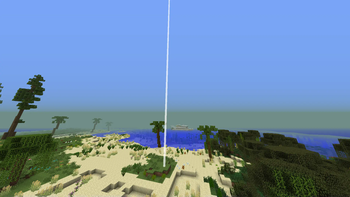
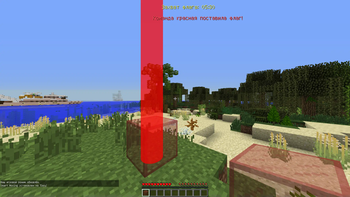
Mod that allow you to place the flag point on the coordinates and start prepare timer for the custom gamemods. You can play simple flag capture with colorful glass or what you want with this modification!
Screenshots
About this Mod
- Мод добавляет:
Ординарный флаг
- /flagpoint x y z //Задача координат флага для создания точки, в которой будут выполняться правила указанные ниже
- /flagpoint time
- /flagpoint prepare
Мульти-Флаг
- /mflagpoints <имя>
<цвет>(необязательно) //Создаёт флаг с радиусом сферой, которая работает по правилам ниже. - /mflagpoint radius <число>)(1-500 блоков) //Изменить радиус.
- /mflagpoint capturetime <секунды>(макс. 3000 секунд) //Изменяет время для таймеров всех флагов
- /mflaglist //Показать список флагов с названиями, координатами и цветами.
- /mflagpoint delete <имя> //Удалить флаг с этим именем.
- /mflagpoint <старое_имя> <новое_имя> //Изменить название флага
- Правила, которые задаёт мод
Общие правила
- У тебя нет возможности ставить никакие блоки на точку, которую ты указал с помощью flagpoint. При попытке будет выводится сообщение над полоской опыта.
- У тебя нет возможности ставить блоки прямо над точкой флага. При попытке будет выводится сообщение над полоской опыта.
- У тебя нет возможности ставить никакие блоки, включая стекло на точку flagpoint, пока идёт подготовка.
Правила для Мульти-флагов
- Сообщение об установке флага и таймер видны игрокам, находящимся в радиусе конкретного флага. Только сообщение о полном захвате транслируется всем игрокам на сервере.
ENGLISH LANGUAGE SUPPORT OFFICIALLY
- Mod adds:
Solo flagpoint
/flagpoint x y z //Task the flag coordinates to create a point where the rules specified below will be executed
/flagpoint time
/flagpoint prepare
Multi-Flag Point:
- /mflagpoints
(optionally) - /mflagpoint radius
)(1-500 blocks) //Change the radius In that radius player see
timer and messages about flagplaced and destroyed. - /mflagpoint capturetime
(max 3000 seconds) //Change the time for multiflag timers - /mflaglist //Show you list of actual flags that has a names, coordinates and colors of flags.
- /mflagpoint delete
//Delete flagpoint from that name. - /mflagpoint
- Ruless that the mod sets
1.You cannot place any blocks on the point you specified with flagpoint. If you try, a message will be displayed above the experience bar.
2. You cannot place blocks directly above the flagpoint. If you try, a message will be displayed above the experience bar.
3. You cannot place any blocks, including glass, on the flagpoint while the preparation is in progress.
Rules for Multi-Flags
- The flag planting message and timer are visible to players within range of the specific flag. Only the full capture message is broadcast to all players on the server.
Available Versions
How to Install CommandMod on Your Server
Order Server
Order a Minecraft Java server with at least 3 GB RAM (4 GB recommended).
Set forge Loader
In the panel under "Egg", select the forge loader and matching Minecraft version (1.7.10).
Install Mod
Open the mod browser in the dashboard and search for "CommandMod". Click "Install" – done! Alternatively, upload the .jar via SFTP to the /mods folder.
Compatibility
Mod Loaders
Minecraft Versions
1.7.10
Server-side
✓ RequiredRecommended RAM
4 GB(min. 3 GB)Frequently Asked Questions
CommandMod server crashes on startup – what to do?
Most common cause: wrong forge version or insufficient RAM. Check the server log (latest.log) for "OutOfMemoryError" or "Mixin" errors. With Mado Hosting: ensure at least 3 GB RAM is allocated and the loader matches the mod version (1.7.10). You can switch loaders with one click in the panel.
Is CommandMod compatible with forge?
CommandMod officially supports forge for Minecraft 1.7.10. The Mado dashboard automatically detects incompatible loader combinations.
Server lagging with CommandMod – how to optimize performance?
Recommended RAM: 4 GB (per 8 players). Use /spark profiler to check if CommandMod consumes the most tick time. Common fixes: reduce server view-distance to 8-10, install "performant" or "starlight" as supplementary mods on Forge. With Mado Hosting, your server runs on NVMe SSDs with dedicated CPU cores for minimal latency.
Similar Mods




Rent Modded Server
Install CommandMod with just one click on your server.