
Config-Cloud-Backuper
A simple Minecraft mod for backing up game configuration files, with configurable backup paths and WebDAV cloud backup support for both client and server usage.
Screenshots
About this Mod
Config Cloud Backuper
A simple Minecraft mod for backing up game configuration files, with configurable backup paths and WebDAV cloud backup support for both client and server usage.
Features
- Client + server command support — both sides can use commands; server also supports
/server_config_backuper ...(requires Fabric API) - Client-to-server upload — clients can upload local backups to server storage; files are saved per player and retention is configurable
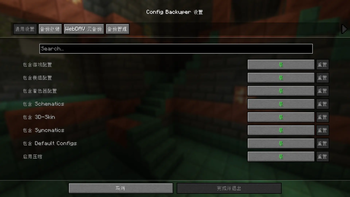
- Optional GUI — install ModMenu and Cloth Config API, then open settings from ModMenu
- Backup game configs, mod configs, shader configs, and more folders (see
config/config-cloud-backuper.json) - Backup compression and automatic old-backup cleanup
- WebDAV — auto upload after backup (if enabled), plus manual list/upload/download commands
- Security checks — client upload only accepts
.zipwith size limit and filename sanitization; server validates SHA-256 and writes audit logs
Requirements
- Minecraft 1.21.1
- Fabric Loader >=0.16.0
- Java 21+
- Fabric API (required for command registration)
- ModMenu (optional)
- Cloth Config API (optional, needed only for ModMenu GUI)
Commands (Client/Server)
Commands are grouped under: remote cloud / remote server.
Root command prefixes (kept for compatibility):
- Client:
/config_backuper - Server:
/config_backuperor/server_config_backuper(same functionality)
Note: The command prefix is intentionally kept for backward compatibility with existing scripts and habits. A cloud-style prefix can be introduced later in a major release with alias transition.
| Subcommand | Description |
|---|---|
backup |
Run local backup and clean old files exceeding maxBackups; if WebDAV auto-upload is enabled, upload the latest backup afterward |
list |
List local backup files matching configured prefix/suffix |
config reload |
Reload config-cloud-backuper.json from disk and refresh runtime instances |
config show |
Show current main config values |
config set <key> <value> |
Update and save main config (true/false etc. are supported for booleans) |
remote cloud status |
Show WebDAV config (password masked) |
remote cloud list |
List files in remote WebDAV directory |
remote cloud upload [file] |
Force upload local backup file (latest by default) to WebDAV; credentials are still required |
remote cloud download [file] |
Download remote file into local backup directory (latest by name by default) |
remote cloud set <field> <value> |
Write fields in config-cloud-backuper_webdav.json: enabled, serverUrl, username, password, remotePath |
remote server status |
(Client) Query server-side client-upload config |
remote server list |
(Client) Query current player's uploaded backups on server |
remote server upload [file] |
(Client) Upload local backup to server (latest by default) |
Running root command without subcommand prints brief help.
Server Examples
/server_config_backuper backup: run server backup/server_config_backuper list: list server local backups/server_config_backuper config show: show current server config/server_config_backuper remote server status: show client-upload config/server_config_backuper remote server list: show your uploaded backups (requires OP level > 2)/server_config_backuper remote server set folder ./configcloudbackuper-backups/client-uploads: set upload root folder/server_config_backuper remote server set maxPerPlayer 20: set max backups per player
Configuration
Main config: config/config-cloud-backuper.json
WebDAV config: config/config-cloud-backuper_webdav.json
You can also edit values with config / remote cloud / remote server commands above.
General and Backup Storage
Main fields include: includeGameConfigs, includeModConfigs, includeShaderPackConfigs, includeSchematics, include3dSkin, includeSyncmatics, includeDefaultConfigs, compressionEnabled, maxBackups, backupFolder, backupFilePrefix, backupFileSuffix.
Client Upload to Server (main config fields)
clientUploadToServerEnabled: allow client uploads to server (defaulttrue)clientUploadFolder: server storage root for uploaded backups (default./configcloudbackuper-backups/client-uploads)clientUploadMaxBackupsPerPlayer: max backups per player (-1means unlimited, default10)
Server storage structure:
<clientUploadFolder>/<playerName>/<backupFile>
WebDAV (config-cloud-backuper_webdav.json)
enabled— auto upload latest backup after local backup flowserverUrl,username,password,remotePath— server and path settings
WebDAV security behavior:
- Upload also writes checksum file:
<filename>.sha256 - Download reads
.sha256first, then verifies SHA-256 after download; mismatch deletes the file and returns error
Modpack Usage
You may freely include this mod in modpacks without requesting permission.
Development
Build
cd fabric
./gradlew build
For local client testing with ModMenu + Cloth GUI, this repo already includes Cloth via modLocalRuntime. You still need to add ModMenu in your run profile (or modRuntimeOnly).
Available Versions
How to Install Config-Cloud-Backuper on Your Server
Order Server
Order a Minecraft Java server with at least 3 GB RAM (4 GB recommended).
Set fabric Loader
In the panel under "Egg", select the fabric loader and matching Minecraft version (1.21.1).
Install Mod
Open the mod browser in the dashboard and search for "Config-Cloud-Backuper". Click "Install" – done! Alternatively, upload the .jar via SFTP to the /mods folder.
Compatibility
Mod Loaders
Minecraft Versions
1.21.1
Server-side
~ OptionalRecommended RAM
4 GB(min. 3 GB)Frequently Asked Questions
Config-Cloud-Backuper server crashes on startup – what to do?
Most common cause: wrong fabric version or insufficient RAM. Check the server log (latest.log) for "OutOfMemoryError" or "Mixin" errors. With Mado Hosting: ensure at least 3 GB RAM is allocated and the loader matches the mod version (1.21.1). You can switch loaders with one click in the panel.
Is Config-Cloud-Backuper compatible with fabric?
Config-Cloud-Backuper officially supports fabric for Minecraft 1.21.1. The Mado dashboard automatically detects incompatible loader combinations.
Server lagging with Config-Cloud-Backuper – how to optimize performance?
Recommended RAM: 4 GB (per 8 players). Use /spark profiler to check if Config-Cloud-Backuper consumes the most tick time. Common fixes: reduce server view-distance to 8-10, install "performant" or "starlight" as supplementary mods on Forge. With Mado Hosting, your server runs on NVMe SSDs with dedicated CPU cores for minimal latency.
Similar Mods




![[ETF] Entity Texture Features](https://cdn.modrinth.com/data/BVzZfTc1/af683d206d50b05258d865b0d6e4aa2f2cee12f2_96.webp)
![[EMF] Entity Model Features](https://cdn.modrinth.com/data/4I1XuqiY/6e5bbd0d06b1741bfdab6c0cfab6de8fdaf0064c_96.webp)
Rent Modded Server
Install Config-Cloud-Backuper with just one click on your server.