
config-editor-render
a improvement for modmenu, supports modmenu, make you can just edit the configure file like text editor, this mod on join reduces lag
Screenshots


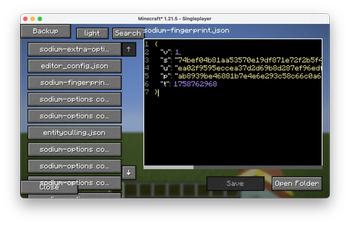


About this Mod
Config Editor
Edit your mod config files without ever leaving the game.
Config Editor is a Fabric client-side mod that gives you a full-featured text editor, a visual JSON editor, an AI assistant, and a block info overlay — all accessible with a keybind while you play.
Features
📝 In-Game Config Editor
Open any config file from your .minecraft/config folder directly inside the game. No more alt-tabbing to Notepad or VS Code.
- Syntax highlighting for JSON, TOML, YAML, Properties, CFG, and plain text
- Line numbers, horizontal and vertical scrollbars
- Find & Replace (Ctrl+F) with previous/next navigation
- Auto-save with file locking — retries up to 3 times if the file is busy
- Unsaved-changes warning when you try to close
- Backup button to snapshot your entire config directory before editing
- Open Folder button to reveal the config directory in your file manager
- Dark / Light / Auto theme with a toggle button
🖱️ Visual JSON Editor
Switch to a point-and-click interface for JSON files. No need to remember syntax.
- Add, rename, delete, and reorder fields
- Change value types (String / Number / Boolean / Null / Object) with one click
- Nested object support with expand/collapse
- Scroll through large files with up/down buttons
🤖 AI Chat Assistant (requires Ollama)
Ask an AI about your config files without leaving the game.
- Loads a file or entire folder into the conversation with one click
- Uses a local Ollama server (default:
localhost:11434, model:tinyllama) - Server availability check on open — shows a clear offline message if Ollama is not running
- Scrollable chat history
� Block Info Overlay
A Jade/WTHIT-style HUD element shown at the top of the screen while you play.
- Displays the block name and registry ID (e.g.
minecraft:stone) of whatever your crosshair is pointing at - Shows the block's item icon next to the name
- Semi-transparent background with a clean border
- Only visible in-game — disappears when any screen is open
- Fully toggleable via the config file (
show_block_overlay)
📦 NBT Viewer
Point your crosshair at a block entity or entity and press the NBT key to open a viewer showing its NBT data as formatted JSON. Save it to saved_nbt/ with a custom filename.
🔌 Plugin API
Other mods can extend the editor by implementing the ApiEntrypoint interface. Built-in plugins include:
| Plugin | What it does |
|---|---|
| Undo/Redo | Tracks edit history |
| Text Stats | Shows character, word, and line count |
| Date/Time Display | Shows the current time in the editor toolbar |
| Auto Bracket Completion | Automatically closes (, [, {, " |
Manage which plugins are active from the Plugins button inside the editor.
⚡ Performance Optimisations
- GC hint on world join/leave — triggers a garbage collection pass before the new world starts allocating memory, reducing the RAM spike that causes join-world lag. Frees hundreds of MB in practice.
- Particle clear on level set — drops stale particle objects from the old world before the new one loads.
- Config is read from disk at most once every 2 seconds, not on every frame or keystroke.
Installation
- Install Fabric Loader and Fabric API
- Drop
config_editor-*.jarinto yourmods/folder - Launch the game
Requirements:
- Minecraft
26.1 - Fabric Loader
≥ 0.18.2 - Fabric API
- Java
≥ 21
The AI Chat feature additionally requires Ollama running locally with a model pulled (e.g. ollama pull tinyllama).
Usage
All three keybinds are unbound by default. Assign them in Options → Controls → Gameplay.
| Keybind | Action |
|---|---|
| Open Editor | Opens the config file editor |
| Open AI Chat | Opens the AI chat assistant |
| NBT Display | Opens the NBT viewer for the targeted block/entity |
Config File
The mod's own settings are stored at .minecraft/config/editor_config.json and are editable both in-game and with any text editor.
{
  "readonly_mode": false,
  "hint": true,
  "theme": "DARK",
  "doRenderBackground": false,
  "doSuggestions": true,
  "show_block_overlay": true
}
| Key | Type | Default | Description |
|---|---|---|---|
readonly_mode |
boolean | false |
Prevent editing files (view-only mode) |
hint |
boolean | true |
Auto-close brackets and quotes |
theme |
string | "DARK" |
Editor theme: DARK, LIGHT, or AUTO |
doRenderBackground |
boolean | false |
Draw a themed background behind the editor |
doSuggestions |
boolean | true |
Show autocomplete suggestions while typing |
show_block_overlay |
boolean | true |
Show the block info HUD overlay |
For Mod Developers — Plugin API
You can add custom behaviour to the editor by implementing ApiEntrypoint and registering it via the Fabric entrypoint system in your fabric.mod.json:
"entrypoints": {
  "config_editor": [
    "com.example.yourmod.YourEditorPlugin"
  ]
}
public class YourEditorPlugin implements ApiEntrypoint {
    @Override
    public void init() { }

    @Override
    public void renderButton(GuiGraphicsExtractor context, int mouseX, int mouseY, float delta) {
        // Draw custom HUD elements over the editor
    }

    @Override
    public InteractionResult onType(int keyCode, int scanCode, int modifiers) {
        // Intercept keystrokes — return FAIL to consume the event
        return InteractionResult.PASS;
    }
}
Links
License
Available Versions
How to Install config-editor-render on Your Server
Order Server
Order a Minecraft Java server with at least 3 GB RAM (4 GB recommended).
Set fabric Loader
In the panel under "Egg", select the fabric loader and matching Minecraft version (26.1.2).
Install Mod
Open the mod browser in the dashboard and search for "config-editor-render". Click "Install" – done! Alternatively, upload the .jar via SFTP to the /mods folder.
Compatibility
Mod Loaders
Minecraft Versions
26.1.2, 26.1.1, 26.1 (+19 more)
Server-side
✗ UnsupportedRecommended RAM
4 GB(min. 3 GB)Frequently Asked Questions
config-editor-render server crashes on startup – what to do?
Most common cause: wrong fabric version or insufficient RAM. Check the server log (latest.log) for "OutOfMemoryError" or "Mixin" errors. With Mado Hosting: ensure at least 3 GB RAM is allocated and the loader matches the mod version (26.1.2). You can switch loaders with one click in the panel.
Is config-editor-render compatible with fabric and neoforge?
config-editor-render officially supports fabric, neoforge for Minecraft 26.1.2, 26.1.1, 26.1. The Mado dashboard automatically detects incompatible loader combinations.
Server lagging with config-editor-render – how to optimize performance?
Recommended RAM: 4 GB (per 8 players). Use /spark profiler to check if config-editor-render consumes the most tick time. Common fixes: reduce server view-distance to 8-10, install "performant" or "starlight" as supplementary mods on Forge. With Mado Hosting, your server runs on NVMe SSDs with dedicated CPU cores for minimal latency.
Similar Mods




Rent Modded Server
Install config-editor-render with just one click on your server.