
Configurable Zombie AI
A simple mod written in Kotlin that gives server admins several options to customize the vanilla zombie AI including with some brand new AI features. Also works on the Pure Titans from SNC!
Screenshots
About this Mod
Configurable Zombie AI
Configurable Zombie AI is a Minecraft Forge mod for 1.16.5 that makes vanilla zombies easier to tune for harder survival servers and modpacks.
Instead of hardcoding one zombie behavior profile, the mod exposes runtime commands for server operators so they can change how zombies detect, acquire, keep, and switch targets without restarting the world. Settings are stored with the world and apply to loaded zombies immediately.
What It Does
- Changes zombie follow range (configurable).
- Optionally lets zombies ignore line of sight checks.
- Optionally prevents zombies from despawning naturally.
- Replaces vanilla "pick the nearest valid target" behavior with configurable target acquisition.
- Optionally lets zombies re-evaluate and switch targets over time using weighted rules.
- Adds easy-to-use admin commands to kill zombies globally or within a radius.
- Works on both zombies, zombie villagers, and Pure Titans from the SNC Datapack.
The mod keeps vanilla target families intact. A zombie can still only target the kinds of entities vanilla would normally allow, but the selection logic inside those target pools becomes configurable.
Compatibility
- Minecraft:
1.16.5 - Forge:
36.xor newer in the1.16.5line - Language/runtime: Kotlin via KotlinForForge
- Implementation details: Sponge Mixin injections plus Kotlin runtime logic
- NOT compatible with the Zombies Ignore LOS and the Zombies Apocalyptic AI mods. Both of which this mod was written to replace.
How Configuration Works
- All settings are changed in-game through commands.
- Command roots:
czaiandconfigurablezombieai - Permission level: operator level
2 - Settings are saved in world data, so they persist across restarts.
- When settings change, loaded zombies are refreshed immediately.
Command Reference
Examples below use the short root command, but every command also works with configurablezombieai instead of czai.
Core Commands
| Command | Description |
|---|---|
czai enable |
Enables all mod behavior. |
czai disable |
Disables all mod behavior and restores vanilla follow range for loaded zombies. |
czai status |
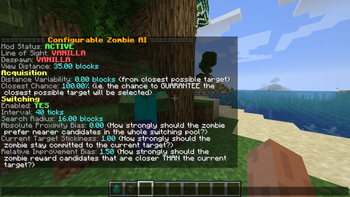
Prints the current live configuration. |
czai ignore_LOS <true |
false> |
czai despawn_prevention <true |
false> |
czai visibility_range <blocks> |
Sets the zombie follow range / detection distance. |
Acquisition Tuning
These settings affect how a zombie picks an initial target after vanilla has already decided that a target goal may run.
| Command | Description |
|---|---|
czai acquisition distance_variability_from_closest_target <blocks> |
Expands the initial candidate pool beyond the closest target by the given distance. |
czai acquisition chance_to_auto-select_closest_target <percent> |
Chance to guarantee the closest available target is chosen. At 100, the closest target always wins. At 0, any candidate in the acquisition pool may be chosen. |
Switching Tuning
Switching is off by default. When enabled, zombies periodically re-roll their target inside the same target family as the current one.
| Command | Description |
|---|---|
czai switching enabled <true |
false> |
czai switching interval <ticks> |
How often each zombie evaluates target switching. |
czai switching search_radius <blocks> |
Radius used to collect alternative targets for switching. |
czai switching proximity_bias <value> |
Positive values favor nearer candidates; negative values favor farther ones. |
czai switching current_target_bias <value> |
Positive values make the zombie more likely to stay on its current target. |
czai switching closer_than_current_target_bias <value> |
Positive values reward candidates that are closer than the current target. |
Utility Commands
Note: You need level 2 permissions (OP) to use these commands.
| Command | Description |
|---|---|
czai kill all |
Kills all loaded zombies across every loaded dimension. |
czai kill radius <blocks> |
Kills zombies within a radius of the executing player. |
Default Values
| Setting | Default |
|---|---|
| Mod enabled | true |
| Ignore line of sight | false |
| Prevent despawn | false |
| Visibility range | 35.0 blocks |
| Acquisition distance variability | 0.0 blocks |
| Chance to auto-select closest target | 100.0% |
| Switching enabled | false |
| Switching interval | 40 ticks |
| Switching search radius | 16.0 blocks |
| Switching proximity bias | 0.0 |
| Switching current target bias | 1.0 |
| Switching closer-than-current-target bias | 1.5 |
Targeting Notes
- Acquisition still respects vanilla target categories such as players, villagers, iron golems, and baby turtles on land.
- Switching does not jump between target families. If a zombie is currently chasing a villager, it will only compare that villager against other villager candidates during a switching pass.
- Line-of-sight bypass still respects attack validity checks and the configured visibility range.
Available Versions
How to Install Configurable Zombie AI on Your Server
Order Server
Order a Minecraft Java server with at least 3 GB RAM (4 GB recommended).
Set forge Loader
In the panel under "Egg", select the forge loader and matching Minecraft version (1.16.5).
Install Mod
Open the mod browser in the dashboard and search for "Configurable Zombie AI". Click "Install" – done! Alternatively, upload the .jar via SFTP to the /mods folder.
Compatibility
Mod Loaders
Minecraft Versions
1.16.5
Server-side
✓ RequiredRecommended RAM
4 GB(min. 3 GB)Frequently Asked Questions
Configurable Zombie AI server crashes on startup – what to do?
Most common cause: wrong forge version or insufficient RAM. Check the server log (latest.log) for "OutOfMemoryError" or "Mixin" errors. With Mado Hosting: ensure at least 3 GB RAM is allocated and the loader matches the mod version (1.16.5). You can switch loaders with one click in the panel.
Is Configurable Zombie AI compatible with forge?
Configurable Zombie AI officially supports forge for Minecraft 1.16.5. The Mado dashboard automatically detects incompatible loader combinations.
Server lagging with Configurable Zombie AI – how to optimize performance?
Recommended RAM: 4 GB (per 8 players). Use /spark profiler to check if Configurable Zombie AI consumes the most tick time. Common fixes: reduce server view-distance to 8-10, install "performant" or "starlight" as supplementary mods on Forge. With Mado Hosting, your server runs on NVMe SSDs with dedicated CPU cores for minimal latency.
Similar Mods




Rent Modded Server
Install Configurable Zombie AI with just one click on your server.