
Controlify Wynn
Use in addition to Controlify and Wynntils to improve your controller experience when playing Wynncraft
Screenshots
About this Mod
Have you ever wondered what it would be like to play Wynncraft with a controller?
Controllify Wynn aims to make it easy to play Wynncraft with a controller.
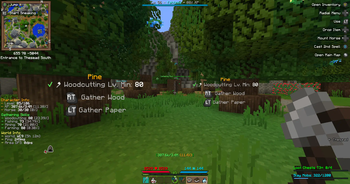
It not only adds Controlify compatability to Wynntils, but also adds some other nice-to-haves such as additional keybinds (such as a quick Blacksmith sell or Identify) and visual guides (such as the Gathering keybind guide).
Full Feature List
- Controlify/Wynntils compatability:
- Allow binding Wynntils keybinds with Controlify (Such as spell casting, horse mousing, ect)
- Enable better Wynntils GUI navigation with controllers
- New keybinds to help with controller usage:
- Identify/Sell/Scrap items (inside Identifer/Blacksmith GUI) - GUI Abstract Action 1
- Page/Scroll navigation using bumpers (inside Trade Market/Bank/Ability Tree/Default Quest Book)
- Contoller gathering button guide
- Better Wynncraft GUI navigation (dont snap the cursor to invisible GUI elements)
Mod Dependencies/Requirements
- Minecraft:
1.20.2(Required for Wynntils) - Fabric API
- Wynntils
- Controlify
Suggested Configuration
Through playing Wynncraft with an Xbox controller, this is the configuration that works for me (and is by no means a requrement, you do you!).
- Movement: Controlify defaults
- Gameplay:
- Drop Item/Stack: Unbound
- Change Perspective: Unbound
- Pick Block: Unbound
- Inventory:
- Drop Item: Unbound
- Swap Hands: Unbound
- Miscellaneous: Controlify defaults
- GUI: Controlify defaults
- Radial Menu:
- Binds:
- Drop Item
- Open Quest Book
- Toggle Gammabright
- Open Main Menu
- Open Main Map
- Cast Spells/Custom Keybinds
- Binds:
- Virtual Mouse:
- Toggle Virtual Mouse: Unbound
- Wynntils:
- Mount Horse: DPad Left
- Cast 1st Spell: X
- Open Main Map: Share Button
WIP/Upcomming Features
- Improved Wynntils GUI navigation
- Improved Wynncraft GUI navigation and usage
- Allow dialogue option selection (possibly through a radial menu)
License
Controlify Wynn is licensed under the license GNU Lesser General Public License v3.0
Available Versions
How to Install Controlify Wynn on Your Server
Order Server
Order a Minecraft Java server with at least 3 GB RAM (4 GB recommended).
Set fabric Loader
In the panel under "Egg", select the fabric loader and matching Minecraft version (1.20.2).
Install Mod
Open the mod browser in the dashboard and search for "Controlify Wynn". Click "Install" – done! Alternatively, upload the .jar via SFTP to the /mods folder.
Compatibility
Mod Loaders
Minecraft Versions
1.20.2
Server-side
✗ UnsupportedRecommended RAM
4 GB(min. 3 GB)Frequently Asked Questions
Controlify Wynn server crashes on startup – what to do?
Most common cause: wrong fabric version or insufficient RAM. Check the server log (latest.log) for "OutOfMemoryError" or "Mixin" errors. With Mado Hosting: ensure at least 3 GB RAM is allocated and the loader matches the mod version (1.20.2). You can switch loaders with one click in the panel.
Is Controlify Wynn compatible with fabric?
Controlify Wynn officially supports fabric for Minecraft 1.20.2. The Mado dashboard automatically detects incompatible loader combinations.
Server lagging with Controlify Wynn – how to optimize performance?
Recommended RAM: 4 GB (per 8 players). Use /spark profiler to check if Controlify Wynn consumes the most tick time. Common fixes: reduce server view-distance to 8-10, install "performant" or "starlight" as supplementary mods on Forge. With Mado Hosting, your server runs on NVMe SSDs with dedicated CPU cores for minimal latency.
Similar Mods




![[ETF] Entity Texture Features](https://cdn.modrinth.com/data/BVzZfTc1/af683d206d50b05258d865b0d6e4aa2f2cee12f2_96.webp)
![[EMF] Entity Model Features](https://cdn.modrinth.com/data/4I1XuqiY/6e5bbd0d06b1741bfdab6c0cfab6de8fdaf0064c_96.webp)
Rent Modded Server
Install Controlify Wynn with just one click on your server.