
Convenient survival
A mod that adds convenient features that allow you to get materials normally obtained through mobs in a safer way
Screenshots
About this Mod
This mod tries to implement features like custom ores and items to make the game more convenient, especially for players who don't want to fight many mobs or peaceful mode players.
for now the mod implements:
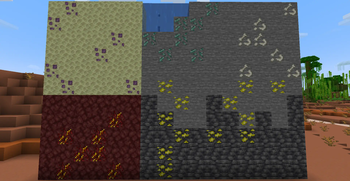
prismarine ore = the prismarine ore can be found from y40 to y10 in all ocean biomes, it can be mined with a stone pickaxe and drops prismarine shards.
bones ore = the bones ore can be found anywhere in the overworld from y64 to y0, it can be mined with a stone pickaxe and drops bones.
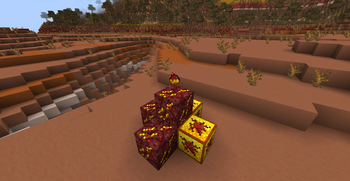
blazing netherrack = blazing netherrack can be found anywhere in the nether from y100 to y0, it can be mined with a stone pickaxe and drops blazing coal.
blazing coal = blazing coal is an item that can be used as fuel to smelt 6 items, or crafted into blaze powder.
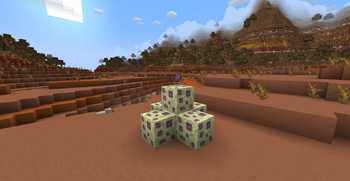
ender calcite ore = the ender calcite ore can be found anywhere in the outher end islands from y120 to y0, it can be mined with an iron pickaxe and drops ender calcite.
ender calcite = ender calcite is an item that can be used to craft a shulker shell using 3 ender calcite and 2 popped chorus fruit in an helmet shape.
trident recipe = tridents can now be crafted with 2 diamonds, 1 heart of the sea and 2 prismarine shards.
blazing coal block = a block of blazing coal, crafted from 9 blazing coal, it can smelt 9 times the amout of items a blazing coal item can.
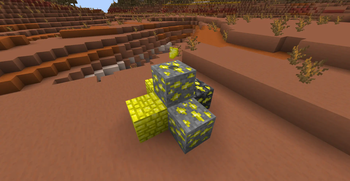
sulfur = sulfur is an item dropped by the sulfur ore and the deepslate sulfur ore, it can be used as fuel smelting 8 items or crafted with coal and charcoal into gunpowder.
sulfur ore = sulfur ore is an ore that can be found between y54 and y0, it can be mined with a stone pickaxe and drops sulfur.
deepslate sulfur ore = deepslate sulfur ore is an ore that can be found between y0 and y-32, it can be mined with a stone pickaxe and drops sulfur.
sulfur block = a block of sulfur, crafted from 9 sulfur, it can smelt 9 times the amout of items a sulfur item can.
Curseforge version at : https://www.curseforge.com/minecraft/mc-mods/convenient-survival
Available Versions
How to Install Convenient survival on Your Server
Order Server
Order a Minecraft Java server with at least 4 GB RAM (6 GB recommended).
Set fabric Loader
In the panel under "Egg", select the fabric loader and matching Minecraft version (1.20.1).
Install Mod
Open the mod browser in the dashboard and search for "Convenient survival". Click "Install" – done! Alternatively, upload the .jar via SFTP to the /mods folder.
Compatibility
Mod Loaders
Minecraft Versions
1.20.1, 1.20, 1.19.4
Server-side
✓ RequiredRecommended RAM
6 GB(min. 4 GB)Frequently Asked Questions
Convenient survival server crashes on startup – what to do?
Most common cause: wrong fabric version or insufficient RAM. Check the server log (latest.log) for "OutOfMemoryError" or "Mixin" errors. With Mado Hosting: ensure at least 4 GB RAM is allocated and the loader matches the mod version (1.20.1). You can switch loaders with one click in the panel.
Is Convenient survival compatible with fabric?
Convenient survival officially supports fabric for Minecraft 1.20.1, 1.20, 1.19.4. The Mado dashboard automatically detects incompatible loader combinations.
Server lagging with Convenient survival – how to optimize performance?
Recommended RAM: 6 GB (per 5 players). Use /spark profiler to check if Convenient survival consumes the most tick time. Common fixes: reduce server view-distance to 8-10, install "performant" or "starlight" as supplementary mods on Forge. With Mado Hosting, your server runs on NVMe SSDs with dedicated CPU cores for minimal latency.
Similar Mods




![[ETF] Entity Texture Features](https://cdn.modrinth.com/data/BVzZfTc1/af683d206d50b05258d865b0d6e4aa2f2cee12f2_96.webp)
![[EMF] Entity Model Features](https://cdn.modrinth.com/data/4I1XuqiY/6e5bbd0d06b1741bfdab6c0cfab6de8fdaf0064c_96.webp)
Rent Modded Server
Install Convenient survival with just one click on your server.