
Coordinate Manager
Capture, organize, and manage coordinates with more controls.
Screenshots
About this Mod
Coordinate Manager
A Fabric-based Minecraft mod for capturing, organizing, and managing coordinates.
Features
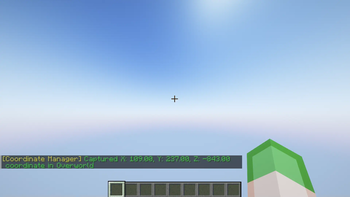
- Capture Modes:
- Instant: Save coordinate immediately without prompts.
- Pop-up: Show a dialog to set a name and adjust coordinate values before saving.
- Capture Cooldown: Prevent spam by setting a cooldown (below
250msdisables it). - Coordinate Thumbnail: Save a thumbnail of your current view when capturing a coordinate (disabled by default).
- Precise Coordinates: Saves coordinate values as decimals for accuracy (disabled by default).
- Auto-Copy on Capture: Automatically copies the saved coordinates to the clipboard when capturing a coordinate (disabled by default).
- System-Aware Copy: Formats copied coordinates according to the system's locale settings (disabled by default).
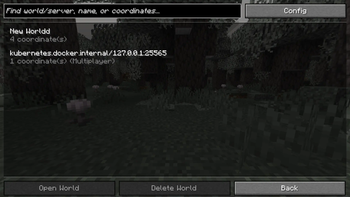
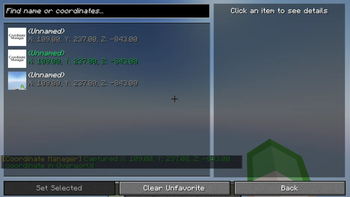
- Coordinate History Screen: View, copy, edit, and manage saved coordinates in-game.
- Copy Coordinates: Copy any coordinate entry to clipboard for easy sharing.
- Set Favorited Coordinates: Protect favorited coordinates from accidental deletion.
- Search Functionality: Find saved coordinates by name or coordinate values.
- Bulk Actions:
- Favorite: Toggle favorite status for multiple entries.
- Delete: Remove multiple selected coordinates at once.
- Delete Options:
- Delete Individual Coordinates: Remove specific entries.
- Clear World/Server Coordinates: Delete all unfavorited coordinates from the current world or server.
Keybindings
Customizable via the in-game controls menu.
- Capture Coordinate:
[F9]Save the current position. - Open History:
[F10]Open coordinate history screen.
Configuration
Configurable via Cloth Config API with Mod Menu.
| Setting | Description | Default |
|---|---|---|
| Capture Mode | Determines whether coordinates are saved instantly or with a pop-up for editing. | Instant |
| Enable Thumbnail | Captures a thumbnail when saving a coordinate. | Disabled |
| Auto-Copy on Capture | Automatically copies the saved coordinates to the clipboard upon capture. | Disabled |
| System-Aware Copy | Formats copied coordinates according to the system's locale settings. | Disabled |
| Capture Cooldown | Adds a delay between captures to prevent spam (set below 250ms to disable). | 250ms |
| Precise Coordinate | Saves coordinates with decimal accuracy for better precision. | Disabled |
Available Versions
How to Install Coordinate Manager on Your Server
Order Server
Order a Minecraft Java server with at least 3 GB RAM (4 GB recommended).
Set fabric Loader
In the panel under "Egg", select the fabric loader and matching Minecraft version (26.1.2).
Install Mod
Open the mod browser in the dashboard and search for "Coordinate Manager". Click "Install" – done! Alternatively, upload the .jar via SFTP to the /mods folder.
Compatibility
Mod Loaders
Minecraft Versions
26.1.2, 26.1.1, 26.1 (+8 more)
Server-side
✗ UnsupportedRecommended RAM
4 GB(min. 3 GB)Frequently Asked Questions
Coordinate Manager server crashes on startup – what to do?
Most common cause: wrong fabric version or insufficient RAM. Check the server log (latest.log) for "OutOfMemoryError" or "Mixin" errors. With Mado Hosting: ensure at least 3 GB RAM is allocated and the loader matches the mod version (26.1.2). You can switch loaders with one click in the panel.
Is Coordinate Manager compatible with fabric?
Coordinate Manager officially supports fabric for Minecraft 26.1.2, 26.1.1, 26.1. The Mado dashboard automatically detects incompatible loader combinations.
Server lagging with Coordinate Manager – how to optimize performance?
Recommended RAM: 4 GB (per 8 players). Use /spark profiler to check if Coordinate Manager consumes the most tick time. Common fixes: reduce server view-distance to 8-10, install "performant" or "starlight" as supplementary mods on Forge. With Mado Hosting, your server runs on NVMe SSDs with dedicated CPU cores for minimal latency.
Similar Mods




![[ETF] Entity Texture Features](https://cdn.modrinth.com/data/BVzZfTc1/af683d206d50b05258d865b0d6e4aa2f2cee12f2_96.webp)
![[EMF] Entity Model Features](https://cdn.modrinth.com/data/4I1XuqiY/6e5bbd0d06b1741bfdab6c0cfab6de8fdaf0064c_96.webp)
Rent Modded Server
Install Coordinate Manager with just one click on your server.