
CoordsOnScreen
A lightweight, client-side coordinate HUD. Displays your current location alongside color-coded, real-time conversions for the Nether/Overworld. Fully customizable position, padding, and toggles via Cloth Config.
Screenshots
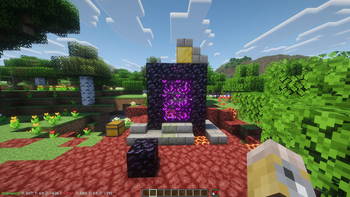
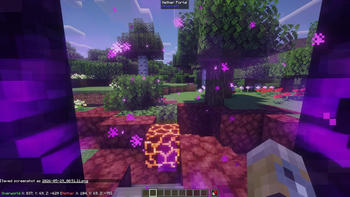
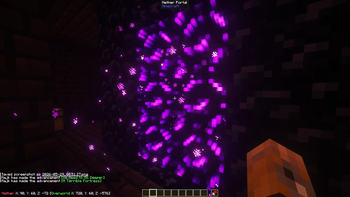
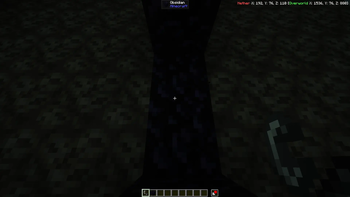
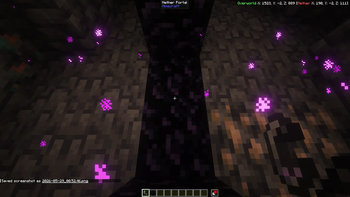
About this Mod
CoordsOnScreen
CoordsOnScreen is a lightweight, client-side Fabric mod that adds a clean, highly customizable coordinate and environment display directly to your HUD. Perfect for Nether portal calculations or just keeping track of your location without opening the bulky F3 debug screen.
✨ Features
- Dual-Dimension Tracking: Shows your current coordinates and automatically calculates the equivalent coordinates for the connecting dimension in brackets (Overworld ↔ Nether).
- Color-Coded Labels: Visually distinguish dimensions at a glance:
- Overworld (Green)
- Nether (Red)
- The End (Purple)
- Biome Display: Your current biome on its own line, colored to fit the biome — oceans in blues and teals, beaches sandy, deserts tan, jungles vivid green, swamps murky, and so on. Prefer plain text? The biome coloring can be toggled off. (Hidden in the End, which is effectively a single biome.)
- Structure Display: Shows the structure you're currently standing in — Stronghold, Ancient City, Ocean Monument, and more — in gold. (Singleplayer only: servers don't send structure data to the client.)
- Smart Line Ordering: The biome and structure lines stack below your coordinates when the HUD is at the top of the screen, and above them when it's at the bottom — so your coordinates always stay nearest the edge.
- Modded-Content Friendly: Modded biomes and structures show clean, readable names (and honor their own translations when provided); modded water biomes are colored appropriately instead of defaulting to green.
- Fully Configurable — Two Ways:
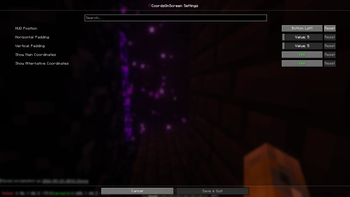
- In-Game Screen (optional, via Cloth Config + ModMenu): a friendly settings menu.
- Config File: every option is editable by hand in
config/coordsonscreen.json— no extra mods needed.
- Configuration Options:
- Screen Positioning: Snap the display to any of the 4 corners (Top-Left, Top-Right, Bottom-Left, Bottom-Right).
- Independent Text Size: Scale the readout from 50% to 300%, independent of Minecraft's GUI Scale — it stays the same on-screen size no matter your GUI Scale setting.
- Smart Padding: Custom X and Y pixel offsets so the text never awkwardly hugs the edge of your monitor or clips with other mods.
- Independent Toggles: Turn the main coordinates, bracketed conversions, biome display, biome coloring, and structure display on/off individually.
🛠️ Requirements
- Fabric Loader & Fabric API
Optional:
- Cloth Config API & Mod Menu — only needed for the in-game settings screen. Without them, the mod runs fine and is fully configurable via its config file.
This is a client-side mod. You do not need to install it on servers to use it.
Available Versions
How to Install CoordsOnScreen on Your Server
Order Server
Order a Minecraft Java server with at least 3 GB RAM (4 GB recommended).
Set fabric Loader
In the panel under "Egg", select the fabric loader and matching Minecraft version (26.2).
Install Mod
Open the mod browser in the dashboard and search for "CoordsOnScreen". Click "Install" – done! Alternatively, upload the .jar via SFTP to the /mods folder.
Compatibility
Mod Loaders
Minecraft Versions
26.2, 26.1.2
Server-side
✗ UnsupportedRecommended RAM
4 GB(min. 3 GB)Frequently Asked Questions
CoordsOnScreen server crashes on startup – what to do?
Most common cause: wrong fabric version or insufficient RAM. Check the server log (latest.log) for "OutOfMemoryError" or "Mixin" errors. With Mado Hosting: ensure at least 3 GB RAM is allocated and the loader matches the mod version (26.2). You can switch loaders with one click in the panel.
Is CoordsOnScreen compatible with fabric?
CoordsOnScreen officially supports fabric for Minecraft 26.2, 26.1.2. The Mado dashboard automatically detects incompatible loader combinations.
Server lagging with CoordsOnScreen – how to optimize performance?
Recommended RAM: 4 GB (per 8 players). Use /spark profiler to check if CoordsOnScreen consumes the most tick time. Common fixes: reduce server view-distance to 8-10, install "performant" or "starlight" as supplementary mods on Forge. With Mado Hosting, your server runs on NVMe SSDs with dedicated CPU cores for minimal latency.
Similar Mods




![[ETF] Entity Texture Features](https://cdn.modrinth.com/data/BVzZfTc1/af683d206d50b05258d865b0d6e4aa2f2cee12f2_96.webp)
![[EMF] Entity Model Features](https://cdn.modrinth.com/data/4I1XuqiY/6e5bbd0d06b1741bfdab6c0cfab6de8fdaf0064c_96.webp)
Rent Modded Server
Install CoordsOnScreen with just one click on your server.