
Copying Table
Duplicate enchanted books using a copying table.
Screenshots
About this Mod
The Copying Table
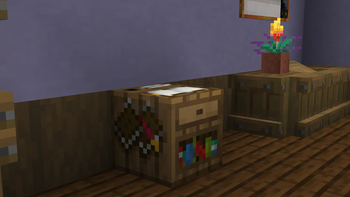
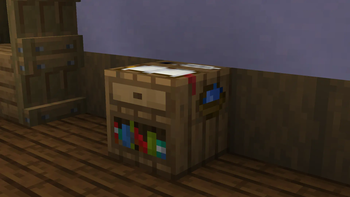
Introducing: the copying table, a new crafting block that lets you duplicate enchanted books. The mod aims to combine encouragement of exploration with the increased accessibility that you can also find with smithing templates.
Purpose
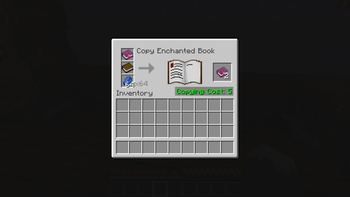
Once you have an enchanted book, you can spend lapis lazuli and XP to duplicate it, providing an alternative/supplement to mass villager trading. This rewards players who have explored the world and obtained treasure books like Soul Speed, Wind Burst, and Swift Sneak. Multiplayer servers benefit especially, because competition over local structures is reduced, allowing people to play at their own pace without needing to rush to beat other players to the loot tables!
How to use
Craft a copying table in the same way you would craft a smithing or fletching table, with four planks, an ink sac, and a feather.
To copy an enchanted book, you'll need:
- The desired enchanted book
- A new regular book
- Some lapis lazuli
Requirements/Dependencies
Mod needs to be installed on the server and on all connected clients, and depends on any version of the Fabric API.
Available Versions
How to Install Copying Table on Your Server
Order Server
Order a Minecraft Java server with at least 3 GB RAM (4 GB recommended).
Set fabric Loader
In the panel under "Egg", select the fabric loader and matching Minecraft version (1.21.11).
Install Mod
Open the mod browser in the dashboard and search for "Copying Table". Click "Install" – done! Alternatively, upload the .jar via SFTP to the /mods folder.
Compatibility
Mod Loaders
Minecraft Versions
1.21.11
Server-side
✓ RequiredRecommended RAM
4 GB(min. 3 GB)Frequently Asked Questions
Copying Table server crashes on startup – what to do?
Most common cause: wrong fabric version or insufficient RAM. Check the server log (latest.log) for "OutOfMemoryError" or "Mixin" errors. With Mado Hosting: ensure at least 3 GB RAM is allocated and the loader matches the mod version (1.21.11). You can switch loaders with one click in the panel.
Is Copying Table compatible with fabric?
Copying Table officially supports fabric for Minecraft 1.21.11. The Mado dashboard automatically detects incompatible loader combinations.
Server lagging with Copying Table – how to optimize performance?
Recommended RAM: 4 GB (per 8 players). Use /spark profiler to check if Copying Table consumes the most tick time. Common fixes: reduce server view-distance to 8-10, install "performant" or "starlight" as supplementary mods on Forge. With Mado Hosting, your server runs on NVMe SSDs with dedicated CPU cores for minimal latency.
Similar Mods




Rent Modded Server
Install Copying Table with just one click on your server.
Details
- License
- Creative Commons Attribution Non Commercial 4.0 International
- Server-side
- Required