
Core Companion
An owner-bound AI companion that chats, remembers, builds a relationship, and runs survival tasks with Baritone path finding — local or cloud AI, optional voice and vision.
Screenshots
About this Mod
Core Companion
Core Companion adds an owner-bound AI companion to Minecraft. The companion can chat with the player, remember context, react to the world, use an inventory, perform survival tasks, show expressions, use optional voice/TTS/vision features, and perform Baritone-powered world actions.
The goal is to make the companion feel like a persistent character in your world instead of a simple pet or command bot. It can follow you, stay nearby, help with tasks, respond to events, manage items, run planner goals, build a relationship over time, and be customized through in-game settings. On first join it sets itself up automatically — picking and downloading a local AI model that fits your hardware — so you can go from install to a talking companion without editing a single config file.
Development Status
Core Companion is an early release. Some features are experimental and may change as the mod is improved.
Main Features
- Spawn, remove, recall, locate, and auto-spawn your companion on login
- Persistent owner-bound companion identity
- Female and male companion setup options
- Choose a start mode per world: bond with a partner immediately, or meet unbonded village companions and earn their trust through chat and food
- Companion can be targeted by vanilla commands through its configured name or alias
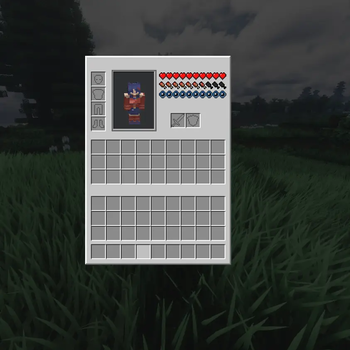
- Backpack and equipment inventory, with a companion inventory screen and a rotatable 3D companion preview
- Item holding, equipment use, item transfer, dropping, depositing, and sorting behavior
- Recovers your dropped items after death — she paths to your death spot, grabs your stuff (full NBT intact), and brings it back
- Orb of Binding and bonded/unbonded spawn-egg support
- Shoulder carry, dismount, hand-holding, player lead attach/release/pull, and paired emote state cleanup
Setup & First Run
The first time you join, Core Companion sets itself up automatically — no config files to edit.
- Hardware-aware model pick: it checks the memory your machine can actually give an AI model — dedicated GPU VRAM, Apple-Silicon unified memory, or system RAM — reserves a few GB for Minecraft itself so nothing offloads and stutters, and downloads the best-fitting local model: lightweight (
dolphin-phi), balanced (dolphin3), or largest (dolphin-mixtral). It tells you which one it chose for your specs, since responses get sharper on bigger models. - Live download, then arrival: a progress bar above your hotbar tracks the one-time download, and your companion only appears once her model is downloaded and warmed up — she never spawns unable to talk.
- Clean-machine friendly: if the local AI service (Ollama) isn't installed yet, a clear in-game setup guide appears instead of a raw error — and following, mining, and building all keep working without it.
- Always adjustable: the chosen model, provider, personality, and everything else stay editable later in the in-game config screen, and a model you set yourself is always respected.
AI And Chat
Core Companion supports normal chat responses and AI-assisted actions through the /corecompanion command.
/corecompanion ask— chat with your companion- Local-first and provider-flexible: runs on a local Ollama model by default, or connect any OpenAI-compatible endpoint (OpenAI, xAI/Grok, Gemini's OpenAI-compatible endpoint, LM Studio, llama.cpp server, and more)
- Zero-config local start: on first join it auto-selects and downloads a local model sized to your hardware, then warms it up before your companion arrives (see Setup & First Run)
- Provider, endpoint, API key, and model are set in the in-game config screen
- Configurable personality, history, temperature, token length, and response settings
- Internal AI action directives for Baritone actions, planner goals, and social actions
- Deterministic handlers for location, looked-at block questions/actions, hunger/eating, nearest village, sleep, "take me to base/farm," and social requests
- Multiple AI action lines can be queued and processed
Direct Action Verbs
The companion supports many direct action commands and AI-triggered actions.
- Control & status:
stop,stay,recall,where,status - Modes:
role,care_mode,combat_mode - Navigation:
follow,surface,sleep_routine,explore,goto,goto_memory,go_home,go_farm,locations,locate_village - Memory:
remember_location - Items & logistics:
collect_items,eat,give_item,drop_item,inventory_intent,deposit_items,sort_inventory - Mining, combat & farming:
mine,defend,attack_hostiles,hunt,harvest,replant - Building:
place,preview_template,build_line,structures,build_template
Planner Automation
Deterministic planner automation for common survival tasks. Natural-language requests can map into plan queues, letting the companion perform multi-step jobs.
Current planner goals: get_wood, get_food, get_torches, farm_cycle, tend_remembered_farm, farm_cycle_deposit, prepare_mining_trip, prepare_toolkit, build_shelter, patrol_base, light_area, maintain_base, restock_base, wood_run, mining_expedition, return_and_deposit, torch_path, recover_death_drops, smelt_ores, tend_livestock, fish, make_camp.
Beyond gathering and base upkeep, she can go fishing, smelt ores, tend livestock, make a camp, and — after a bad run — recover your death drops and carry them back to you. Relationship perks can scale some planner supply amounts.
Social And Relationship Features
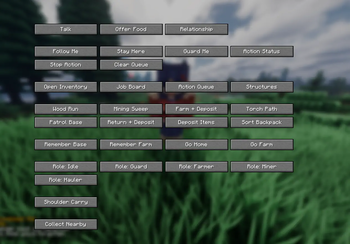
The interaction menu includes companion actions, task shortcuts, relationship options, and utility controls: inventory access, relationship screen, job board, structures menu, action queue, follow/stay/status/stop/clear-queue, sorting and deposit, guard/farm/patrol/torch/wood/mining presets, base and farm memory controls, role buttons, and social actions.
Built-in emotes: Wave, High five, Sit, Lean, Hug, Kiss.
Rest together: at night an affectionate companion can settle in beside you to sleep — in her own adjacent bed, a spot pulled in closer, or sharing your bed — with a few hearts. Kissing, hand-holding, and an overall affection intensity are all configurable, so you decide how forward she is.
Relationships build through conversation and feeding and progress through tiers — Stranger, Acquaintance, Friend, Close, Dating, Bonded — unlocking more social actions and warmer behavior:
- Stranger / Acquaintance — reserved; basic actions and high five
- Friend — lean, carry, hold hands; auto-defense and food help when you're hurt
- Close — hug, kiss
- Dating / Bonded — openly affectionate; hands you a golden apple when you are about to go down, and occasionally gives you a small gift
Some paired interactions only run when the companion state and player position allow them, preventing awkward or invalid animations.
Autonomy And Safety Modes
Role, care, and combat settings let the companion behave differently per situation.
- Roles: Idle, Guard, Farmer, Miner, Hauler
- Care modes: Passive, Balanced, Guard, Retreat, Full
- Combat policy: Passive, Defend, Assist
- World-editing safety: toggle whether she's allowed to break or place blocks in your world
She looks after herself and you: eats and drinks healing potions when low, auto-equips her best armor and draws her best weapon before a fight, retreats to you — or to a remembered base if you are far away — when badly hurt, and asks for food when she has none. A friendly companion can also take initiative, offering to make torches when it gets dark or fetch food when you are starving. If she dies, she leaves a recoverable spawn-egg keepsake so you can bring her back with the bond intact.
Memory And Awareness
Persistent memory can track player preferences, recent chats, events, deaths, mining, exploration, biomes, remembered bases/farms/coordinates, remembered plans, mood/current goal, and summaries.
World context can include dimension, position, biome, time, weather, light level, nearby entities, remembered places, sound/hearing context, and physical state. Her current mood influences behavior — a fragile mood makes her pull back sooner, while a protective mood makes her hold the line and guard you. She also reasons across recent events together, connecting them instead of reacting to each one in isolation.
Passive reactions can cover receiving items, hand-holding, carrying, social actions, player-lead events, damage, hunger, mining, building, combat, travel, idle moments, danger, and — with vision enabled — notable things she sees on screen.
Voice, Vision, And Client UI
Optional client-side features for voice, TTS, vision, HUDs, overlays, and rendering:
- Voice input capture with local speech-to-text / whisper.cpp support
- Text-to-speech playback using OpenAI or ElevenLabs voices (configured in-game)
- Optional framebuffer vision capture through a local Ollama vision model, with on-demand capture and visual summaries fed into companion context
- Status HUD, debug HUD, and Baritone path overlay
- In-game config screen styled to match the vanilla menus, including an AI Providers section for endpoints, models, and API keys
- Companion render layers for body shape, cat ears, tail, player-lead visuals, armor, and held items
Data And Extensibility
- Built-in and config-loaded interaction packs
- Built-in and config-loaded structure templates, plus bundled shelter/template data
- Reload commands for packs and templates
- Debug-gated tools for prompt dumps, Baritone status/failures, parity checks, expression testing, video scripts, and handhold recording
Privacy / AI Service Note
Core Companion is designed around user-configured AI services. Chat can run through a local Ollama model or any OpenAI-compatible endpoint you configure. Optional voice, text-to-speech, and vision features depend on the services the player configures. Using a cloud LLM or TTS provider sends your text (and, for vision, screenshot context) to that provider; running everything locally keeps it on your machine. Review your configuration before enabling these features.
Commands
Main command: /corecompanion
Subcommands: ask, spawn, remove, recall, where, help, setup female, setup male, start bonded, start village, carry, dismount, playerlead, reload. Additional debug and developer commands are available when debug options are enabled.
Requirements
- Fabric API
- GeckoLib
- Mod Menu (optional — opens the in-game config screen)
- A compatible Minecraft / Fabric version
- Ollama (or another local model service) for local AI, or an OpenAI-compatible API key for cloud AI — for local AI the right-sized model is downloaded automatically on first run
Available Versions
How to Install Core Companion on Your Server
Order Server
Order a Minecraft Java server with at least 3 GB RAM (4 GB recommended).
Set fabric Loader
In the panel under "Egg", select the fabric loader and matching Minecraft version (1.21.8).
Install Mod
Open the mod browser in the dashboard and search for "Core Companion". Click "Install" – done! Alternatively, upload the .jar via SFTP to the /mods folder.
Compatibility
Mod Loaders
Minecraft Versions
1.21.8
Server-side
✓ RequiredRecommended RAM
4 GB(min. 3 GB)Frequently Asked Questions
Core Companion server crashes on startup – what to do?
Most common cause: wrong fabric version or insufficient RAM. Check the server log (latest.log) for "OutOfMemoryError" or "Mixin" errors. With Mado Hosting: ensure at least 3 GB RAM is allocated and the loader matches the mod version (1.21.8). You can switch loaders with one click in the panel.
Is Core Companion compatible with fabric?
Core Companion officially supports fabric for Minecraft 1.21.8. The Mado dashboard automatically detects incompatible loader combinations.
Server lagging with Core Companion – how to optimize performance?
Recommended RAM: 4 GB (per 8 players). Use /spark profiler to check if Core Companion consumes the most tick time. Common fixes: reduce server view-distance to 8-10, install "performant" or "starlight" as supplementary mods on Forge. With Mado Hosting, your server runs on NVMe SSDs with dedicated CPU cores for minimal latency.
Similar Mods
![[EMF] Entity Model Features](https://cdn.modrinth.com/data/4I1XuqiY/6e5bbd0d06b1741bfdab6c0cfab6de8fdaf0064c_96.webp)


Rent Modded Server
Install Core Companion with just one click on your server.