
Cornball's Music Player
This mod adds a music GUI that allows you to play most of the music without a jukebox.
Screenshots

About this Mod
Cornball’s Music Player
Cornball’s Music Player is a client-side Fabric mod that gives you a simple, polished way to play vanilla and custom music from anywhere in-game. Instead of placing a jukebox or manually swapping discs, you can open the mod’s custom music player GUI at any time by pressing M and instantly browse the full supported library from one screen.
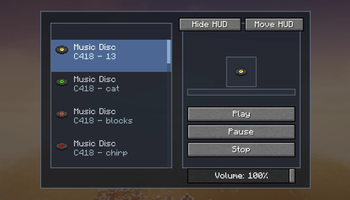
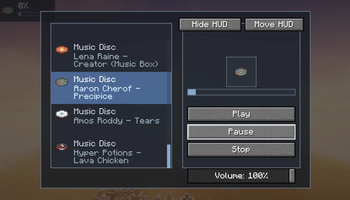
The interface is designed to feel clean and easy to use. The left side displays a scrollable library of vanilla and custom music with each songs icon, name, and song title, while the right side gives you dedicated playback controls and a live view of the current track. Clicking a song starts playing it immediately, and the mod makes sure only one track plays at a time so audio stays organized and never overlaps.
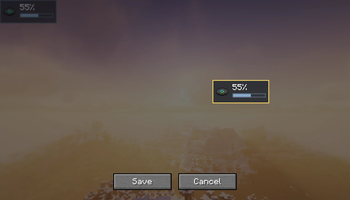
Cornball’s Music Player also includes quality-of-life features that make it much more convenient than a normal jukebox setup. You can pause, resume, stop, adjust volume, monitor playback progress with a built-in progress bar, and keep track of what is currently playing through a compact HUD overlay. The HUD can be moved anywhere on your screen through a placement mode with Save and Cancel options, or disabled entirely if you prefer a cleaner look.
Everything runs client-side, so the mod is lightweight and easy to use. There’s no extra block to place, no complicated setup, and no required config files to get started. Install the mod, launch the game with Fabric, and press M to open the music player.
Features
- Open the music player GUI anywhere by pressing
M - Browse supported vanilla and custom music in a custom scrollable menu
- View song icons, song names, and song titles in the selector
- Instantly play tracks by clicking them
- Dedicated Play, Pause, and Stop controls
- Only one track plays at a time (at the moment)
- Built-in volume slider
- Playback progress bar and time display
- Small movable HUD overlay for current song and progress
- HUD placement mode with Save and Cancel
- Button to enable or disable the HUD
- Custom .ogg music support
Requirements
- Fabric
- Fabric API
To access custom music you first need to put your .ogg into the "tracks" folder found in the "musicplayer" folder inside your Minecraft instance file. Then simply navigate into the local tab inside the mods in-game menu.
Feedback is appreciated and the mod will continue to update with even more music.
Available Versions
How to Install Cornball's Music Player on Your Server
Order Server
Order a Minecraft Java server with at least 3 GB RAM (4 GB recommended).
Set fabric Loader
In the panel under "Egg", select the fabric loader and matching Minecraft version (1.21.11).
Install Mod
Open the mod browser in the dashboard and search for "Cornball's Music Player". Click "Install" – done! Alternatively, upload the .jar via SFTP to the /mods folder.
Compatibility
Mod Loaders
Minecraft Versions
1.21.11
Server-side
✗ UnsupportedRecommended RAM
4 GB(min. 3 GB)Frequently Asked Questions
Cornball's Music Player server crashes on startup – what to do?
Most common cause: wrong fabric version or insufficient RAM. Check the server log (latest.log) for "OutOfMemoryError" or "Mixin" errors. With Mado Hosting: ensure at least 3 GB RAM is allocated and the loader matches the mod version (1.21.11). You can switch loaders with one click in the panel.
Is Cornball's Music Player compatible with fabric?
Cornball's Music Player officially supports fabric for Minecraft 1.21.11. The Mado dashboard automatically detects incompatible loader combinations.
Server lagging with Cornball's Music Player – how to optimize performance?
Recommended RAM: 4 GB (per 8 players). Use /spark profiler to check if Cornball's Music Player consumes the most tick time. Common fixes: reduce server view-distance to 8-10, install "performant" or "starlight" as supplementary mods on Forge. With Mado Hosting, your server runs on NVMe SSDs with dedicated CPU cores for minimal latency.
Similar Mods




Rent Modded Server
Install Cornball's Music Player with just one click on your server.