
CosmicExtractions
Utility mod to improve QOL and enhance gameplay within the Extraction feature on CosmicSky.
Screenshots

About this Mod
What is CosmicExtractions?
CosmicExtractions is a utility mod designed by Minecoin to improve the QOL and overall gameplay experience within the Extraction gamemode within CosmicSky.
All features and mechanics within this mod have been approved for use by the Cosmic Administration.
Key Features:
Visual indicators for chest spawn locations
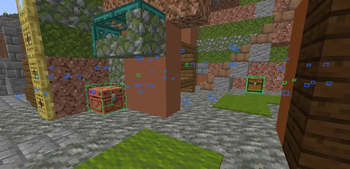
Whenever a player loots a chest within the Extraction world, this chest location is added to a permanent list stored within the player's config folder. In all future extraction runs, this location will be highlighted for the player with a blue indicator. Whenever a chest location is looted, the indicator becomes green for the rest of that Extraction run to help track where the player has already explored during each run. Over time, as players explore the map and discover every possible chest spawn, this feature allows players to clear large landmarks and search for chests more efficiently.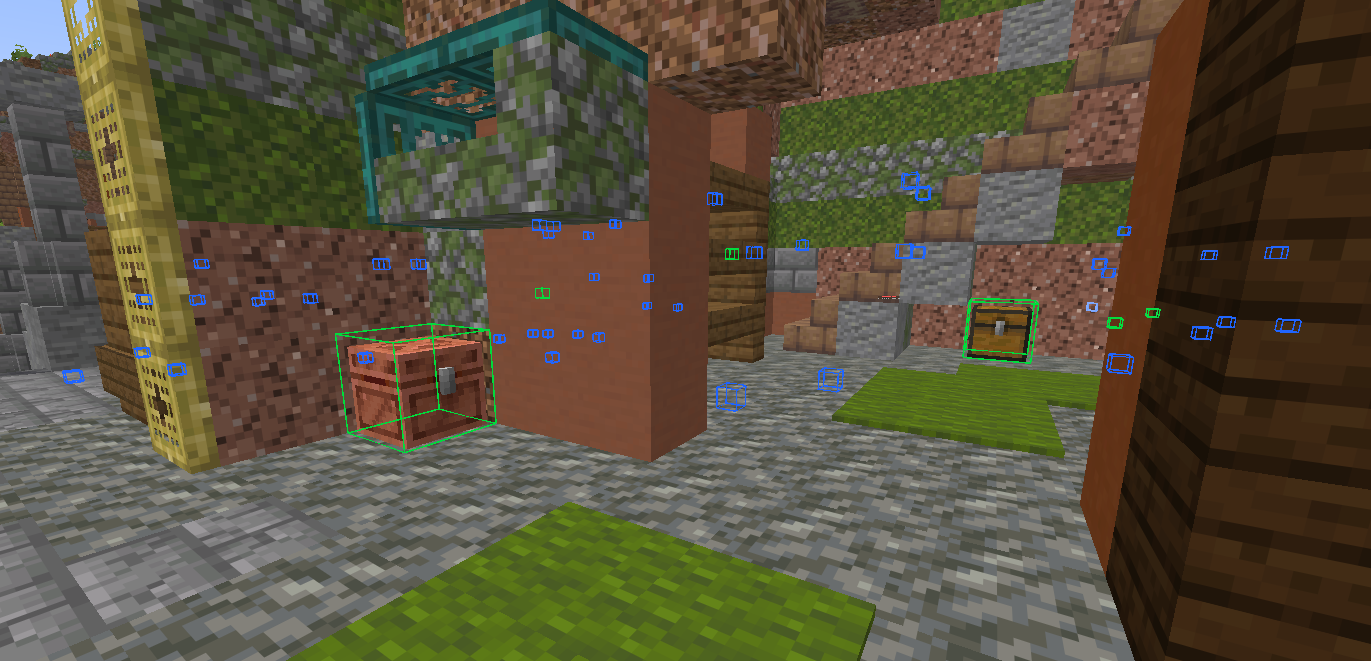
Improved audio queues for chest spawns
By default, whenever a chest is generated nearby, there is a very faint audio queue that is often very difficult to hear and almost impossible to pinpoint. This feature replaces the default sound with a much louder and more dynamic audio queue, which allows players to hear exactly how many chests spawn within a given area, as well as the precise direction of each chest relative to the player.
Dynamic waypoints indicating the nearest exit zone
Whenever the Extraction timer gets low or an enemy player is nearby, it can be critical to locate the nearest exit zone. This feature automatically detects and permanently stores the locations of each exit zone within the Extraction world, and it automatically displays a waypoint at whichever exit zone is closest to the player, along with the distance.
Exit zone countdown timer
Whenever you activate an Extraction exit zone, the waypoint will turn yellow, and it will display a countdown indicating the number of seconds until the exit zone opens. This countdown is also displayed above the player's hotbar. Once the 60 second countdown is completed and the exit zone opens, the waypoint will turn green, and a new 10 second timer will be displayed.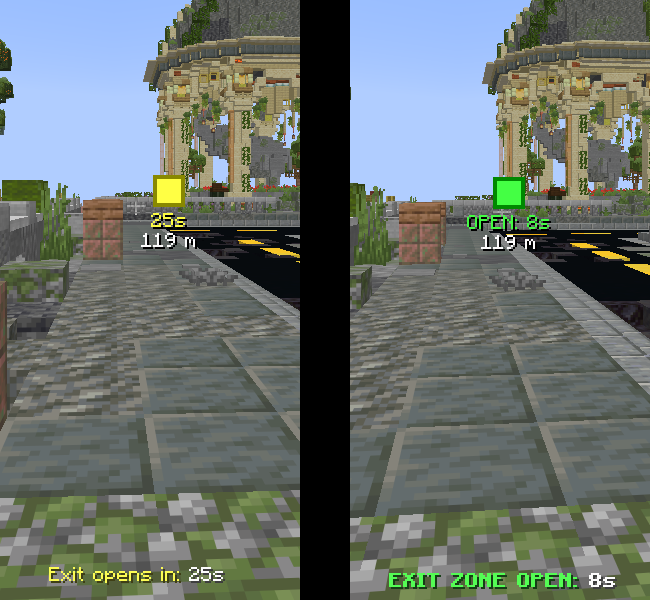
Local player list & join/leave alerts
This feature displays a list of all players currently in the same local server, which includes all players in your current Extraction world, as well as possibly some players in a different Extraction world. Once the Extraction timer hits 15 minutes and no more players can enter the same Extraction world, this list automatically stops adding new players who join the local server, because once the timer is below 15 minutes, those players must be joining a different Extraction world. Additionally, whenever a new player joins or leaves the Extraction world, an alert appears in the chat.
Looted chest tracker
When doing an Extraction run, it's important to know how efficient your route was, and also to be able to complain if you looted a lot of chests and got nothing of value. Therefore, while in an Extraction run, there is a tracker at the top-left of the screen that indicates how many chests you have looted during that Extraction run.
Extraction cooldown alerts
Because there is a cooldown between Extraction runs, it's helpful to know exactly when this cooldown expires so you can go back in and do another run. This feature sends a chat alert, as well as an audio alert, whenever your Extraction cooldown has expired. This feature is able to track multiple accounts, and persists through closing and re-opening Minecraft, so it will still be useful even if you are running 2 or 3 different alts for Extraction. If you have the /skill for a shorter Extraction cooldown, be sure to indicate this within the config so that your alerts will be accurate.
Config
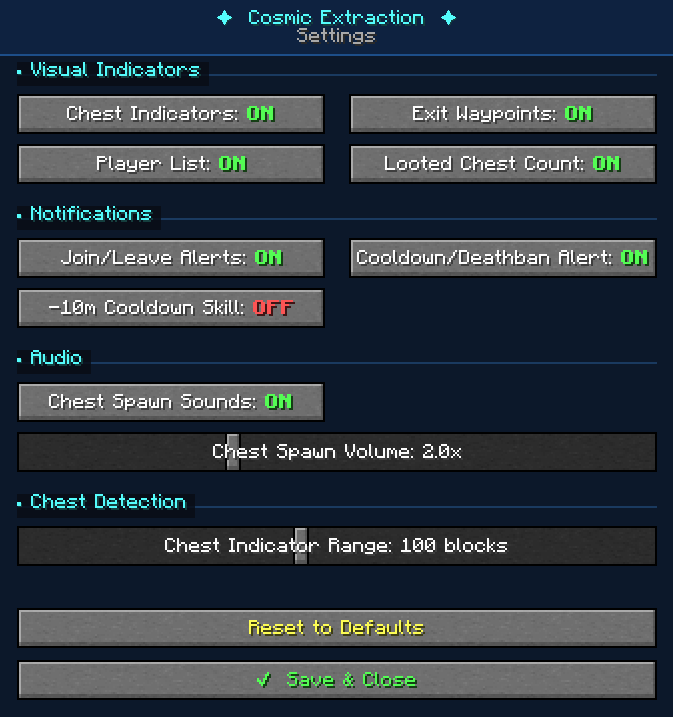
Everyone has their own preferences, and you may want to tweak or disable certain aspects of the mod. Within the config (default key is K), players can enable/disable every aspect of the mod, as well as adjust certain settings such as the distance that chest indicators appear or the volume of the audio when a chest spawns nearby. If you would prefer a different keybind to open the config, that can be adjusted using Minecraft's Key Binds menu. If the config menu looks abnormal, try adjusting your GUI scale.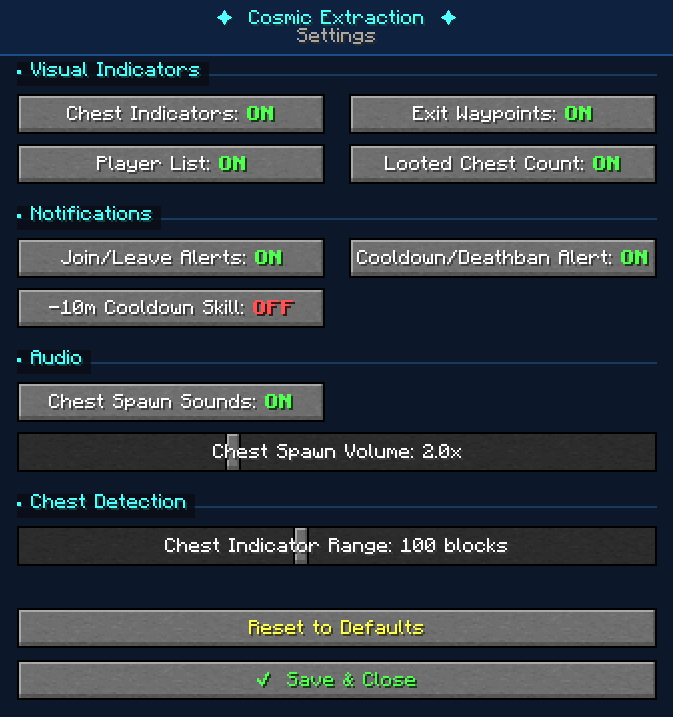
Technical Info:
If you want to manually edit your list of saved chest locations or saved exit points, you can find these files in %appdata% -> .minecraft -> config
Available Versions
How to Install CosmicExtractions on Your Server
Order Server
Order a Minecraft Java server with at least 3 GB RAM (4 GB recommended).
Set fabric Loader
In the panel under "Egg", select the fabric loader and matching Minecraft version (1.21.11).
Install Mod
Open the mod browser in the dashboard and search for "CosmicExtractions". Click "Install" – done! Alternatively, upload the .jar via SFTP to the /mods folder.
Compatibility
Mod Loaders
Minecraft Versions
1.21.11
Server-side
✗ UnsupportedRecommended RAM
4 GB(min. 3 GB)Frequently Asked Questions
CosmicExtractions server crashes on startup – what to do?
Most common cause: wrong fabric version or insufficient RAM. Check the server log (latest.log) for "OutOfMemoryError" or "Mixin" errors. With Mado Hosting: ensure at least 3 GB RAM is allocated and the loader matches the mod version (1.21.11). You can switch loaders with one click in the panel.
Is CosmicExtractions compatible with fabric?
CosmicExtractions officially supports fabric for Minecraft 1.21.11. The Mado dashboard automatically detects incompatible loader combinations.
Server lagging with CosmicExtractions – how to optimize performance?
Recommended RAM: 4 GB (per 8 players). Use /spark profiler to check if CosmicExtractions consumes the most tick time. Common fixes: reduce server view-distance to 8-10, install "performant" or "starlight" as supplementary mods on Forge. With Mado Hosting, your server runs on NVMe SSDs with dedicated CPU cores for minimal latency.
Similar Mods




![[ETF] Entity Texture Features](https://cdn.modrinth.com/data/BVzZfTc1/af683d206d50b05258d865b0d6e4aa2f2cee12f2_96.webp)
![[EMF] Entity Model Features](https://cdn.modrinth.com/data/4I1XuqiY/6e5bbd0d06b1741bfdab6c0cfab6de8fdaf0064c_96.webp)
Rent Modded Server
Install CosmicExtractions with just one click on your server.