
Counter
Counter Mod adds configurable Day & Death Counters, a Time Overlay, a Coordinates Overlay and a Numeric Ping Display for tracking world progression and player stats, and in-game time.
Screenshots
About this Mod
Track Days, Deaths, Survival Time, Time, Coordinates & Ping – Fully Customizable!
The Counter Mod enhances Minecraft by adding Day Counters, Death Counters, a Survival Time Tracker, a Time Overlay, a Coordinates Overlay and a Numeric Ping Display. Whether in singleplayer or multiplayer, this mod provides an easy way to track world progression, player statistics, and network latency – especially useful in hardcore modpacks.
🌟 Features
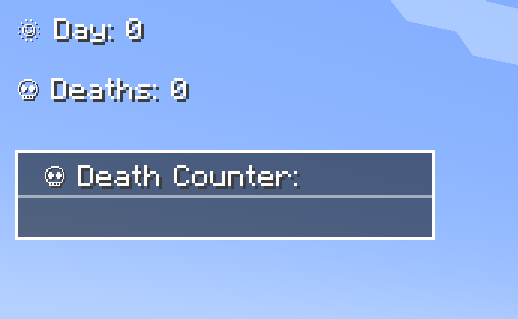
- ✅ Day Counter – Displays the current Minecraft day as an overlay or in chat.
- ✅ Death Counter – Tracks player deaths with an overlay leaderboard & chat display.
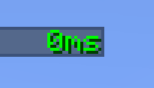
- ✅ Survival Time Tracker – Tracks how long a player has survived since their last death. Shows best time, global best, and history.
- ✅ Time Overlay – Shows the current in-game time directly on screen.
- ✅ Coords Overlay – Shows the current coordinates directly on screen and share locations with others.
- ✅ Numeric Ping Display – Replaces vanilla ping bars with color-coded numeric values.
- ✅ Highly Configurable – Customize positions, colors, display modes, and styles.
⚙️ Configuration
- Configure everything via server-config.toml and client-config.toml.
- Customize text color, overlay positions, scaling, and display styles.
- Supports multiple display modes: Chat, Overlay, or both.
- Enable or disable specific features (Day, Death, Survival, etc.) independently.
- 📜 For a full list of config options, visit: GitHub Configuration Guide
📝 Commands
Below is an overview of the main commands the mod provides:
| Command | Permission | Description |
|---|---|---|
/day get |
all |
Shows the current day counter value. |
/day set <days> |
admin |
Sets the Day Counter to the specified value. |
/death get [player / list] |
all |
Shows your own total deaths, another player's deaths, or the leaderboard (list). |
/death set <player> <amount> |
admin |
Sets the death count for the specified player(s). |
/death reset |
admin |
Resets the death count of all players to 0. |
/time get |
all |
Shows the current in-game time. |
/coords get |
all |
Shows your current coordinates. |
/coords send [player / all] |
all |
Shares your coordinates with another player or all players. |
/survival history [player] |
all |
Shows the survival time history for you or another player. |
/survival best [player / global] |
all |
Displays the best survival time for you, another player, or the global best. |
/survival current [player] |
all |
Displays the current survival time since the last death. |
🎨 Overlay Edit Mode
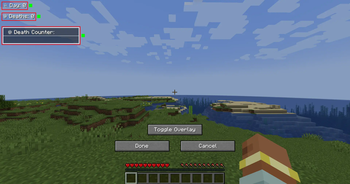
- Easily adjust the position and visibility of overlays via an in-game UI.
- Supports dragging elements, hiding overlays, and saving changes dynamically.
- Resize overlays with buttons.
- Change alignment (left, center, right) using arrow icons.
🔗 Links
🐛 Please report issues to the Issue Tracker on GitHub
Available Versions
How to Install Counter on Your Server
Order Server
Order a Minecraft Java server with at least 3 GB RAM (4 GB recommended).
Set neoforge Loader
In the panel under "Egg", select the neoforge loader and matching Minecraft version (26.1.2).
Install Mod
Open the mod browser in the dashboard and search for "Counter". Click "Install" – done! Alternatively, upload the .jar via SFTP to the /mods folder.
Compatibility
Mod Loaders
Minecraft Versions
26.1.2, 26.1.1, 26.1 (+10 more)
Server-side
✓ RequiredRecommended RAM
4 GB(min. 3 GB)Frequently Asked Questions
Counter server crashes on startup – what to do?
Most common cause: wrong neoforge version or insufficient RAM. Check the server log (latest.log) for "OutOfMemoryError" or "Mixin" errors. With Mado Hosting: ensure at least 3 GB RAM is allocated and the loader matches the mod version (26.1.2). You can switch loaders with one click in the panel.
Is Counter compatible with neoforge?
Counter officially supports neoforge for Minecraft 26.1.2, 26.1.1, 26.1. The Mado dashboard automatically detects incompatible loader combinations.
Server lagging with Counter – how to optimize performance?
Recommended RAM: 4 GB (per 8 players). Use /spark profiler to check if Counter consumes the most tick time. Common fixes: reduce server view-distance to 8-10, install "performant" or "starlight" as supplementary mods on Forge. With Mado Hosting, your server runs on NVMe SSDs with dedicated CPU cores for minimal latency.
Similar Mods




Rent Modded Server
Install Counter with just one click on your server.