
Countered's Floating Tree Decay
A mod that allows logs from trees to decay, once they are no longer connected to the ground
Screenshots
About this Mod
Floating Tree Decay
Now with support for Tree Physics!
Tree Physics can create a lot of sublevels in your world or server, especially when people aren't breaking down trees completely. This causes lag and might even cause your server to crash!
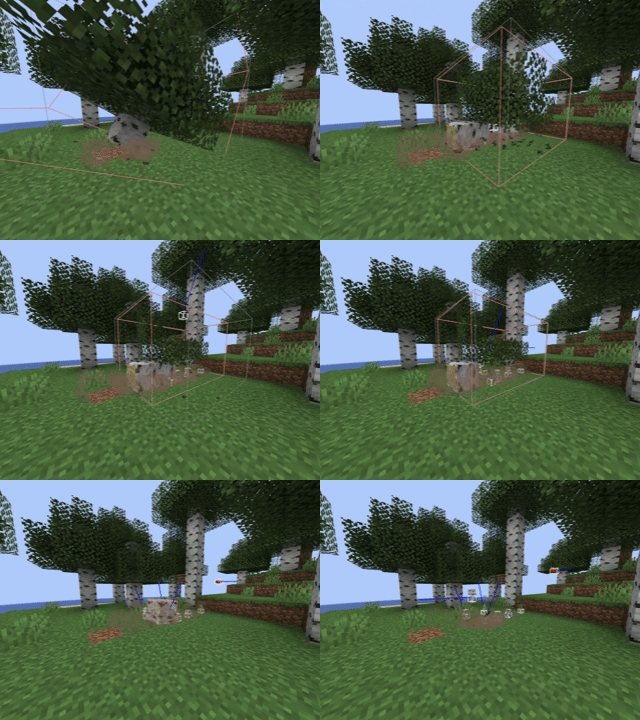
Floating Tree Decay fixes this by slowly decaying chopped down trees in your world:
(Sped up for demonstration purposes)
Features
- When a log block becomes "floating" (disconnected from the ground), it begins to decay and disappear over time.
- Works seamlessly with player-built structures, only naturally generated logs are affected. (Note that if you want to use this mod in an already existing world, check out the Config section
- Works with modded trees!
Config
The Config provides control over the following parameters:
- Decay speed (default fastest setting)
- Duration until decay starts
- Maximum amount of blocks in a tree that's considered decayable
- Existing World Compat: Enable this setting in case you already built structures with logs in them, so that they won't accidentally be decayed.
Please Backup before using this mod in your existing world
Follow Countered for Updates!
Stay up to date with the latest news, updates, and upcoming features for "Countered's Floating Tree Decay" by following me on social media:
- Twitter (X): https://twitter.com/RealCountered
- Discord: https://discord.gg/wANx8YbzDs
- YouTube: https://www.youtube.com/@realCountered
- Bluesky: https://bsky.app/profile/coun7ered.bsky.social
- Donate via PayPal: https://www.paypal.com/donate/?hosted_button_id=M6JCVGPEDKKDS
Feedback and Support
I would love to hear your feedback on the mod! If you have suggestions, bug reports, or just want to share your experience, please create an issue on the CurseForge page or join my Discord server!
Available Versions
How to Install Countered's Floating Tree Decay on Your Server
Order Server
Order a Minecraft Java server with at least 3 GB RAM (4 GB recommended).
Set fabric Loader
In the panel under "Egg", select the fabric loader and matching Minecraft version (1.21.11).
Install Mod
Open the mod browser in the dashboard and search for "Countered's Floating Tree Decay". Click "Install" – done! Alternatively, upload the .jar via SFTP to the /mods folder.
Compatibility
Mod Loaders
Minecraft Versions
1.21.11, 1.21.1, 1.20.1
Server-side
✓ RequiredRecommended RAM
4 GB(min. 3 GB)Frequently Asked Questions
Countered's Floating Tree Decay server crashes on startup – what to do?
Most common cause: wrong fabric version or insufficient RAM. Check the server log (latest.log) for "OutOfMemoryError" or "Mixin" errors. With Mado Hosting: ensure at least 3 GB RAM is allocated and the loader matches the mod version (1.21.11). You can switch loaders with one click in the panel.
Is Countered's Floating Tree Decay compatible with fabric and forge and neoforge?
Countered's Floating Tree Decay officially supports fabric, forge, neoforge for Minecraft 1.21.11, 1.21.1, 1.20.1. Note: Forge and Fabric mods are NOT cross-compatible – pick one loader and stick with it. The Mado dashboard automatically detects incompatible loader combinations.
Server lagging with Countered's Floating Tree Decay – how to optimize performance?
Recommended RAM: 4 GB (per 8 players). Use /spark profiler to check if Countered's Floating Tree Decay consumes the most tick time. Common fixes: reduce server view-distance to 8-10, install "performant" or "starlight" as supplementary mods on Forge. With Mado Hosting, your server runs on NVMe SSDs with dedicated CPU cores for minimal latency.
Similar Mods




![[ETF] Entity Texture Features](https://cdn.modrinth.com/data/BVzZfTc1/af683d206d50b05258d865b0d6e4aa2f2cee12f2_96.webp)
![[EMF] Entity Model Features](https://cdn.modrinth.com/data/4I1XuqiY/6e5bbd0d06b1741bfdab6c0cfab6de8fdaf0064c_96.webp)
Rent Modded Server
Install Countered's Floating Tree Decay with just one click on your server.