Couples Mod
Bring romance to your server! Date players by gifting bouquets, track your love in an Anniversary Journal, and level up your relationship through kisses and gifts. Reach level 10 to marry your partner for permanent saturation buffs and bonus XP!
Screenshots
About this Mod
Couples Mod
Couples Mod is a multiplayer Minecraft NeoForge modification designed to enhance the multiplayer experience by adding meaningful relationships, interactions, and shared progression between players. Whether you want to casually date a friend or propose for marriage, this mod adds immersive features and rewarding mechanics to celebrate your bond.
Note: This mod is designed for multiplayer servers.
🌟 Features
Dating & Marriage Systems: Start a relationship with a simple bouquet and eventually propose with an engagement ring.
Interactive Mechanics: Kiss your partner to earn experience and level up your relationship.
Shared Progression: As your relationship levels up, unlock unique perks and buffs when near your partner.
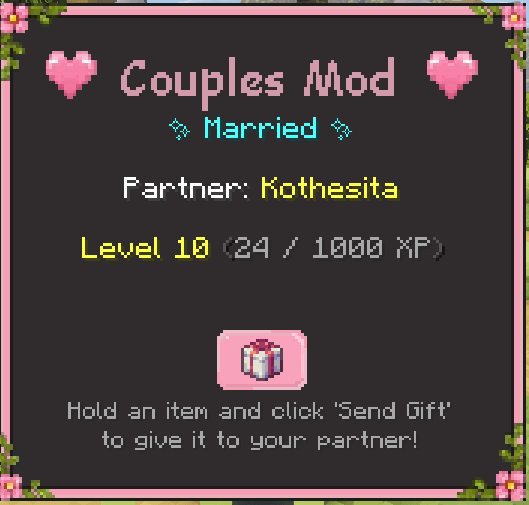
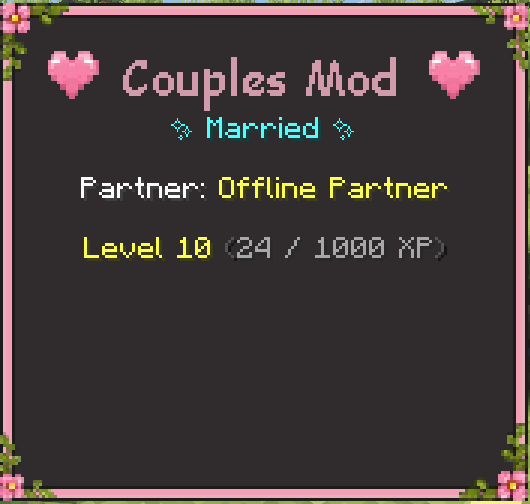
Custom UI: View your relationship status, partner name, level, and shared statistics through a dedicated interface.
Advancements: Unlock custom advancements as you reach relationship milestones.
Immersive Effects: Custom heart particles and sound effects when interacting with your partner.
💍 Getting Started
1. Dating
To start dating someone, you must craft or find a Bouquet. The mod supports bouquets made from various vanilla flowers (Tulips, Poppies, Orchids, Roses, etc.).
Proposing a Date: Right-click another player while holding a Bouquet.
Accepting: The targeted player must Shift + Right-Click you with an empty hand to accept the proposal.
2. Interactions & Leveling
Once dating, you can interact with your partner to grow your bond:
Kissing: Shift + Right-Click your partner with an empty hand. This grants relationship XP, increments your kiss counter, and spawns beautiful custom particles. (Note: XP has a short cooldown to prevent spamming).
Leveling Up: Accumulating XP will automatically level up your relationship.
3. Gifting
You can surprise your partner with gifts directly from your inventory!
How to Gift: Hold the item you want to give in your Main Hand, open the Relationship Screen (
G), and click the "Send Gift" button. The item will be magically transferred to your partner's inventory.Daily XP: The first gift you send each day (every 24 real hours) grants a massive boost of relationship XP based on the rarity and amount of the item!
Gifted Food 💝: If you gift a food item, it becomes infused with love! When your partner eats "Gifted Food", they receive a significant bonus to their Saturation, making it much better than regular food.
4. Marriage
When your relationship reaches Level 10, you are ready for the next big step! You cannot propose before reaching Level 10.
Proposing Marriage: Craft an Engagement Ring (available in Diamond, Iron, Gold, and Emerald variants). Right-click your partner while holding the ring.
Accepting: Your partner must Shift + Right-Click you with an empty hand to accept. You will both receive matching rings!
✨ Perks and Buffs
Being in a relationship isn't just for show; it provides tangible survival benefits:
Sweet Dreams: If you sleep in a bed near your partner (within 10 blocks) and wake up successfully, both players will receive long-lasting Saturation and Regeneration buffs for the next 10 minutes.
Power of Love (Marriage Only): Married couples who stay close to each other (within 32 blocks) will passively receive a powerful aura of buffs, including Haste II, Regeneration I, Speed I, Health Boost II, and Luck I.
Note: All relationship effects and buffs are completely configurable! Server owners and players can easily modify, add, or disable these effects.
- NeoForge: Edit the
config/couplesmod-common.tomlfile.- Fabric: The mod integrates perfectly with MidnightLib and ModMenu. Simply install both libraries and you will be able to edit all effects through a beautiful in-game interface!
🌍 Supported Languages
Couples Mod currently supports the following languages natively:
- 🇺🇸 English (
en_us) - 🇪🇸 Spanish (
es_es) - Items and advancements translated!
📖 Items & Controls
Items
💐 Bouquets
Bouquets are your way of saying "I like you". They are used to initiate a relationship with another player.
| Icon | Item Name | How to obtain | Function |
|  | Allium Bouquet | 9x Allium | Right-click a player to ask them out! |
|  | Blue Orchid Bouquet | 9x Blue Orchid | Right-click a player to ask them out! |
|  | Cornflower Bouquet | 9x Cornflower | Right-click a player to ask them out! |
|  | Dandelion Bouquet | 9x Dandelion | Right-click a player to ask them out! |
|  ) | Lilac Bouquet | 9x Lilac | Right-click a player to ask them out! |
|  | Lily of the Valley Bouquet | 9x Lily of the Valley | Right-click a player to ask them out! |
|  | Orange Tulip Bouquet | 9x Orange Tulip | Right-click a player to ask them out! |
|  | Oxeye Daisy Bouquet | 9x Oxeye Daisy | Right-click a player to ask them out! |
|  | Pink Tulip Bouquet | 9x Pink Tulip | Right-click a player to ask them out! |
|  | Poppy Bouquet | 9x Poppy | Right-click a player to ask them out! |
|  | Red Tulip Bouquet | 9x Red Tulip | Right-click a player to ask them out! |
|  | Rose Bush Bouquet | 9x Rose Bush | Right-click a player to ask them out! |
|  | Sunflower Bouquet | 9x Sunflower | Right-click a player to ask them out! |
|  | White Tulip Bouquet | 9x White Tulip | Right-click a player to ask them out! |
|  | Wither Rose Bouquet | 9x Wither Rose | Right-click a player to ask them out! |
💍 Engagement Rings
The ultimate symbol of love. You can only propose marriage once you reach Level 10!
| Icon | Ring Type | Crafting Materials | Rarity | Effect |
|  | Iron Engagement Ring | Iron Ingots | Common | Unlocks Marriage & Shared Buffs |
|  | Gold Engagement Ring | Gold Ingots | Uncommon | Unlocks Marriage & Shared Buffs |
|  | Diamond Engagement Ring | Gold + Diamond | Rare | Unlocks Marriage & Shared Buffs |
|  | Emerald Engagement Ring | Gold + Emeralds | Epic | Unlocks Marriage & Shared Buffs |
📓 Special Items
| Icon | Item Name | Description |
|  | Anniversary Journal | Automatically granted when you start dating. Tracks your level, days together, kisses, and gifts exchanged! |
Controls
G(Default): Opens the Relationship Screen. Here you can see your current status (Dating/Married), your partner's name, your relationship level, and fun stats like total kisses and nights slept together.
⚙️ Installation
Ensure you have NeoForge 1.21.1 installed.
Download the latest version of Couples Mod.
Drop the
.jarfile into your Minecraftmodsfolder.Launch the game and enjoy!
🛠️ Modpack Permissions
You are completely free to include Couples Mod in your modpacks! Credit is appreciated.
💖 Credits
A massive thank you to my sister, Iara, for her incredible help with all the beautiful designs and textures in this mod!
You can check out more of her amazing work here: @anahss7 on Instagram
Available Versions
How to Install Couples Mod on Your Server
Order Server
Order a Minecraft Java server with at least 3 GB RAM (4 GB recommended).
Set fabric Loader
In the panel under "Egg", select the fabric loader and matching Minecraft version (1.21.1).
Install Mod
Open the mod browser in the dashboard and search for "Couples Mod". Click "Install" – done! Alternatively, upload the .jar via SFTP to the /mods folder.
Compatibility
Mod Loaders
Minecraft Versions
1.21.1
Server-side
✓ RequiredRecommended RAM
4 GB(min. 3 GB)Frequently Asked Questions
Couples Mod server crashes on startup – what to do?
Most common cause: wrong fabric version or insufficient RAM. Check the server log (latest.log) for "OutOfMemoryError" or "Mixin" errors. With Mado Hosting: ensure at least 3 GB RAM is allocated and the loader matches the mod version (1.21.1). You can switch loaders with one click in the panel.
Is Couples Mod compatible with fabric and neoforge?
Couples Mod officially supports fabric, neoforge for Minecraft 1.21.1. The Mado dashboard automatically detects incompatible loader combinations.
Server lagging with Couples Mod – how to optimize performance?
Recommended RAM: 4 GB (per 8 players). Use /spark profiler to check if Couples Mod consumes the most tick time. Common fixes: reduce server view-distance to 8-10, install "performant" or "starlight" as supplementary mods on Forge. With Mado Hosting, your server runs on NVMe SSDs with dedicated CPU cores for minimal latency.
Similar Mods

![[ETF] Entity Texture Features](https://cdn.modrinth.com/data/BVzZfTc1/af683d206d50b05258d865b0d6e4aa2f2cee12f2_96.webp)
![[EMF] Entity Model Features](https://cdn.modrinth.com/data/4I1XuqiY/6e5bbd0d06b1741bfdab6c0cfab6de8fdaf0064c_96.webp)



Rent Modded Server
Install Couples Mod with just one click on your server.