
Cozy Sleep Conditions
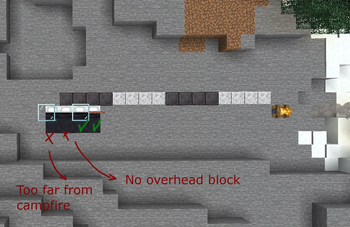
Adds cozy survival sleep requirements: a nearby lit campfire and some roof coverage above the bed.
Screenshots
About this Mod
Description
Adds additional requirements to use a bed. You must have a campfire within 16 blocks in any direction + something above the head of the bed (can be anything, even string).
Why?
The idea is to discourage the temptation of just plopping a bed down to skip the night. Instead, it nudges the player into the direction of finding shelter to truly settle down for the night with safety and comfort.
I made it for me, bc I like the idea of securing an area to "hole up for the night" somewhere safe. I made it a self-imposed rule and enjoyed how it played, so decided its good enough that I'd want it enforced naturally.
With villages, surface caves, or mods with random structures scattered in world gen, it makes it actually convenient to find one while traveling too, giving immersive value to otherwise skippable locations.
Q&A
Why campfires even in hot biomes?
I thought about allowing a different block to account for heat sources not really being necessary in hot places, but for now its not necessary. Thematically, I think fires always have a case to be needed in camp (cooking, disinfecting, warding off predators/undead, etc.).
In the future I'll probably allow any block to provide comfort, by including its id into a config.
Why require overhead coverage but allow anything?
In the "campsite" theme and most homes/outposts, the bed would almost always be covered by a roof of some sort if made immersively. Seems like an easy-to-check thing if its truly a cozy spot to sleep or not.
That said, I can imagine a cool stargazing bed setup too, so I wanted nearly invisible blocks (e.g., string) to achieve this requirement. Allowing any block gives more flexibility for all the things I can't program for.
Available Versions
How to Install Cozy Sleep Conditions on Your Server
Order Server
Order a Minecraft Java server with at least 3 GB RAM (4 GB recommended).
Set fabric Loader
In the panel under "Egg", select the fabric loader and matching Minecraft version (26.1.2).
Install Mod
Open the mod browser in the dashboard and search for "Cozy Sleep Conditions". Click "Install" – done! Alternatively, upload the .jar via SFTP to the /mods folder.
Compatibility
Mod Loaders
Minecraft Versions
26.1.2, 26.1.1, 26.1
Server-side
✓ RequiredRecommended RAM
4 GB(min. 3 GB)Frequently Asked Questions
Cozy Sleep Conditions server crashes on startup – what to do?
Most common cause: wrong fabric version or insufficient RAM. Check the server log (latest.log) for "OutOfMemoryError" or "Mixin" errors. With Mado Hosting: ensure at least 3 GB RAM is allocated and the loader matches the mod version (26.1.2). You can switch loaders with one click in the panel.
Is Cozy Sleep Conditions compatible with fabric?
Cozy Sleep Conditions officially supports fabric for Minecraft 26.1.2, 26.1.1, 26.1. The Mado dashboard automatically detects incompatible loader combinations.
Server lagging with Cozy Sleep Conditions – how to optimize performance?
Recommended RAM: 4 GB (per 8 players). Use /spark profiler to check if Cozy Sleep Conditions consumes the most tick time. Common fixes: reduce server view-distance to 8-10, install "performant" or "starlight" as supplementary mods on Forge. With Mado Hosting, your server runs on NVMe SSDs with dedicated CPU cores for minimal latency.
Similar Mods




Rent Modded Server
Install Cozy Sleep Conditions with just one click on your server.