
Craftables | Crafting Tweaks
A little datapack that adds recipes to normally uncraftable items and tweaks some current recipes.
Screenshots
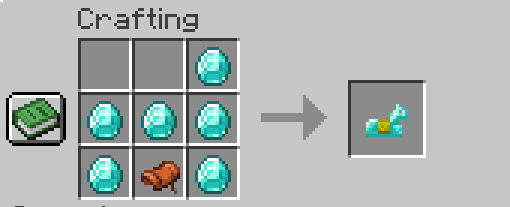
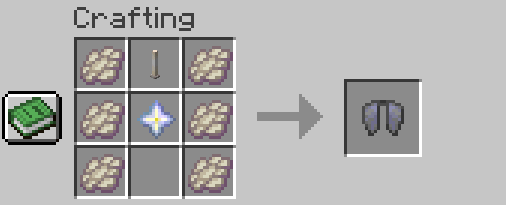
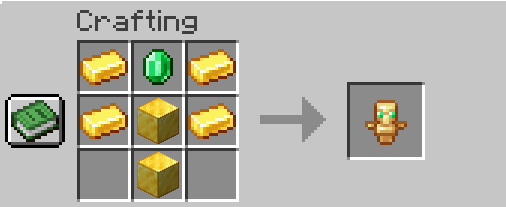
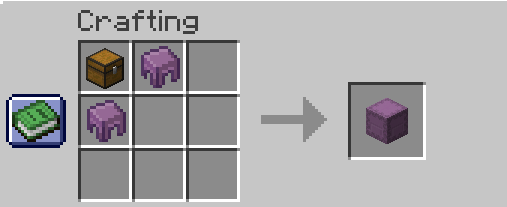
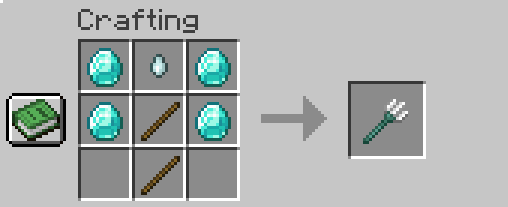
About this Mod
Craftables v1
About
The Craftables datapack for Minecraft enhances the crafting system by adding new recipes for items that were previously unobtainable through crafting. It also tweaks several existing recipes to improve balance or add variety. With this datapack, players can craft things like enchantment books, more useful building materials, or even items that were once limited to rare drops or commands. Whether you're looking to make your survival experience more versatile or just enjoy discovering new crafting possibilities, Craftables opens up a whole new world of crafting options.
Please note that the 'Craftables' datapack is still in the early development stages, and we'd love to hear your suggestions! Feel free to reach out to us on Discord or leave a comment on our CurseForge page.
Contact
If you would like to suggest any ideas or would like to report a bug to me please either message me on curseforge or DM me on discord (recommended for faster respones) my discord is 'Macdogg'
Current Item Recipes
- Horse Armor's
- Diamond Armor
- Gold Armor
- Iron Armor
- Leather Armor
- Elytra
- Trident
- Enchanted Golden Apple
- Saddle
- Name Tag
- Totem of undying
- Shapeless shulkers
- Smelting Rotten Flesh > Leather
- Heart of the sea
- Bell
Available Versions
How to Install Craftables | Crafting Tweaks on Your Server
Order Server
Order a Minecraft Java server with at least 3 GB RAM (4 GB recommended).
Set datapack Loader
In the panel under "Egg", select the datapack loader and matching Minecraft version (1.21.3).
Install Mod
Open the mod browser in the dashboard and search for "Craftables | Crafting Tweaks". Click "Install" – done! Alternatively, upload the .jar via SFTP to the /mods folder.
Compatibility
Mod Loaders
Minecraft Versions
1.21.3, 1.21.2, 1.21.1 (+1 more)
Server-side
✓ RequiredRecommended RAM
4 GB(min. 3 GB)Frequently Asked Questions
Craftables | Crafting Tweaks server crashes on startup – what to do?
Most common cause: wrong datapack version or insufficient RAM. Check the server log (latest.log) for "OutOfMemoryError" or "Mixin" errors. With Mado Hosting: ensure at least 3 GB RAM is allocated and the loader matches the mod version (1.21.3). You can switch loaders with one click in the panel.
Is Craftables | Crafting Tweaks compatible with datapack and fabric and forge and neoforge and quilt?
Craftables | Crafting Tweaks officially supports datapack, fabric, forge, neoforge, quilt for Minecraft 1.21.3, 1.21.2, 1.21.1. Note: Forge and Fabric mods are NOT cross-compatible – pick one loader and stick with it. The Mado dashboard automatically detects incompatible loader combinations.
Server lagging with Craftables | Crafting Tweaks – how to optimize performance?
Recommended RAM: 4 GB (per 8 players). Use /spark profiler to check if Craftables | Crafting Tweaks consumes the most tick time. Common fixes: reduce server view-distance to 8-10, install "performant" or "starlight" as supplementary mods on Forge. With Mado Hosting, your server runs on NVMe SSDs with dedicated CPU cores for minimal latency.
Similar Mods




![[ETF] Entity Texture Features](https://cdn.modrinth.com/data/BVzZfTc1/af683d206d50b05258d865b0d6e4aa2f2cee12f2_96.webp)
![[EMF] Entity Model Features](https://cdn.modrinth.com/data/4I1XuqiY/6e5bbd0d06b1741bfdab6c0cfab6de8fdaf0064c_96.webp)
Rent Modded Server
Install Craftables | Crafting Tweaks with just one click on your server.