Crafting The Impossible
Adding uncraftable recipes into Minecraft and making them balanced
Screenshots
About this Mod
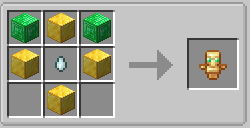
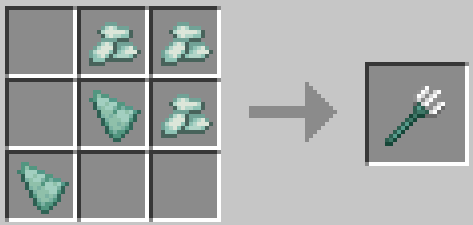
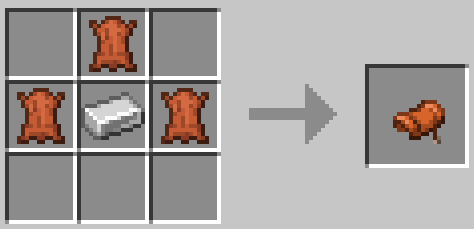
Crafting the Impossible adds recipes for uncraftable items.
For the best downloading experience click on the download button uptop rather than the versions tab
If you're downloading the Datapack version then you want to place it into the datapack folder of your minecraft world
If you have any suggestions,feedback or bug reports please send a DM on discord to 4_Square or make a comment on the curseforge page
Current Recipes
To see images go to the Gallery tab
List of Current Recipes
- Totem Of Undying
- Trident
- Saddle
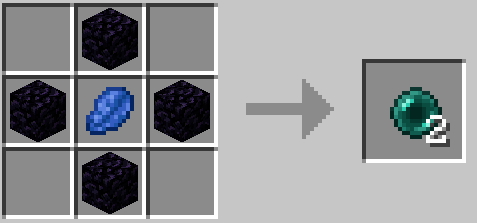
- Ender Pearl
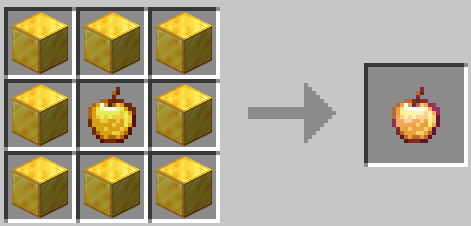
- Enchanted Golden Apple
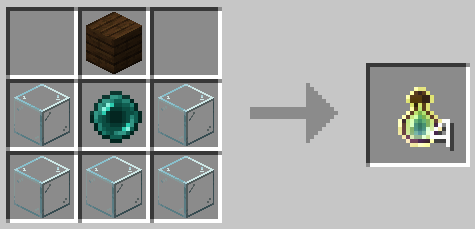
- Bottle O' Enchanting
- Crying Obsidian
- Name Tag
- Bell
- Sponge
- Cobweb
- Lead
- Lodestone
- Reinforced Deepslate
- Netherite Upgrade Template (suggestion by user_qtkpyoxws9rsvn2z)
- Nether Star (suggestion by user_3rmaeslpbqd120aw)
- Dragon Breath (suggestion by Toran0246)
- Prismarine Shard
- Heart of the Sea
- Chainmail Helmet
- Chainmail Chestplate
- Chainmail Leggings
- Chainmail Boots
- Leather Horse Armor
- Iron Horse Armor
- Gold Horse Armor
- Blackstone
- String
- Gilded Blackstone
- Skeleton Skull
- Wither Skeleton Skull
- Zombie Head
- Piglin Head
- Gravel
- Suspicious Gravel
- Suspicious Sand
- Red Mushroom Block
- Brown Mushroom Block
- Mushroom Stem
If you want to add this mod to any server or modpack, please ask 4_Square on discord
Available Versions
How to Install Crafting The Impossible on Your Server
Order Server
Order a Minecraft Java server with at least 3 GB RAM (4 GB recommended).
Set datapack Loader
In the panel under "Egg", select the datapack loader and matching Minecraft version (1.21.8).
Install Mod
Open the mod browser in the dashboard and search for "Crafting The Impossible". Click "Install" – done! Alternatively, upload the .jar via SFTP to the /mods folder.
Compatibility
Mod Loaders
Minecraft Versions
1.21.8, 1.21.7, 1.21.6 (+36 more)
Server-side
✓ RequiredRecommended RAM
4 GB(min. 3 GB)Frequently Asked Questions
Crafting The Impossible server crashes on startup – what to do?
Most common cause: wrong datapack version or insufficient RAM. Check the server log (latest.log) for "OutOfMemoryError" or "Mixin" errors. With Mado Hosting: ensure at least 3 GB RAM is allocated and the loader matches the mod version (1.21.8). You can switch loaders with one click in the panel.
Is Crafting The Impossible compatible with datapack and fabric and forge and neoforge and quilt?
Crafting The Impossible officially supports datapack, fabric, forge, neoforge, quilt for Minecraft 1.21.8, 1.21.7, 1.21.6. Note: Forge and Fabric mods are NOT cross-compatible – pick one loader and stick with it. The Mado dashboard automatically detects incompatible loader combinations.
Server lagging with Crafting The Impossible – how to optimize performance?
Recommended RAM: 4 GB (per 8 players). Use /spark profiler to check if Crafting The Impossible consumes the most tick time. Common fixes: reduce server view-distance to 8-10, install "performant" or "starlight" as supplementary mods on Forge. With Mado Hosting, your server runs on NVMe SSDs with dedicated CPU cores for minimal latency.
Similar Mods




Rent Modded Server
Install Crafting The Impossible with just one click on your server.