
Craftpilot
AI based Minecraft building assistant.
Screenshots
About this Mod
Craftpilot





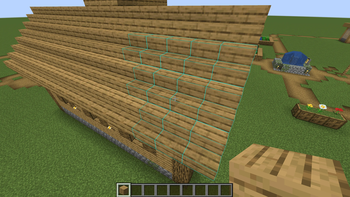
Craftpilot is your personal building assistant in Minecraft. As you build, it provides relevant suggestions through an easy-to-use overlay. Whether you're seeking inspiration for new structures or struggling with complex details, Craftpilot helps bring your creative vision to life. The assistant supports a wide variety of building styles and block palettes, making it a versatile tool for any Minecraft builder.
Setup
Craftpilot requires a companion program that runs the ML model. Here's how to get started:
Quick Start (Recommended)
- Download the latest release from the releases page
- Run the companion program
⚠️ Note: The ML model requires a modern GPU (NVIDIA recommended) for optimal performance. Without one, generation times may be significantly slower.
- Start Minecraft - Craftpilot will automatically connect to the local instance
Alternative Setup Options
- For Developers: You can run the companion program directly from source code. Clone the repo, install Python dependencies, and run it locally. This is useful for customization or troubleshooting.
- Advanced Configuration: The companion program can run on a remote server. Configure the connection URL in the mod settings to point to your desired server address.
Usage
Triggering Suggestions
- Place any block to begin a new build or continue an existing one. Suggestions will automatically appear.
- You can also manually trigger the suggestions without placing any block by pressing the trigger key (default R).
- Craftpilot will display suggested blocks as a transparent overlay.
Working with Suggestions
- Accept suggestions by placing blocks where they're shown.
- With easy place mode (enabled by default) you can place blocks exactly as they appear in the suggestions, without needing to worry about orientation or adjacent blocks. Simply right-click on the suggested block to place it in the correct orientation and state. In creative mode, you can even place blocks with an empty hand.
- As you build, new suggestions will automatically appear.
- Use the pick block function (middle mouse) on suggestions to quickly select blocks.
- Press the clear key (default Z) to clear all current suggestions.
- Remove individual suggestions by left-clicking (punching) them.
- Accept all of the suggested blocks at once by pressing the accept key (default V).
Building Flexibility
- Feel free to deviate from suggestions - the system will adapt.
- A grace period allows for placing a few different blocks before regenerating suggestions.
- This helps accommodate support blocks and minor adjustments.
Selecting Alternatives
- In addition to the main suggestions, several alternatives can also be generated. These can be seen as boxes next to the Craftpilot logo on the top right of the screen.
- Hold the select alternative key (default left alt) and use the scroll wheel or the hotbar keys to choose an option.
Performance Tuning
Running the ML model is very performance intensive and hardware dependent. There are thus several options / tradeoffs for performance. If the suggestions generate very slow, try reducing these. If the generation speed is okay, you can try increasing them. There are 3 main options that affect performance:
- Model Type - There are currently 2 different size models, Iron and Diamond. Iron is significantly smaller and faster than Diamond, but will provide lesser quality suggestions. If running on CPU, Diamond is almost impossible to run. With this setting on default it uses the model that the companion program has automatically chosen for your hardware.
- Suggestion Range - This changes the size of the structure sent to the model and thus directly affects the amount of computation it needs to do. Larger ranges exponentially increase the computation and memory requirements. Reducing this value will speed things up, but the suggestions will take into account less of the surrounding area.
- Max Alternatives - Each alternative the model calculates takes extra computation and memory. It will be fastest to set this to 1.
Customization
Settings can be edited in the config file "craftpilot.json" or on the configuration screen accessed through Mod Menu. Available settings include visual options (like overlay appearance), building behavior, and ML model parameters.
Available Versions
How to Install Craftpilot on Your Server
Order Server
Order a Minecraft Java server with at least 3 GB RAM (4 GB recommended).
Set fabric Loader
In the panel under "Egg", select the fabric loader and matching Minecraft version (1.21.11).
Install Mod
Open the mod browser in the dashboard and search for "Craftpilot". Click "Install" – done! Alternatively, upload the .jar via SFTP to the /mods folder.
Compatibility
Mod Loaders
Minecraft Versions
1.21.11, 1.21.10, 1.21.5 (+2 more)
Server-side
~ OptionalRecommended RAM
4 GB(min. 3 GB)Frequently Asked Questions
Craftpilot server crashes on startup – what to do?
Most common cause: wrong fabric version or insufficient RAM. Check the server log (latest.log) for "OutOfMemoryError" or "Mixin" errors. With Mado Hosting: ensure at least 3 GB RAM is allocated and the loader matches the mod version (1.21.11). You can switch loaders with one click in the panel.
Is Craftpilot compatible with fabric?
Craftpilot officially supports fabric for Minecraft 1.21.11, 1.21.10, 1.21.5. The Mado dashboard automatically detects incompatible loader combinations.
Server lagging with Craftpilot – how to optimize performance?
Recommended RAM: 4 GB (per 8 players). Use /spark profiler to check if Craftpilot consumes the most tick time. Common fixes: reduce server view-distance to 8-10, install "performant" or "starlight" as supplementary mods on Forge. With Mado Hosting, your server runs on NVMe SSDs with dedicated CPU cores for minimal latency.
Similar Mods




![[ETF] Entity Texture Features](https://cdn.modrinth.com/data/BVzZfTc1/af683d206d50b05258d865b0d6e4aa2f2cee12f2_96.webp)
![[EMF] Entity Model Features](https://cdn.modrinth.com/data/4I1XuqiY/6e5bbd0d06b1741bfdab6c0cfab6de8fdaf0064c_96.webp)
Rent Modded Server
Install Craftpilot with just one click on your server.