
Cranberry
In-game music playback on macOS
Screenshots
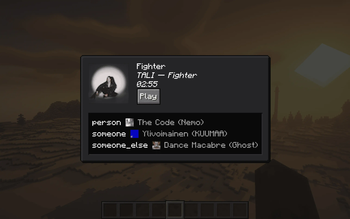
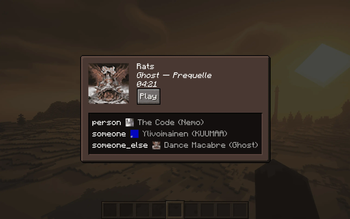
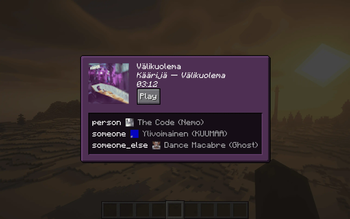
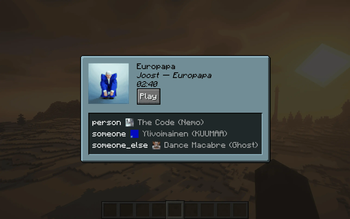
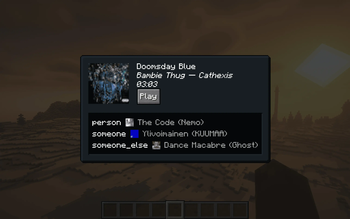
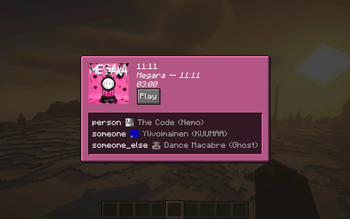
About this Mod
Cranberry
In-game music playback on macOS
Cranberry allows you to control whatever music is playing on your computer from within Minecraft. If also installed on a server, others with the mod will be able to see what you're listening to (disableable).
Table of Contents
Images

Visit the gallery for more examples.
Client Installation
Cranberry is currently only supported on macOS and will automatically disable itself on any other platform.
If installed only on the client, pressing the keybind (M by default) will open a screen that shows what music is currently being played and allows you to play/pause it. By default, the background of the screen is dynamically tinted with the dominant color from the image - this can be disabled in the configuration (see Configuration Options).
Server Installation
Installing the mod on the server allows clients to see each other's music statuses - clients may disable sending or receiving statuses in the configuration. Note that if this mod is installed on the server, owo-lib (a library mod that this mod depends on) must be installed on every connecting client, or they will not be able to connect due to registry mismatches. The mod itself is optional.
Configuration Options
You may edit configuration values in config/cranberry-client-config.json5. Alternatively, installing Mod Menu will allow you to change the following configuration options via a GUI:
- Send music statuses (default: true; only takes effect when playing multiplayer)
- Receive music statuses (default: true; only takes effect when playing multiplayer)
- Dynamic background (default: true)
How Does It Work?
Magic.
Technical details
Apple has a private framework on its platforms called `MediaRemote`, which allows for media playback information and control. Some Swift code is linked to this framework, built to a dynamic library, and called from Java using JNI.Windows / Linux?
While this sort of thing would generally be easier on Windows and Linux (Windows has MediaPlayer and Linux has MPRIS/D-Bus, both of which are well-documented and intended for public consumption, as opposed to Apple's MediaRemote), I have absolutely no experience working with WinRT or D-Bus. So although I'm interested in adding support, I don't currently actually have plans to do it.
Available Versions
How to Install Cranberry on Your Server
Order Server
Order a Minecraft Java server with at least 3 GB RAM (4 GB recommended).
Set fabric Loader
In the panel under "Egg", select the fabric loader and matching Minecraft version (1.21.1).
Install Mod
Open the mod browser in the dashboard and search for "Cranberry". Click "Install" – done! Alternatively, upload the .jar via SFTP to the /mods folder.
Compatibility
Mod Loaders
Minecraft Versions
1.21.1, 1.21
Server-side
✗ UnsupportedRecommended RAM
4 GB(min. 3 GB)Frequently Asked Questions
Cranberry server crashes on startup – what to do?
Most common cause: wrong fabric version or insufficient RAM. Check the server log (latest.log) for "OutOfMemoryError" or "Mixin" errors. With Mado Hosting: ensure at least 3 GB RAM is allocated and the loader matches the mod version (1.21.1). You can switch loaders with one click in the panel.
Is Cranberry compatible with fabric and quilt?
Cranberry officially supports fabric, quilt for Minecraft 1.21.1, 1.21. The Mado dashboard automatically detects incompatible loader combinations.
Server lagging with Cranberry – how to optimize performance?
Recommended RAM: 4 GB (per 8 players). Use /spark profiler to check if Cranberry consumes the most tick time. Common fixes: reduce server view-distance to 8-10, install "performant" or "starlight" as supplementary mods on Forge. With Mado Hosting, your server runs on NVMe SSDs with dedicated CPU cores for minimal latency.
Similar Mods

![[ETF] Entity Texture Features](https://cdn.modrinth.com/data/BVzZfTc1/af683d206d50b05258d865b0d6e4aa2f2cee12f2_96.webp)
![[EMF] Entity Model Features](https://cdn.modrinth.com/data/4I1XuqiY/6e5bbd0d06b1741bfdab6c0cfab6de8fdaf0064c_96.webp)



Rent Modded Server
Install Cranberry with just one click on your server.