
craft
Craft – Quality of Life Crafting Recipes Mod For Minecraft Tired of rare or uncraftable items slowing down your progress? EasyCraft adds a collection of simple and balanced crafting recipes to help streamline your survival experie
Screenshots
About this Mod
Craft – Quality of Life Crafting Recipes Mod
For Minecraft
Tired of rare or uncraftable items slowing down your progress? EasyCraft adds a collection of simple and balanced crafting recipes to help streamline your survival experience — without breaking the game!
🛠️ Features:
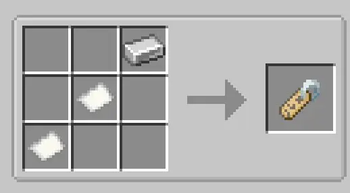
Name Tag – Craftable with Paper, String, and an Iron Ingot.
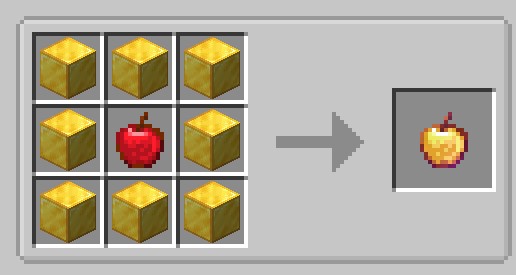
Enchanted Golden Apple – Now craftable using 8 Gold Blocks and a Golden Apple.
Wither Skeleton Skull – Get 2 Skulls from Coal, Bone, and a Skull.
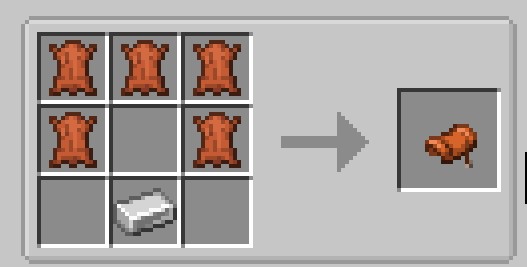
Saddle – Made from 5 Leather and an Iron Ingot.
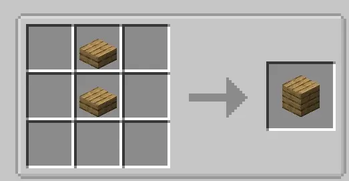
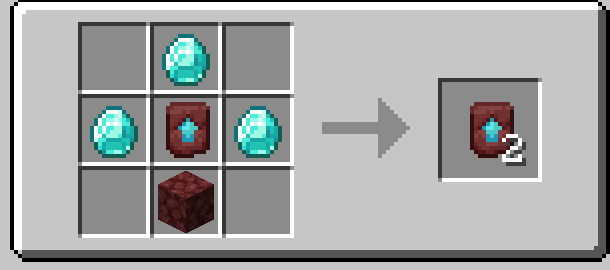
Upgrade Template – Craft 2 with 3 Diamonds, Netherrack, and an existing Template.
Gunpowder – Combine Flint and Charcoal to create it.
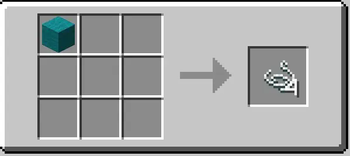
Leather from Rotten Flesh – Smelt Rotten Flesh in a Furnace to get Leather.
All recipes are configurable and balanced to fit seamlessly into your gameplay.
🔧 Compatibility:
Works with NeoForge on Minecraft 1.21.4.
Lightweight and fully server-compatible.
Perfect for players who want a smoother experience without relying on cheats or commands. Craft smarter, not harder!
📥 How to Install EasyCraft Mod
Download the Craft mod file (usually a .jar file) from the official source or trusted mod sites.
Open your Minecraft folder:
Windows: Press Win + R, type %appdata%.minecraft, and hit Enter.
macOS: Go to ~/Library/Application Support/minecraft
Locate or create a folder named mods.
Place the EasyCraft .jar file inside the mods folder.
Run Minecraft using the NeoForge 1.21.4 profile.
Enjoy the new crafting recipes in your game!
Available Versions
How to Install craft on Your Server
Order Server
Order a Minecraft Java server with at least 3 GB RAM (4 GB recommended).
Set forge Loader
In the panel under "Egg", select the forge loader and matching Minecraft version (1.21.5).
Install Mod
Open the mod browser in the dashboard and search for "craft". Click "Install" – done! Alternatively, upload the .jar via SFTP to the /mods folder.
Compatibility
Mod Loaders
Minecraft Versions
1.21.5, 1.21.4, 1.21.1 (+1 more)
Server-side
✓ RequiredRecommended RAM
4 GB(min. 3 GB)Frequently Asked Questions
craft server crashes on startup – what to do?
Most common cause: wrong forge version or insufficient RAM. Check the server log (latest.log) for "OutOfMemoryError" or "Mixin" errors. With Mado Hosting: ensure at least 3 GB RAM is allocated and the loader matches the mod version (1.21.5). You can switch loaders with one click in the panel.
Is craft compatible with forge and neoforge?
craft officially supports forge, neoforge for Minecraft 1.21.5, 1.21.4, 1.21.1. The Mado dashboard automatically detects incompatible loader combinations.
Server lagging with craft – how to optimize performance?
Recommended RAM: 4 GB (per 8 players). Use /spark profiler to check if craft consumes the most tick time. Common fixes: reduce server view-distance to 8-10, install "performant" or "starlight" as supplementary mods on Forge. With Mado Hosting, your server runs on NVMe SSDs with dedicated CPU cores for minimal latency.
Similar Mods




Rent Modded Server
Install craft with just one click on your server.