Create: Blueprint Void
Bring structure void to schematicannon!
Screenshots
About this Mod
蓝图空位
Create:Blueprint Void
简介
Brief
类似于原版的结构空位方块,当使用蓝图大炮打印包含该方块的结构时,无论如何设置蓝图大炮的填充模式,最终打印出来的结构中的蓝图空位对应位置的方块都不会被替换
Similar to structure void in vanilla mc. When a schematic with blueprint void is printed, the block in accordance won't be replaced regardless of selected replace mode.
保存结构时,结构中的结构空位将会被替换为蓝图空位方块(可配置)
When a structure is saved, the structure void in the schematic will be replaced by blueprint void. (Optional, configure it in [save]/serverconfig/bpvoid-server.toml)
方块属性
Block Properties
没有碰撞箱,不可以被火把等方块依附,使用方块右键将直接被替换,当其被活塞等推动时会直接被破坏
No Collision, can't be attached by torch etc., will be replaced when right-clicked holding a block, will be destroyed when pushed by a piston.
其他信息
Misc Infos
蓝图空位方块可以通过一个蓝图与笔和脚手架合成(无序合成),放置该方块不会消耗自身
It can be crafted by a schematic and quill with a scaffolding (shapeless), it won't shrink on placed.
该 Mod 也修复了 Create 中蓝图渲染的深度冲突( z-fighting )问题
The mod also fixed the z-fighting problem in schematic render.
演示效果
Demonstrations
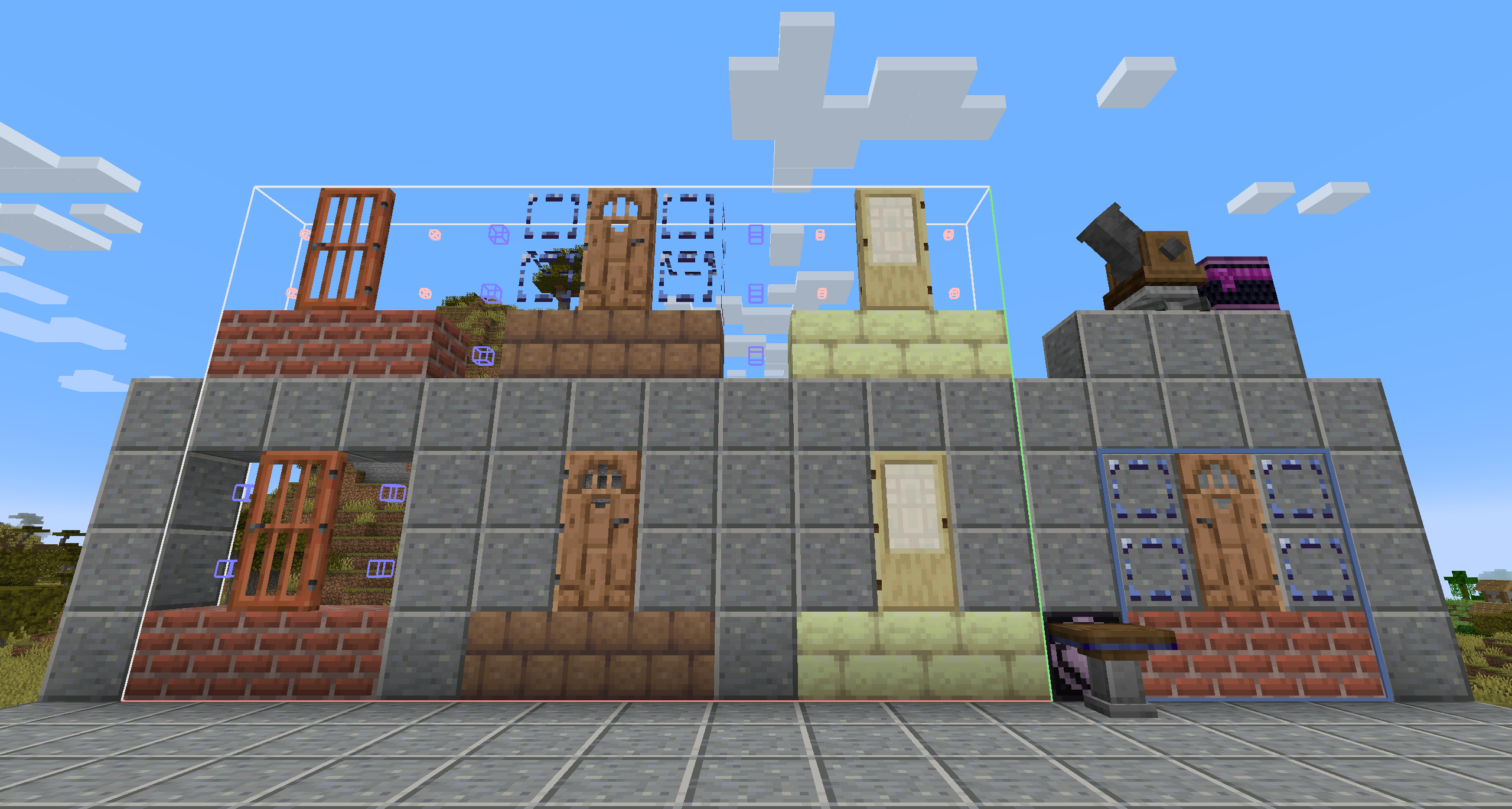
图片上半部分为保存的结构,下半部分为使用蓝图大炮打印出的结果
The uppers are the structures to save, while the lowers are the printed results.
从左到右分别为:
- Create 原版结构中使用结构方块打印效果
- 使用蓝图空位的打印效果
- 安装本 Mod 后结构方块的打印效果
(白色小方块位置为结构方块,蓝色方块位置为空气方块)
From left to right:
- vanilla Create result
- blueprint void printed
- replaced structure void
(Small white cubes are structure void blocks, blue cubes are air blocks)
最右侧为放置蓝图时的预览效果,可以看到不再有深度冲突问题
Demonstrated on the right-bottom is the schematic render effect, no z-fighting anymore.
Available Versions
How to Install Create: Blueprint Void on Your Server
Order Server
Order a Minecraft Java server with at least 4 GB RAM (6 GB recommended).
Set forge Loader
In the panel under "Egg", select the forge loader and matching Minecraft version (1.20.1).
Install Mod
Open the mod browser in the dashboard and search for "Create: Blueprint Void". Click "Install" – done! Alternatively, upload the .jar via SFTP to the /mods folder.
Compatibility
Mod Loaders
Minecraft Versions
1.20.1
Server-side
✓ RequiredRecommended RAM
6 GB(min. 4 GB)Frequently Asked Questions
Create: Blueprint Void server crashes on startup – what to do?
Most common cause: wrong forge version or insufficient RAM. Check the server log (latest.log) for "OutOfMemoryError" or "Mixin" errors. With Mado Hosting: ensure at least 4 GB RAM is allocated and the loader matches the mod version (1.20.1). You can switch loaders with one click in the panel.
Is Create: Blueprint Void compatible with forge?
Create: Blueprint Void officially supports forge for Minecraft 1.20.1. The Mado dashboard automatically detects incompatible loader combinations.
Server lagging with Create: Blueprint Void – how to optimize performance?
Recommended RAM: 6 GB (per 5 players). Use /spark profiler to check if Create: Blueprint Void consumes the most tick time. Common fixes: reduce server view-distance to 8-10, install "performant" or "starlight" as supplementary mods on Forge. With Mado Hosting, your server runs on NVMe SSDs with dedicated CPU cores for minimal latency.
Similar Mods


Rent Modded Server
Install Create: Blueprint Void with just one click on your server.