
Create: Chain Conveyors Compat
Adds a tag to allow any item to be used as a chain conveyor connector with custom texture support. For modpack development and adding compatibility with modded chains or items
Screenshots
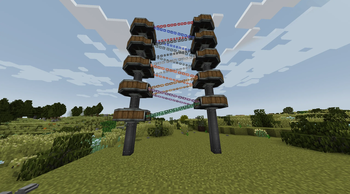
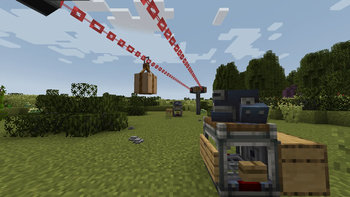
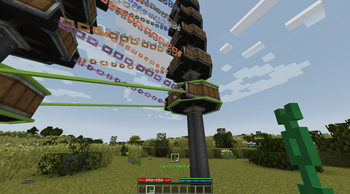

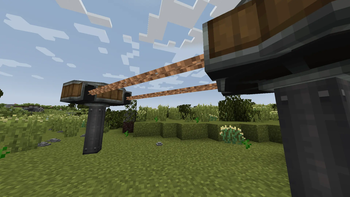
About this Mod
Create: Chain Conveyors Compat
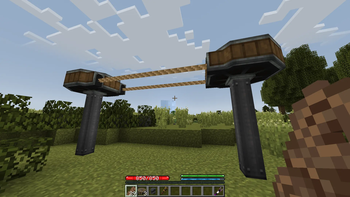
This Create addon for Neoforge 1.21.1 allows any item to be used for connecting chain conveyors via a unique tag.
The chain items featured in the screenshots are from TerraFirmaCraft as this addon was initially intended to support those exclusively, but TFC is not a dependency, and this addon can be used to add chain conveyor functionality to items from any mod. The code is partially based on the implementation of this feature in the WoodenCog addon for Forge 1.20.1 by manubarrach.
This mod's entire implementation is built on mixins, and as I'm not terribly experienced in working with these, I can't guarantee its compatibility with other mods or addons that affect the behavior of Create's Chain Conveyors.
Compatibility Notes
- TerraFirmaCraft (Out-of-the-box compatibility)
- Create Aeronautics (Modded chains work on chain conveyors on physics contraptions)
- Quark, Supplementaries, Farmer's Delight (Rope can be added to tag, but the default rendering looks very broken. As of v0.1.0, a generic rope texture is included in the mod, together with conditionally-loaded data map entries for these items. Users are no longer required to supply their own replacement texture for these items to appear without broken rendering)
- Let me know how it gets along with other mods!
Adding Compatibility for Modded Chains
Items that can be used to connect chain conveyors are included in the item tag #createchaincompat:valid_for_chain_conveyor. By default, this tag inherits from the #c:chains tag. Valid connectors for chain conveyors can be added to the tag using datapacks, KubeJS, or any other method for adding tags to items. Theoretically, any item (not just chains) can be added to this tag, but non-chainlike blocks may render strangely and non-block items (items that cannot be placed) will render identically to the vanilla minecraft chain unless a custom texture for that item is added to the data map.
Adding Custom Textures via Data Map (v0.0.4)
v0.0.4 adds a data map that can be used to add custom textures for blocks and items when they are used to connect chain conveyors. The datamap is located at createchaincompat/data_maps/item/chain_tex_data.json. This also allows for live reloading with the /reload command to quickly test your changes ingame!
See the example entry below:
{
  "values": {
    "minecraft:melon_slice": {
      "texture": "minecraft:textures/block/melon_side.png"
    }
  }
}
Note: the melon slice is not added to the valid_for_chain_conveyor tag by default. It is only included as an example of how to use this feature.
Known Issues
Game crashes when loading into an existing world with "vanilla" chain conveyors.Fixed in v0.0.2In cases where the chain's block texture location does not match the resource location of the block itself, the texture will not load properly. I'm trying to work out a better way to get the intended texture.Fixed in v0.0.4Sneak-wrenching chain conveyors in pre-existing worlds with chain connections made before installing this addon will not return any chains to the player's inventory.Fixed in v0.1.0
Available Versions
How to Install Create: Chain Conveyors Compat on Your Server
Order Server
Order a Minecraft Java server with at least 4 GB RAM (6 GB recommended).
Set neoforge Loader
In the panel under "Egg", select the neoforge loader and matching Minecraft version (1.21.1).
Install Mod
Open the mod browser in the dashboard and search for "Create: Chain Conveyors Compat". Click "Install" – done! Alternatively, upload the .jar via SFTP to the /mods folder.
Compatibility
Mod Loaders
Minecraft Versions
1.21.1
Server-side
✓ RequiredRecommended RAM
6 GB(min. 4 GB)Frequently Asked Questions
Create: Chain Conveyors Compat server crashes on startup – what to do?
Most common cause: wrong neoforge version or insufficient RAM. Check the server log (latest.log) for "OutOfMemoryError" or "Mixin" errors. With Mado Hosting: ensure at least 4 GB RAM is allocated and the loader matches the mod version (1.21.1). You can switch loaders with one click in the panel.
Is Create: Chain Conveyors Compat compatible with neoforge?
Create: Chain Conveyors Compat officially supports neoforge for Minecraft 1.21.1. The Mado dashboard automatically detects incompatible loader combinations.
Server lagging with Create: Chain Conveyors Compat – how to optimize performance?
Recommended RAM: 6 GB (per 5 players). Use /spark profiler to check if Create: Chain Conveyors Compat consumes the most tick time. Common fixes: reduce server view-distance to 8-10, install "performant" or "starlight" as supplementary mods on Forge. With Mado Hosting, your server runs on NVMe SSDs with dedicated CPU cores for minimal latency.
Similar Mods

![[ETF] Entity Texture Features](https://cdn.modrinth.com/data/BVzZfTc1/af683d206d50b05258d865b0d6e4aa2f2cee12f2_96.webp)
![[EMF] Entity Model Features](https://cdn.modrinth.com/data/4I1XuqiY/6e5bbd0d06b1741bfdab6c0cfab6de8fdaf0064c_96.webp)



Rent Modded Server
Install Create: Chain Conveyors Compat with just one click on your server.