
Create: Chocolate Fountain
Adds a configurable Chocolate Fountain that automatically feeds nearby players
Screenshots
About this Mod
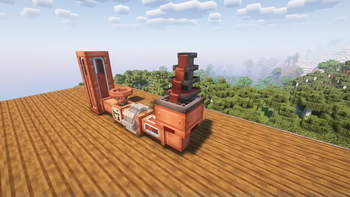
This addon for the Create Mod introduces a Chocolate Fountain that automatically feeds nearby players with chocolate, keeping them from going hungry while they build and explore. The fountain’s range and other settings can be adjusted to fit your needs, making it a useful and customizable addition to any world.
Features
Chocolate Fountain Block
- Automatic Feeding: Continuously feeds nearby players with chocolate, restoring Hunger
- Highly Configurable: Config for aspects like range, consumption rate, and feeding interval
- Supported Fluids:
- Chocolate for feeding players
- Honey for feeding players and calming nearby bees
- Water for aesthetic purposes
Bee Calming Effect
When filled with honey, the fountain calms nearby bees, preventing them from becoming aggressive when harvesting beehives and getting attacked.
Mod Compatibility
- Thirst Was Taken: Water Fountains hydrate players automatically while within range
- Create: Confectionery: Full compatibility with modded chocolate variants
Also available on CurseForge.
Available Versions
How to Install Create: Chocolate Fountain on Your Server
Order Server
Order a Minecraft Java server with at least 4 GB RAM (6 GB recommended).
Set forge Loader
In the panel under "Egg", select the forge loader and matching Minecraft version (1.21.1).
Install Mod
Open the mod browser in the dashboard and search for "Create: Chocolate Fountain". Click "Install" – done! Alternatively, upload the .jar via SFTP to the /mods folder.
Compatibility
Mod Loaders
Minecraft Versions
1.21.1, 1.21, 1.20.1
Server-side
✓ RequiredRecommended RAM
6 GB(min. 4 GB)Frequently Asked Questions
Create: Chocolate Fountain server crashes on startup – what to do?
Most common cause: wrong forge version or insufficient RAM. Check the server log (latest.log) for "OutOfMemoryError" or "Mixin" errors. With Mado Hosting: ensure at least 4 GB RAM is allocated and the loader matches the mod version (1.21.1). You can switch loaders with one click in the panel.
Is Create: Chocolate Fountain compatible with forge and neoforge?
Create: Chocolate Fountain officially supports forge, neoforge for Minecraft 1.21.1, 1.21, 1.20.1. The Mado dashboard automatically detects incompatible loader combinations.
Server lagging with Create: Chocolate Fountain – how to optimize performance?
Recommended RAM: 6 GB (per 5 players). Use /spark profiler to check if Create: Chocolate Fountain consumes the most tick time. Common fixes: reduce server view-distance to 8-10, install "performant" or "starlight" as supplementary mods on Forge. With Mado Hosting, your server runs on NVMe SSDs with dedicated CPU cores for minimal latency.
Similar Mods

![[ETF] Entity Texture Features](https://cdn.modrinth.com/data/BVzZfTc1/af683d206d50b05258d865b0d6e4aa2f2cee12f2_96.webp)
![[EMF] Entity Model Features](https://cdn.modrinth.com/data/4I1XuqiY/6e5bbd0d06b1741bfdab6c0cfab6de8fdaf0064c_96.webp)



Rent Modded Server
Install Create: Chocolate Fountain with just one click on your server.