
Create Cursor Anchor Fix
Fixes cursor positioning in Create mod's settings screen on Linux Wayland/X11 via mixins with anchor-offset model.
Screenshots
About this Mod
Create Cursor Anchor Fix
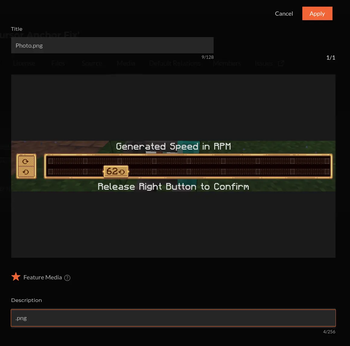
Fixes the cursor in Create's value settings screens on Linux — including native Wayland.
When you open a Create value settings window (Rotation Speed Controller, creative motors, anything
using ValueSettingsScreen), Create warps the OS cursor onto the current value and reads it back
to decide which value you picked. On Linux that breaks:
- X11 / XWayland — Minecraft sometimes hands Create stale cursor coordinates, so the wrong
value gets saved. - Native Wayland — the compositor forbids moving a visible cursor, so the warp does nothing
and the value snaps to zero / a wrong number.
This client-side mod fixes both.
What it does
- X11 / XWayland — feeds Create the live cursor position, so the saved value always matches
where your cursor is. - Native Wayland — uses an anchor/offset model instead of relying on the (forbidden)
cursor warp. The value highlight lands on the current setting when the screen opens and follows
your mouse relatively, with no cursor teleporting. While the screen is open the system cursor is
hidden and the highlight itself acts as the pointer — so there is no mismatch between an
un-movable arrow and the highlight (this also fixes setups using cursor-pinning GLFW patches likeglfw-wayland-minecraft-cursor).
Power Grid compatibility
Power Grid's settings screens subclass Create's screen and override the save logic to read the
slider/cursor on their own, so the base fix doesn't reach them and they'd still save the raw
cursor position. This mod includes a compatibility layer that applies the same correction to Power
Grid's screens, so values save correctly there too. Power Grid is not required — the compat
layer is skipped automatically when it isn't installed.
Requirements
- Minecraft 1.21.1
- NeoForge 21.1.219+
- Create 6.0.9+ (tested on 6.0.10)
Client-side only — not needed on the server.
Open source
Clean-room implementation, MIT licensed. Source, issues and builds:
https://github.com/LowaSC/create-cursor-anchor-fix
Available Versions
How to Install Create Cursor Anchor Fix on Your Server
Order Server
Order a Minecraft Java server with at least 4 GB RAM (6 GB recommended).
Set neoforge Loader
In the panel under "Egg", select the neoforge loader and matching Minecraft version (1.21.1).
Install Mod
Open the mod browser in the dashboard and search for "Create Cursor Anchor Fix". Click "Install" – done! Alternatively, upload the .jar via SFTP to the /mods folder.
Compatibility
Mod Loaders
Minecraft Versions
1.21.1
Server-side
✗ UnsupportedRecommended RAM
6 GB(min. 4 GB)Frequently Asked Questions
Create Cursor Anchor Fix server crashes on startup – what to do?
Most common cause: wrong neoforge version or insufficient RAM. Check the server log (latest.log) for "OutOfMemoryError" or "Mixin" errors. With Mado Hosting: ensure at least 4 GB RAM is allocated and the loader matches the mod version (1.21.1). You can switch loaders with one click in the panel.
Is Create Cursor Anchor Fix compatible with neoforge?
Create Cursor Anchor Fix officially supports neoforge for Minecraft 1.21.1. The Mado dashboard automatically detects incompatible loader combinations.
Server lagging with Create Cursor Anchor Fix – how to optimize performance?
Recommended RAM: 6 GB (per 5 players). Use /spark profiler to check if Create Cursor Anchor Fix consumes the most tick time. Common fixes: reduce server view-distance to 8-10, install "performant" or "starlight" as supplementary mods on Forge. With Mado Hosting, your server runs on NVMe SSDs with dedicated CPU cores for minimal latency.
Similar Mods




Rent Modded Server
Install Create Cursor Anchor Fix with just one click on your server.