
Create Cursor Fix
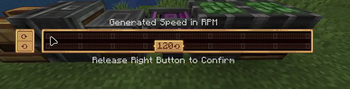
Fixes a gui rendering bug with Create on some linux distros. Guis may not reflect the true physical cursor position when opened.
Screenshots
About this Mod
Create Cursor Fix
Small client-side NeoForge mod for Minecraft 1.21.1 that fixes stale cursor
coordinates in Create value settings screens.
This issue shows up in any gui that is an instance of ValueSettingsScreen including Rotation Speed Controllers and Creative motors.
I do not intend to support other versions unless asked, but its pretty easy to port, so feel free to do so or request a particular version.
Requirements
- Minecraft 1.21.1
- NeoForge 21.1.219 or newer
- Create 6.0.9 or newer
What It Fixes
Create's value settings UI receives mouse coordinates from Minecraft's normal
screen rendering path. On some Linux setups, those coordinates can be stale
after Create programmatically moves the cursor.
This mod patches Create's value settings screen to read the current GLFW cursor
position directly when rendering and saving the panel.
Wayland Support
Wayland is not explicitly supported.
This mod can fix the stale-coordinate case when cursor repositioning already
works. That usually means x11 or xwayland, but I haven't been able to reliably prove this fixes anything outside of x11. Im a new modder, apologies.
Native Wayland seems to sometimes fail earlier than that. GLFW only supportsglfwSetCursorPos on Wayland while the cursor is disabled. Minecraft GUI
screens normally use a visible, enabled cursor, so a Wayland compositor may
refuse Create's attempt to move the cursor in the first place.
In that case there is no moved cursor position for this mod to read:
Create asks GLFW to move/snap the cursor
The Wayland compositor refuses or ignores that cursor move
The visible cursor never moves to the saved setting
This mod cannot infer the intended cursor position from GLFW
If the cursor does not visibly move to the saved value when opening the Create
panel, that setup is probably outside this mod's support boundary.
Available Versions
How to Install Create Cursor Fix on Your Server
Order Server
Order a Minecraft Java server with at least 4 GB RAM (6 GB recommended).
Set neoforge Loader
In the panel under "Egg", select the neoforge loader and matching Minecraft version (1.21.1).
Install Mod
Open the mod browser in the dashboard and search for "Create Cursor Fix". Click "Install" – done! Alternatively, upload the .jar via SFTP to the /mods folder.
Compatibility
Mod Loaders
Minecraft Versions
1.21.1
Server-side
✗ UnsupportedRecommended RAM
6 GB(min. 4 GB)Frequently Asked Questions
Create Cursor Fix server crashes on startup – what to do?
Most common cause: wrong neoforge version or insufficient RAM. Check the server log (latest.log) for "OutOfMemoryError" or "Mixin" errors. With Mado Hosting: ensure at least 4 GB RAM is allocated and the loader matches the mod version (1.21.1). You can switch loaders with one click in the panel.
Is Create Cursor Fix compatible with neoforge?
Create Cursor Fix officially supports neoforge for Minecraft 1.21.1. The Mado dashboard automatically detects incompatible loader combinations.
Server lagging with Create Cursor Fix – how to optimize performance?
Recommended RAM: 6 GB (per 5 players). Use /spark profiler to check if Create Cursor Fix consumes the most tick time. Common fixes: reduce server view-distance to 8-10, install "performant" or "starlight" as supplementary mods on Forge. With Mado Hosting, your server runs on NVMe SSDs with dedicated CPU cores for minimal latency.
Similar Mods




![[ETF] Entity Texture Features](https://cdn.modrinth.com/data/BVzZfTc1/af683d206d50b05258d865b0d6e4aa2f2cee12f2_96.webp)
![[EMF] Entity Model Features](https://cdn.modrinth.com/data/4I1XuqiY/6e5bbd0d06b1741bfdab6c0cfab6de8fdaf0064c_96.webp)
Rent Modded Server
Install Create Cursor Fix with just one click on your server.