
Create: Designed Decor
**Designed Decor** is a lightweight Create mod add-on focused on decorative industrial-style blocks and items like cardboard sheets, safety gear, and sawdust crafting, made to fit seamlessly into Create 0.5-based modpacks.
Screenshots
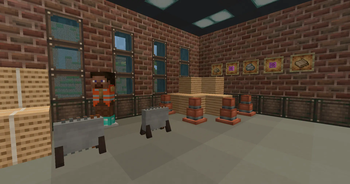
About this Mod
Thank you wonderful people who made this dream of being a modder a reality
Can we get 3k downloads before curseforge?
Designed Decor is a feature-focused add-on for the Create mod, built specifically for players and modpack makers who want rich decorative content without jumping to Create 0.6. This mod expands the creative possibilities of your factory and industrial builds by introducing a curated selection of themed blocks, items, and recipes that fit naturally into the Create 0.5.x ecosystem.
With Designed Decor, you can craft immersive industrial environments using new materials like cardboard sheets made from wood pulp, which in turn can be processed through Create’s machinery. Add realism to your factories with sawdust produced via milling logs, and use it in custom crafting chains. Want to add some safety aesthetics? Equip your workers with a bright orange safety vest—a purely cosmetic armor item that sells the look of a fully operational facility.
All new content is designed to integrate seamlessly with Create’s systems. Recipes use Create’s mechanics like milling and blasting, and each item is balanced to feel like it belongs in a survival playthrough—not just creative mode. Whether you’re running a logistics empire, building a warehouse, or creating an immersive modpack experience, Designed Decor fills in the stylistic and functional gaps with a lightweight, lore-friendly touch.
This mod was built with MCreator, but designed with care—not bloated, not overpowered, and fully compatible with most Create add-ons that stick to the 0.5 range. If you’re not ready to leap into Create 6.0 but still want something fresh, functional, and decorative—Designed Decor delivers.
https://www.youtube.com/watch?v=LVIy5-lBYvY
Features
Decorative & Thematic Blocks
Weathered Iron Block
Weathered Iron Window
Road Barrier
Traffic Cone
Spindle Crate
Blueprint Table
Tool Cabinet
Tool Rack
Wrenchly Box
Blueprint Pile
Blue Post Box
Blue Table Cloth
Crafting Materials & Processing Items
Cardboard
Bound Cardboard
Cardboard Sheet
Sawdust
Pulp
Orange Fabric
Packing Tape
Cardboard Roll
Blueprint
That Looks Familiar
This Again
Cleaking Helper
Wearables & Safety Gear
Safety Vest
Blue Hard Hat
White Hard Hat
Yellow Hard Hat
Red Hard Hat
Orange Hard Hat
Machines & Tools
Miter Saw
Floor Miter Saw
Saw Blade
SOUND CREDITS:
Cardboard Paper Tension by syenasweta -- https://freesound.org/s/686733/ -- License: Attribution 4.0
Powerful Ripping Of Cardboard by Entagon -- https://freesound.org/s/615501/ -- License: Attribution 4.0
Dropping a Cardboard Box and Rubbing It by fordps3 -- https://freesound.org/s/729285/ -- License: Attribution 4.0
Available Versions
How to Install Create: Designed Decor on Your Server
Order Server
Order a Minecraft Java server with at least 4 GB RAM (6 GB recommended).
Set forge Loader
In the panel under "Egg", select the forge loader and matching Minecraft version (1.21.11).
Install Mod
Open the mod browser in the dashboard and search for "Create: Designed Decor". Click "Install" – done! Alternatively, upload the .jar via SFTP to the /mods folder.
Compatibility
Mod Loaders
Minecraft Versions
1.21.11, 1.21.10, 1.21.9 (+9 more)
Server-side
✓ RequiredRecommended RAM
6 GB(min. 4 GB)Frequently Asked Questions
Create: Designed Decor server crashes on startup – what to do?
Most common cause: wrong forge version or insufficient RAM. Check the server log (latest.log) for "OutOfMemoryError" or "Mixin" errors. With Mado Hosting: ensure at least 4 GB RAM is allocated and the loader matches the mod version (1.21.11). You can switch loaders with one click in the panel.
Is Create: Designed Decor compatible with forge and neoforge?
Create: Designed Decor officially supports forge, neoforge for Minecraft 1.21.11, 1.21.10, 1.21.9. The Mado dashboard automatically detects incompatible loader combinations.
Server lagging with Create: Designed Decor – how to optimize performance?
Recommended RAM: 6 GB (per 5 players). Use /spark profiler to check if Create: Designed Decor consumes the most tick time. Common fixes: reduce server view-distance to 8-10, install "performant" or "starlight" as supplementary mods on Forge. With Mado Hosting, your server runs on NVMe SSDs with dedicated CPU cores for minimal latency.
Similar Mods

![[ETF] Entity Texture Features](https://cdn.modrinth.com/data/BVzZfTc1/af683d206d50b05258d865b0d6e4aa2f2cee12f2_96.webp)
![[EMF] Entity Model Features](https://cdn.modrinth.com/data/4I1XuqiY/6e5bbd0d06b1741bfdab6c0cfab6de8fdaf0064c_96.webp)



Rent Modded Server
Install Create: Designed Decor with just one click on your server.