
Create: Geo-Resonance
Uncover the depths of the world with seismic prospecting!
About this Mod

Create: Geo-Resonance
This mod brings seismic prospecting to Create: strike terrain, follow returning echoes, read seismograms and generate projections of hidden treasures in your Minecraft world.
Find smarter, mine faster.
How It Works
1) Strike and Read Echoes
Use the Seismic Hammer to send pulses and read returns. Hand hammer can assist in finding caves, underground water or lava pools.

2) Automate Scans and Find Ores
Power the Seismic Station, load paper + ink, run scans and collect seismograms - interactive maps of discovered resources.

Refine scan results with modules to focus on the valuables you need.

- Noise Cancellation removes cave/water/lava background signals.
- Below Zero enables deep-layer detection (
Y < 0). - Target modules: add specific signatures (ores and other valuables). There are plenty of them.
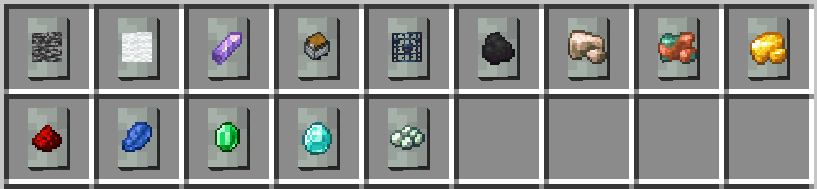
3) Project Hidden Targets
Load two valid seismograms into the Seismic Projector to generate underground projections.

Compatibility
- Minecraft version:
1.20.1 - Loader:
Forge - Create version:
Create 6.x - Environment: Client and Server
Install
- Install Forge
1.20.1 - Install Create
6.x - Put mod jar file into
mods
Links
- Report bugs/suggest features: GitHub Issues Page
- Source code: GitHub Page
Available Versions
How to Install Create: Geo-Resonance on Your Server
Order Server
Order a Minecraft Java server with at least 4 GB RAM (6 GB recommended).
Set forge Loader
In the panel under "Egg", select the forge loader and matching Minecraft version (1.20.1).
Install Mod
Open the mod browser in the dashboard and search for "Create: Geo-Resonance". Click "Install" – done! Alternatively, upload the .jar via SFTP to the /mods folder.
Compatibility
Mod Loaders
Minecraft Versions
1.20.1
Server-side
✓ RequiredRecommended RAM
6 GB(min. 4 GB)Frequently Asked Questions
Create: Geo-Resonance server crashes on startup – what to do?
Most common cause: wrong forge version or insufficient RAM. Check the server log (latest.log) for "OutOfMemoryError" or "Mixin" errors. With Mado Hosting: ensure at least 4 GB RAM is allocated and the loader matches the mod version (1.20.1). You can switch loaders with one click in the panel.
Is Create: Geo-Resonance compatible with forge?
Create: Geo-Resonance officially supports forge for Minecraft 1.20.1. The Mado dashboard automatically detects incompatible loader combinations.
Server lagging with Create: Geo-Resonance – how to optimize performance?
Recommended RAM: 6 GB (per 5 players). Use /spark profiler to check if Create: Geo-Resonance consumes the most tick time. Common fixes: reduce server view-distance to 8-10, install "performant" or "starlight" as supplementary mods on Forge. With Mado Hosting, your server runs on NVMe SSDs with dedicated CPU cores for minimal latency.
Similar Mods




Rent Modded Server
Install Create: Geo-Resonance with just one click on your server.